ASP.NET Core 8
Timeline of changes
| Date | Change |
|---|---|
| March 2024 | Microsoft .NET 8.0 released |
| June 2024 | Orbit Version 2.1.3 released—dependent on the ASP.NET Core 8 Server Hosting Bundle |
| November 2024 | End of support for ASP.NET Core 6 |
Apteco Orbit update requirements
From version 2.1.3 onwards, Apteco Orbit requires the ASP.NET Core 8 Server Hosting Bundle for the OrbitAPI, and doesn't require .NET 6 anymore.
To take advantage of the new features in Orbit, follow these steps to update:
-
Download and install the .NET Core 8 update.
- Ensure you are using version 8.0.7 or later, as it includes essential security patches from Microsoft.
- For the latest updates and details from Microsoft, visit the Microsoft .NET 8 downloads page.
Note
When installing a new version of the .NET Core Hosting Bundle, keep your current version installed. If you delete your current version before installing a new version, this can cause the OrbitAPI to stop functioning correctly.
If you have any issues, please contact our technical services team.
What do partners/customers have to do?
For existing Apteco Orbit installations
Warning
You do not yet need to uninstall the existing version of ASP.NET Core 6. You can uninstall this after we have fully migrated Apteco Orbit to ASP.NET Core Runtime 8.
-
Install the ASP.NET 8 Hosting Bundle from dotnet.microsoft.com/en-us/download/dotnet/8.0
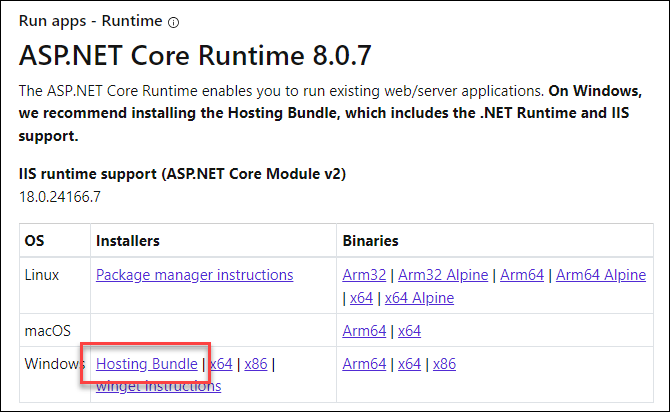
-
Install the .NET Desktop Runtime from the same resource dotnet.microsoft.com/en-us/download/dotnet/8.0
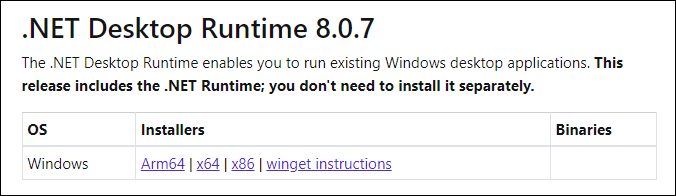
For new Apteco Orbit installations
Both the ASP.NET Core Hosting bundle (8.0) and .NET Desktop Runtime items should be installed.
FAQs
What is Microsoft ASP.NET Core?
Microsoft ASP.NET Core is an implementation of the Microsoft .NET Framework, specifically targeted at providing basic services for internet-connected apps, such as web apps, IoT (Internet of Things) apps and mobile backends.
Apteco Orbit (or at least the Orbit API) is implemented using the Microsoft ASP.NET Core framework.
Why are we doing this?
We have used .NET Core 6 for a number of years in Orbit (as a previous "Long Term Service" - LTS - version of .NET), but it will soon stop being supported by Microsoft and will no longer receive security updates, representing a security risk.
The current LTS release of .NET (including the ASP.NET Core libraries) was released in March 2024 and we are now migrating Orbit to this version.
Will we have to do this again?
We anticipate eventually having to move to a newer version of .NET in the future, but Microsoft have committed to supporting .NET 8 until at least November 2026. See https://dotnet.microsoft.com/en-us/platform/support/policy/dotnet-core for further information.
When will we push out the first version of the Orbit API that requires .NET 8?
Orbit Version 2.1.3 released on June 10th 2024 requires .NET 8. If telemetry and other feedback indicates a slow take up of ASP.NET Core 8, we may choose to delay this.
Using an unsupported version of the .NET library increases the potential of a security risk. Apteco needs to balance this risk with any delay.
What will happen if the required version of ASP.NET Core is not installed?
When the first version of the Orbit API that requires ASP.NET Core 8 is released, those systems that don't have the prerequisite will still be able to continue to use Orbit.
They won't automatically update until the prerequisite is installed and will not benefit from any new Orbit features or fixes.
Once ASP.NET Core 8 has been installed, are any other actions necessary?
No. The updater detects the presence of ASP.NET Core 8 the next time it attempts an update, and then updates to the latest version.
Are there any prerequisites for installing ASP.NET Core 8?
Yes. The operating systems that are supported can be found in the .NET 8 supported OS list.
My web server's OS is not on that list. What does this mean?
If the web server is running on an operating system that is not in the list supported by Microsoft, then you will not be able to install Microsoft .NET Core. Please see What will happen if the required version of ASP.NET Core is not installed? above for how this will affect your system.
Will this affect any other applications that use .NET Core?
No. ASP.NET Core 8 can be installed side by side with other versions of the same component library.
Issues when uninstalling earlier versions of ASP.NET Core
Uninstalling earlier versions of the ASP.NET Core hosting bundle (e.g. 6) before installing the latest version can result in the ASP.NET Core 8 hosting bundle being de-registered within IIS, resulting in the OrbitAPI no longer running correctly.
To avoid this, repair the ASP.NET Core installation from within Apps & Features:
-
Select the Windows Server Hosting entry, and then the Modify option.
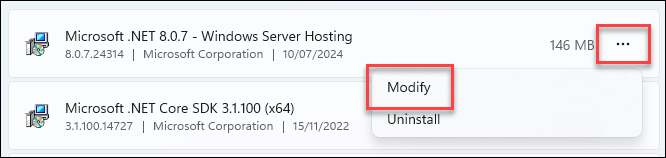
-
In the dialogue that opens, choose the Repair option.
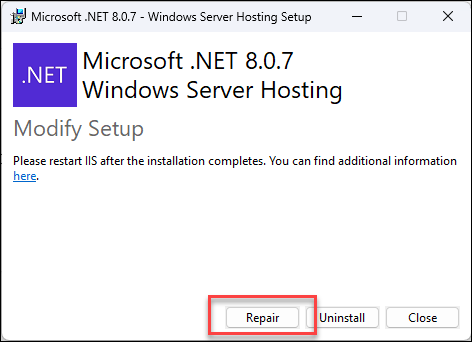
-
Restart IIS.