Technical requirements
Overview
The Apteco Marketing Suite is a range of marketing data analysis & automation applications that supports easy analysis, visualisation, predictive modelling and campaign management with massive customer and prospect databases. The system has a multi-tier, web service architecture using a variety of client application technologies. The data processing is powered by the FastStats.NET Server which provides specialist marketing data analysis query capabilities. All data resides securely on the host system, and is only accessible to authenticated users.
FastStats.NET server
The FastStats.NET Server is a highly scalable, multi-threaded, multi-server solution that runs on Windows servers and provides an XML Web Service and API. The Server can be operated on a wide range of system configurations from a single laptop to a load balanced, multi-server configuration with no single point of failure.
The system administrator can determine the connection scope of the client applications, which can be run on a departmental or corporate Intranet or connected to the Internet. This document provides a summary of the requirements of a server intended to run the FastStats.NET WebService on either the Internet or an Intranet.
Client applications
The FastStats range includes many client applications:
- Apteco FastStats: powerful analytics, visualisation and predictive modelling
- Apteco PeopleStage: event driven, multi-channel, visual campaign management tool
- Apteco Orbit: A platform-independent, browser-based application that works on tablets, phones and desktop computers
- API: Application Programming Interface
- Excelsior: Excel plug-in for dashboard type reporting
Apteco FastStats
Apteco FastStats is a rich and powerful Windows.NET application supporting a highly intuitive, flexible and powerful drag and drop interface. The application can be locally installed or deployed online using a small downloadable launcher application that automates version control from the web server.
The user interface includes a powerful selection mechanism with full Boolean logic across multiple tables, sampling, Top/Bottom N and RFV criteria. The powerful analysis tools include multi-dimensional cubes, nested trees and five-way Venn diagrams. Predictive modelling techniques include profiling, clustering and decision trees. Selected subsets of records can be exported in a wide variety of formats with coded or described data values. Apteco FastStats is our premier product providing the broadest range of functions.
Apteco PeopleStage
Apteco PeopleStage is an event driven multi-channel campaign management tool which provides a shared drawing space for multiple users to define marketing process flowcharts. PeopleStage enables highly personalised communications with multiple tests to be run concurrently in multiple campaigns across multiple on and offline channels while implementing marketing constraints on budget, volume, channel, etc. PeopleStage uses the segments, models, scores, response rules etc. defined in Apteco FastStats and produces marketing reports that can be distributed by email or saved back into the analysis environment. The application also requires Excel 2007 or above, or Office 365.
Apteco Orbit
Apteco Orbit is a browser-based, device-independent platform that works on desktops, laptops, tablets, and phones. No client installation is required—users access Orbit through a modern web browser. For server-side installation requirements, see ASP.NET Core 8 requirement.
API
The FastStats API enables third party developers to use FastStats results. The API supports XML, HTML and JSON results and can be used to retrieve up to date results for FastStats objects created using Apteco FastStats or Orbit. The API can be used by licensed users or made available for public access.
FastStats Excelsior
The FastStats Excelsior plug-in enables FastStats results to be embedded in Microsoft Excel spreadsheets. These results can be calculated, formatted and presented using standard Excel methods such as charts, grids, traffic lights, etc. typically for dashboards. Excelsior supports parameters used in FastStats objects, allowing users to run variations of reports. Users may be given permission to create reports or simply to refresh and publish them as plain Excel documents.
FastStats.NET Web Service architecture
The FastStats.NET WebService coordinates and multi-threads work to the FastStats Server(s). It also receives results from the FastStats Server(s) and delivers the result messages back to the client applications.
The FastStats Server is a COM object deployed as a 64-bit Windows DLL. This specialist database server provides marketing data selection and analysis features. FastStats uses a compressed and indexed column oriented representation of the data stored in a proprietary format optimised for the querying work.
Scalability
The FastStats system scales linearly in both user count and data volume.
Users
The FastStats.NET web service supports single or dual web servers (for resilience) and single or multiple FastStats servers (for resilience and capacity). The system is scalable in line with the server capacity provided by multiple machines. Multi-server installations also gain maintenance flexibility as individual machines may be closed down while leaving the system operational.
The number of users supportable given a particular server capacity depends on the database size and the type and intensity of work undertaken by the users. It is practical to support hundreds of users on a single server if the work undertaken is not very intensive. Larger production implementations already support thousands of users from a three tier, fault resilient configuration.
Data volume
The FastStats system is linearly scalable for data – both the data storage requirement and the query times increase linearly as the data volumes increase. It is established practice to build FastStats systems of tens or hundreds of millions of rows containing hundreds or thousands of attributes. Our biggest systems have over 2 billion rows with over 1 billion rows in a single table.
Metrics
The current largest system metrics are:
- Largest system has approximately 2.3 billion (2,300 million) rows
- Largest single table input data set has over 1 billion rows
- Largest Meta data driven attribute process has over 2,000 variables
- Tables have been tested at over 2 billion rows
- The widest input encountered had over 6,000 variables (now re-engineered!)
- The most frequent refresh is nightly
- The most FastStats databases on a pair of fault resilient servers is approximately 150
- The largest user base is approx. 70 worldwide from a single organization, and over 1,500 from multiple organisations run on a single set of servers
Configurations
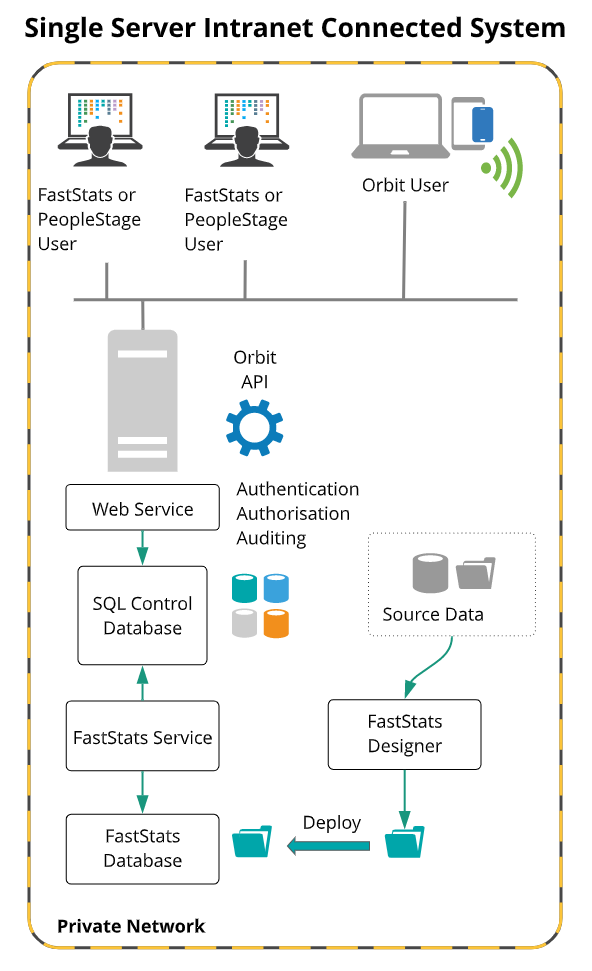
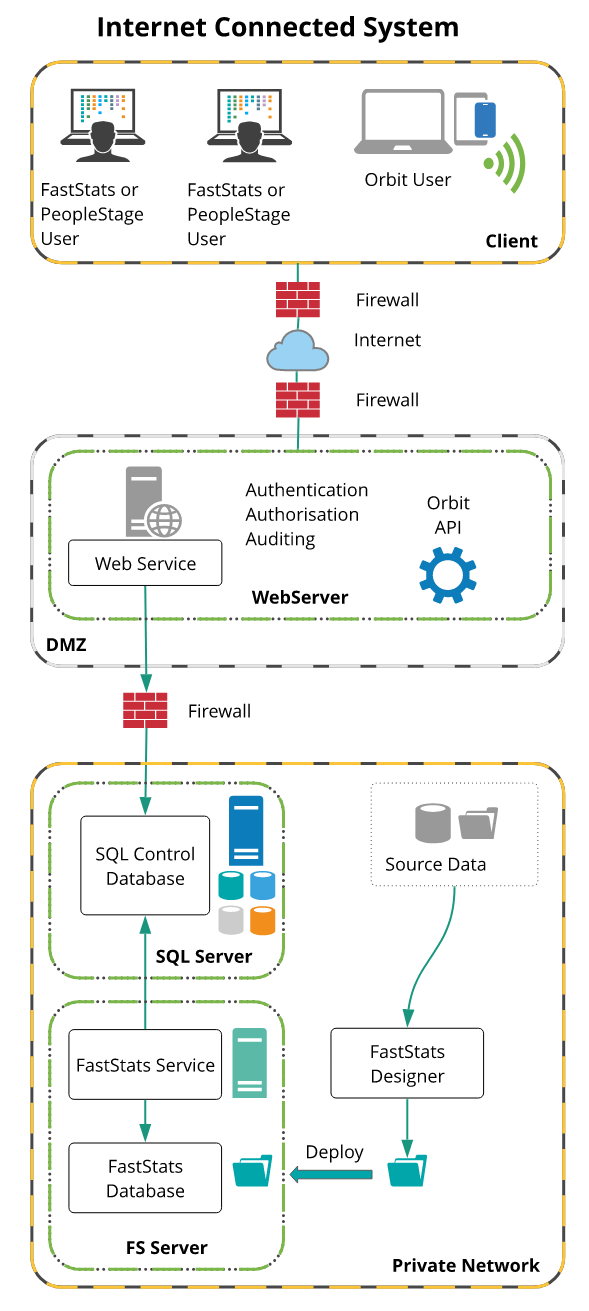
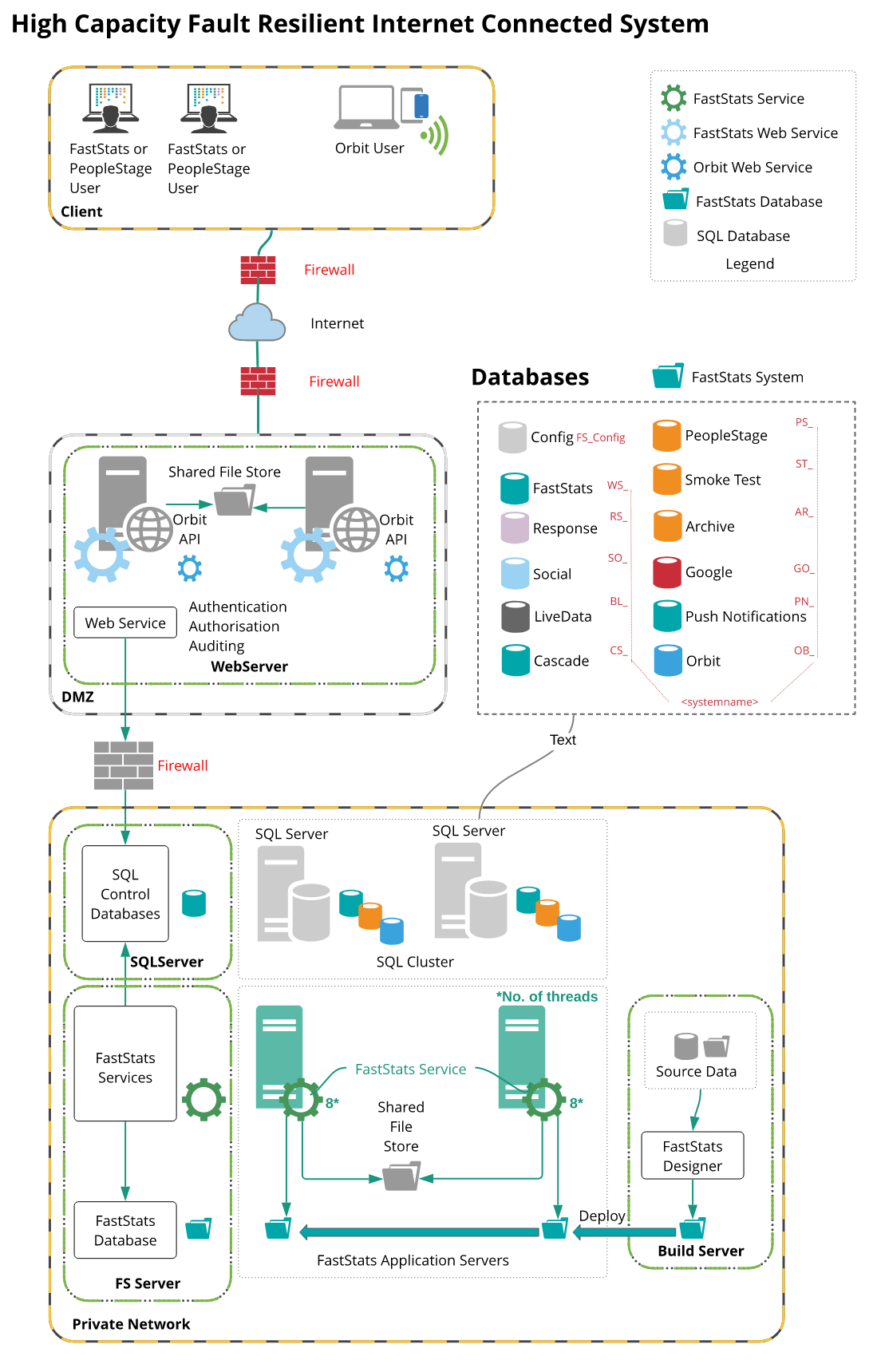
The diagrams below show various different configurations of the FastStats.NET server and user interfaces.
Note
The whole application can be …
- used on physical or virtual machines
- installed on a single PC (typically for demonstration use)
- scaled up to a single server with client connections across a network
- scaled up to support multi-tenanted FastStats databases
- scaled up to a multi-tier solution (typically for Internet deployment)
- scaled up to multiple FastStats servers (for capacity)
- scaled up to multiple web servers with a load balancer and clustered database (for fault resilience)
Load balancers and firewalls are optional depending on the network context (for example an Intranet solution does not require firewall boundaries).
The use of multiple servers for the Web Service, SQL control database and FastStats Server are optional to provide capacity and resilience.
The following diagrams show illustrations of different system configurations.
.png "Databases Legend")
Configuration
To prepare for implementation, we suggest you consider the following elements:
Intranet or internet
The FastStats.NET WebService can service users connected to either a private Intranet or to the public Internet. As the Apteco Marketing Suite is often provided on a hosted basis by marketing services providers, it is typically used in an Internet deployment. However it can be used just as readily for marketing analysis and automation of an enterprise's customer and prospect database with an Intranet connected server.
Single or multi server
The diagrams above show a variety of single and multi-server solutions. Using multiple servers increases capacity and resilience, but does not affect the speed of any single query (which will still run on one thread on any particular server). With an appropriate configuration, you can eliminate all single points of failure and provide a fault resilient solution. However, it is perfectly practical to operate the entire solution on a single server. The Apteco Marketing Suite implementations may start with a single server solution and grow as the data and use extends. The initial and planned growth path for an installation can be agreed with Apteco.
Web server
The web server needs to be permanently connected to the network (Internet or Intranet), and to run Internet Information Server (IIS) on a minimum of Windows Server 2016 (but preferably above!) operating system. This web server will need to have a fully qualified domain name for use on the Internet or a resolvable server name for use on an Intranet.
Note
Single-machine installations (e.g. laptops used for demonstrations) do not need a network connection and can use the loopback address 127.0.0.1 or the server identity "localhost".
Control database
The FastStats.NET control database is used to manage and store user, group and configuration details and all user requests and results. This is a relatively low volume and low throughput database, which is polled by both the client and server processes to detect work requests and deliver results. Apteco typically use Microsoft SQL Server Express Edition for initial deployments of this database, but this can be replaced with any full SQL Server edition. The Apteco Marketing Suite does not require web enabled editions of SQL server in order to support web connected users and can be licensed on a processor or Client Access Licence basis. The database can run on the same machine as the FastStats Server, on a stand-alone machine or on a cluster of machines for resilience. SQL Server 2016 is the minimum requirement, with a more recent version recommended.
Campaign management database
The Apteco Marketing Suite includes optional campaign management tools called Cascade & PeopleStage. In each case, the campaign management module stores information about marketing campaigns, promotions, communication history etc. in a relational database. This database will typically use the same database server as the control database. The PeopleStage database requires a full edition (not express) of SQL Server 2016 SP2 or above recommended.
Communications
All Apteco client communications can operate on standard HTTP or secure HTTPS connections. The communication does not require any non-standard port or firewall configuration.
Software delivery
The Apteco FastStats and PeopleStage software are typically delivered to the end user machines by using a FastStats or PeopleStage Launcher. This small footprint application (<3Mb) is installed from the web server the first time the user runs the client application and will download the executable application libraries. On each subsequent execution the Launcher compares the previously downloaded libraries with those held on the web server and will download any that are newer. This allows system administrators to roll out updates by simply installing the new libraries on the web server. Each user will be updated whenever they next connect.
Orbit is delivered in a browser. No installation is necessary on a client machine. Updates to Orbit are delivered automatically by Apteco by default and guarantee compatibility with the last four quarterly software releases.
Excelsior is available as an installer (installed locally on a user's machine) to offer a plugin to Excel.
Build server
FastStats operates on a proprietary snapshot of the source data, built using an "Extract Transform and Load" tool (FastStats Designer). FastStats database builds are typically scheduled to run automatically daily or weekly a separate staging server. This server resides within your private network and needs to be able to connect to the source databases or files. The machine needs to be sufficiently powerful to rebuild or update the FastStats database in the prescribed time. This workload can be estimated once a sample database has been built (as performance varies linearly with the size of the input data). Although a FastStats database is typically smaller than the size of the source data, we recommend the build machine is configured with five times the source data size (to allow source data, three fold source data sort area, result area and result deployment). For a more precise estimate of the space required, use the FastStats System Size Ready Reckoner spreadsheet available from Apteco.
Updated FastStats database snapshots can be deployed to the production FastStats server(s) either remotely through the WebService or directly if the staging and production areas are on a common private network. This deployment process allows new database generations to be deployed without requiring the users to save their work or log off.
FastStats Designer is available as a 64 bit application. To use this version, the Build Server must run as a minimum, Windows Server 2016 with a more recent version being preferred.
Windows 10 can be used for testing or in smaller desktop environments.
FastStats servers
There may be one or more FastStats servers depending on the capacity and resilience required. These machines will typically each use a local copy of the FastStats database, and will run processor and disk intensive tasks. Alternatively, a single copy of the FastStats database can be stored on a Storage Area Network and shared between multiple FastStats servers.
In an Intranet deployment, the FastStats Server (database engine) can be hosted on either the same machine as the web service or on another locally networked server. Typical host configurations start with the FastStats engine on the same machine as the web service and move the engine to a dedicated server if the load becomes sufficient. However, corporate architecture and security policies may mean a single machine implementation is not advised. Any Internet connected deployment will need separate web server and control database / FastStats servers to allow proper security boundaries between the FastStats WebService operating in a DMZ and the control database / FastStats Service operating in the private network. It is possible to use multiple FastStats Servers to provide capacity and resilience if the load warrants it. These FastStats Server instances use a polling architecture to share work approximately equally.
Security policy
The FastStats WebService can communicate using either an http or https (SSL) connection. Users can be authenticated and authorised at both the operating system and application level. In each case the authenticated user account can determine the data, tools and usage that is allowed. This broad range of network functions may be restricted by established security policies. It is good practice to consult the web master, network administrators and firewall administrator before commissioning a FastStats WebService on an existing web server.
Customisation
The Apteco FastStats application has fewer explicit customisation parameters, but automatically adopts the Windows Theme settings of the client machine. The start-up splash screen, login information panel, Help About screen and logoff dialogue can all be customised.
The Apteco PeopleStage application supports limited customisation as the colours and shapes are a prescribed part of the application design.
Orbit can be customised in a limited fashion – company logos and further branding can be added for example.
Support applications
The Apteco Marketing Suite can use a number of support applications that provide a richer environment for the user. These are Microsoft Excel, Word and PowerPoint for train of thought logging and Bing Mapping for geographic mapping, drive-time selection and map generation. The user must license these applications themselves.
Email despatch
The Apteco Marketing Suite includes the capability to despatch emails from the server (for example in data vending installations or for password reminders etc.). This capability operates with an SMTP Mail Service and a permanent outbound network connection.
PeopleStage and FastStats integrate with external digital delivery platforms (email broadcasters) to provide bulk communication capabilities. These integrations are developed by Apteco and configured through the administration suite. The integrations use a variety of http / https / SOAP / RESTful / ftp / ftps and sftp connections to connect to the digital delivery platform API and to upload lists. FastStats includes a Response Gatherer application which retrieves batches of responses from the digital delivery platform and processes them into a standard format in the FastStats response database.
Host capacity planning
There are several aspects of capacity that need to be considered.
Bandwidth
The Web Server needs to be able to deliver the FastStats & PeopleStage libraries (approximately 300Mb each) or FastStats Orbit application on demand. The downloads for each only occur on the first request and after software updates.
Bandwidth is required for normal use of the applications to support the communication and file transfer needs of the maximum forecast number of concurrent users. Interactive use of the application does not normally use significant bandwidth. However, users may request downloads of data extracted by the application (which may be zipped and encrypted) and which may be tens of megabytes. A 1Mb connection is the minimum sensible, and anything above that will improve the performance of the system. However, most Intranets have more than enough bandwidth to support FastStats/PeopleStage as even a 10Mbs connection would easily support many users.
FastStats server processor capacity
The faster the processor, the faster each query can be handled. The most direct influence on perceived speed of operation is the performance of the querying engine. This is affected by both processor speed, cache size and speed of the disks holding the data files. It is best to have a well-balanced system rather than, for example, a blazing fast processor and slow disks. The FastStats Server components are extensively multi-threaded and use parallel processing for some operations (such as sorting). This means the application can benefit from a multi-core / multi-processor server.
FastStats performs relatively few but long running queries. Each query will use a maximum of a single thread for the length of the query. A query can take several minutes to run. This makes the performance profile very different to that of a web server or a transactional database.
The speed of a FastStats query depends on the single-thread speed of a CPU. More threads/cores allows for more queries to be processed simultaneously and can speed up a single query if 'distributed processing is enabled. Broadly speaking though, the recommendation is go for fewer, faster cores and concentrate on specifying hardware that maximises single thread performance.
The following linked chart shows CPU's benchmarked by their single thread performance:
https://www.cpubenchmark.net/singleThread.html
FastStats queries access a large data structure that is held in memory. Every query performs a sequential scan of this data structure and this data structure is far too big to fit into a processor cache. A limiting factor on performance, therefore, can be the bandwidth to uncached memory and the access time to uncached memory.
The following two linked charts show memory read speeds for Intel and AMD CPU's:
https://www.memorybenchmark.net/read_uncached_ddr3_intel.html
https://www.memorybenchmark.net/read_uncached_ddr3_amd.html
The following two linked charts show memory latency for Intel and AMD CPU's:
https://www.memorybenchmark.net/latency_ddr3_intel.html
https://www.memorybenchmark.net/latency_ddr3_amd.html
At the time of writing these charts clearly show a large difference in memory bandwidth and latency between Intel and AMD processor architectures.
While AMD CPU's can provide extremely good performance they achieve this performance by providing more cores and threads than equivalently priced Intel CPU's. This is ideal for transactional databases or for web servers that can parallelise their work effectively but is not the required performance characteristic for FastStats. Apteco recommend the use of Intel processors for FastStats servers.
FastStats server disk capacity
The server(s) must be capable of storing the compressed FastStats data files (which are typically between the same size and one-tenth the size of the original data dependant on configuration). The size of the FastStats system can be readily estimated once a configuration has been devised by using the FastStats System Size Ready Reckoner spreadsheet available from Apteco. The FastStats data files tend to grow linearly as the number of records increases and are therefore easy to forecast. The specification of the disk devices can impact FastStats performance as this is often constrained by the throughput achieved by the disks. It is beneficial to use a RAID 5 array of disks to maximise the data throughput.
FastStats server RAM capacity
Although the FastStats database engine does not rely on the RAM capacity of the server to deliver speed, more RAM will allow a server running several processes run far more smoothly. Using the 64-bit version of the FastStats Server components will allow the server to use all the RAM installed. A 64-bit Windows server can be configured with 8Gb RAM or more to enable maximum caching benefit etc.
Starter configuration
For a typical Intranet single machine starter configuration, Apteco recommend:
- Core i5 or better processor
- 8 GB RAM
- 100 GB disk storage
- Windows 2016 Server Operating System (or above) with latest service packs and updates
- 100Mbps network card
- Backup device
Note
In this implementation, the Web, Application and Database tiers are all on one hardware platform, so there is no load balancing and no fault resilience. See the Full configuration and General notes on hardware specification sections below for additional details.
Full configuration
For a typical multi-server configuration for Internet deployment, Apteco recommend:
Web tier
FastStats WebService operating in IIS Web Server (one required, second instance is optional and only required for fault resilience)
- Core i5 or better
- 8GB RAM or more
- Disk Space - 110MB
- Windows Server 2016 Standard or above with latest service packs and updates
- 100Mbps network card
- Minimal backup capability (e.g. Initial backup through removable device, subsequently only need to backup log files etc.)
- If using two web servers for resilience, you will require a load balancer (e.g. Alteon, Big Iron etc.) and temporary shared storage area (e.g. a NAS) for files transferred by users.
- Microsoft .NET 4.8 (minimum) with the latest version recommended.
Application tier
The Application Tier consists of a SQL "control" database to store work requests / results and a Windows service to implement the business logic of the application. These two elements are typically implemented on separate servers to allow for a fault resilient solution using a clustered control database and multiple FastStats services.
- Core i5 or better
- 8GB RAM or more
- Minimum 1 GB required for each FastStats Service
- 64-bit version Windows Server 2016 Standard or above with latest service packs and updates
- Microsoft .NET 4.8 (minimum) with the latest version recommended.
Database server
SQL Server Database (one required, may be implemented on same server as the Application Tier below, second server is optional to support a database cluster for fault resilience):
- Core i5 or better
- 8 GB RAM or preferably more
- Large SQL data and log store partition (e.g. 500Gb RAID 5 or bigger). Additional storage may be required depending on your system.
Note that PeopleStage stores significant volumes of data for automated campaigns. Please use the FastStats System Size Ready Reckoner to estimate the space required.
This storage is NOT for the main FastStats data, but is used only for the requests and responses for all users for all systems and for the Cascade or PeopleStage campaign management module. The space required is most likely to be determined by the volume of communication activity that is to be stored (if using the campaign management modules) or by the number of user requests if not.
- 100Mbps network card
- Backup device
- Windows Server 2016 Standard or above with latest service packs and updates
- SQL Server 2016 SP2 or above
- SQL Server can be licenced using either a 'Processor' or 'CAL' (Client Access Licence) model. The CAL approach is appropriate if:
- You are not using the FastStats API
- You can easily count the number of users that will be accessing the system
- The number of users you have does not mean a CAL based licence model is more expensive than Processor based.
Otherwise, use the Processor model.
See http://go.microsoft.com/fwlink/?LinkId=230678 for more information.
- Enterprise Edition for Clustered operation for fault resilience
- For PeopleStage, SQL 2016 or above is recommended
- Higher RAM specified as all usable by SQL Server.
- The Apteco Marketing Suite uses SQL Full Recovery model by default, so allowance should be made for regular database and log backups.
- Access to SMTP Server for email to perform scheduled task reports
Database tier
The Database Tier consists of a database build server and a production server that operates the database using a Windows Service.
FastStats build server
One required, may be implemented on the same server as the business tier / FastStats service, multiple servers may be used if building multiple databases:
- Core i5 or better. Multiple cores will be used and improve performance for parallel data extract, parallel sorting, etc.
- 8 GB RAM
- Large FastStats database store partition (e.g. 2Tb RAID 5), size depends on number of and size of FastStats databases that will be supported.
- Use the FastStats System Size Ready Reckoner spreadsheet to create an accurate system size and workspace estimate.
- Windows Server 2019 or above with latest service packs and updates
- Microsoft .NET Framework v 4.8 minimum, latest version recommended.
- 100Mbps or above network card
- Backup device
The FastStats Server database engine that powers the counting and analysis functions can be hosted on a Windows 2016 or later platform, Windows Server 2019 or above recommended.
FastStats production server
One required, may be implemented on the same server as the business tier above, a second server is optional for fault resilience, further servers are optional for additional capacity:
- Core i5 or better
RAM dependent on number of systems envisaged. For optimum performance, aim for at least 2Gb per FastStats database to be supported.
- Large FastStats database store partition (e.g. 2Tb RAID 5), size depends on number of and size of FastStats databases that will be supported. This can be readily estimated once a prototype design has been created.
- Windows Server 2019 or above with latest service packs and updates
- Microsoft .NET Framework v4.6.2 minimum, latest version recommended
- 100Mbps or above network card
- Backup device
General notes on hardware specification
- If possible within the budget, the disk drives should be specified to be high speed, i.e. 15,000RPM devices. SSD devices operate fine and may give performance improvement by reduced latency and improved read rates (FastStats is primarily limited by processor capacity and read speed).
- We suggest use of Windows Server 2019 for any new installations.
- For larger FastStats databases, allow additional storage space. For example to support automated deployment from FastStats Designer, the Production server needs space for the following major elements
- 1 copy of the deployment zip, approximately 10% the size of the FastStats system
- 3 copies of the FastStats database (new, current and archive), approximately the same size as the raw data (though often smaller and the archive will automatically be zipped after a deployment).
- User's exported data files (size depends on the amount of data exported and period the files are retained, allow 100Mb per user).
- See the FastStats System Size Ready Reckoner spreadsheet available from Apteco
- The Cascade module requires additional SQL database storage space for the communication history table. This may run to hundreds of millions of rows each containing approximately 50 bytes i.e. a few tens of Gigabytes once allowance has been made for fragmentation, logs and indexes.
- The PeopleStage database requires significant storage space – allow 500 bytes per communication. The database can therefore grow to 100s of Gigabytes in a typical high use implementation.
- For additional capacity choose to use multi-core, multi-processor servers.
- For additional resilience and read speed, you may choose to use RAID 5 drive storage.
- For performance and to eliminate replicated copies of FastStats database, you can use a Storage Area Network (SAN) for the large FastStats database store partition.
- Note that there is no need to attempt to specify a server that will provide for all future capacity requirements. The FastStats.NET architecture supports the expansion of capacity through the addition of FastStats Servers in the Database Tier. The individual machines in the implementation can be of moderate specification, but used together to produce massive capacity.
Contact Apteco for specific consultation on a particular implementation.
User machine requirements
The following minimum specifications apply to machines running Apteco client applications.
Apteco FastStats
Apteco FastStats user's machines require Microsoft .NET Framework v 4.8 or above.
The processing speed and capacity of the Apteco FastStats interface will depend on the power and capacity of the user's machines. FastStats can use large amounts of RAM to deliver powerful results such as multi-dimensional cubes or large profile reports and may not operate on user's machines with insufficient memory.
Apteco recommend:
| Specification | Requirement |
|---|---|
| OS | 64-bit Windows 8.1 minimum, Windows 11 recommended |
| Processor | Core i5 or above |
| RAM | 4 GB minimum |
| Disk space | 600 MB required for Apteco FastStats installation |
| Connectivity | 10 Mbps or above |
User's Client machines do not need significant bandwidth to connect and use the system. The initial application download will be approximately 20Mb, but this download process is managed and displays a progress bar during the download. Once the application is downloaded it will remain on the user's PC and will only need re-downloading when the software version on the server is changed.
Normal use of the application does not require significant bandwidth, but file transfers may cause higher network use.
Apteco PeopleStage
Apteco PeopleStage user's machines require Microsoft .NET Framework v 4.8 or above.
The speed of the Apteco PeopleStage interface will depend on the power and capacity of the user's machines. PeopleStage makes extensive use of graphics transforms and works best with an accelerated graphics card. Windows.NET includes a mechanism for ranking graphics performance. FastStats PeopleStage requires tier 2 – contact us for a test application that determines the graphics tier for existing machines.
Apteco recommend:
| Specification | Requirement |
|---|---|
| OS | 64-bit Windows 8.1 minimum, Windows 11 recommended |
| Processor | Core i5 or above |
| RAM | 4 GB minimum |
| Disk space | 120 MB required for PeopleStage installation |
| Graphics | Windows.NET Tier 2 graphics performance |
| Connectivity | 10 Mbps or above |
Users' machines do not need significant bandwidth to connect and use the system. The initial application download will be approximately 13Mb, but this download process is managed and displays a progress bar during the download. Once the application is downloaded it will remain on the user's PC and will only need re-downloading when the software version on the server is changed. Normal use of the application does not require significant bandwidth.