Set the stopping conditions
The Stopping Conditions dictate how large your tree will grow. To set the Stopping Conditions, select the Basic Options tab from the Build Options menu.
To change the default Stopping Conditions see How do I change the default Options?.
A node is stopped from growing if:
- One of the stopping conditions is met.
- No splits are available which both pass all the Split Validation Conditions and have been set to Use.
The tree will stop growing once it reaches the maximum number of nodes, or once all nodes have been stopped.
The Stopping Reason, explaining why a node has stopped growing is displayed at the top of the Focus Node Panel, as well as in the Tree Grid and Node Details.
To enable a node to grow again, you will need to update one or more of the Stopping Conditions. See Amending Stopping Conditions based on Stopping Reasons for more details.
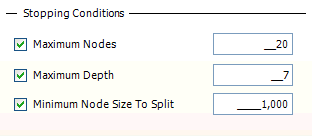
Each stopping condition is applied if the checkbox is ticked, and ignored otherwise. When the condition is being used, the value in the limits edit box is applied.
Stopping conditions
| Stopping Condition | Description |
|---|---|
| Maximum Nodes | The tree will be allowed to grow further while it contains less than the number of nodes specified by the Maximum Nodes stopping condition. Since the tree grows by 2 or more nodes each time it could end up with more nodes than this condition specifies as a result of the final split made. |
| Maximum Depth | A node will be allowed to grow further while it is at a depth less than that specified by the Maximum Depth stopping condition. A tree with just the root node has a depth of 1. |
| Minimum Node Size to Split | A node will be allowed to grow further while its base count is higher than that specified by the Minimum Node Size to Split stopping condition. It could then split into two nodes which may have fewer records than this condition specifies (provided that they pass the following stopping condition) . |
Amending stopping conditions based on stopping reasons
The Stopping Reason explains why a node has stopped growing. This is visible in the header bar of the Focus Node panel and also as one of the attributes in the Node Details.
The Stopping Reason relate to the Stopping Conditions. Changing the right Stopping Condition will allow a stopped node to grow further.
| Stopping Reason | Stopping Condition action |
|---|---|
| “Tree reach maximum nodes” | Increase the Maximum Nodes stopping condition |
| “Node reached maximum depth” | Increase the Maximum Depth stopping condition |
| “Node is too small to split” | Decrease the Minimum Node Size to Split stopping condition |
| “No valid splits found” | All the splits have failed the Split Validation conditions. Use the Reason column to help understand why. See How do I set the Split Validation Options? for more details. |