PeopleStage release notes 2024
Q4 2024
4 December, 2024
New Wait selections
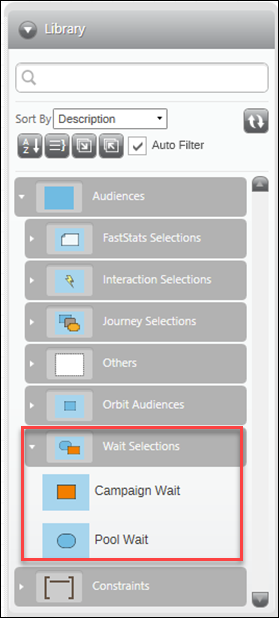
There’s a new folder in the PeopleStage Audiences library called Wait Selections.
Wait selections are an audience library option that lets you either exit recipients from an audience step or move them through it.
There are two wait selections options:
- Campaign Wait: Moves a recipient who has spent at least X amount of time anywhere in the campaign. You can use this in an Audience step to either exit them or move them to a message.
- Pool Wait: This works the same way as when selecting a Pool Journey. If a recipient has been in the previous pool for X amount of time, then you move them forward in the campaign.
New Process constraints
Note
We’ve developed process constraints in PeopleStage to support triggered events in Orbit campaigns.
We’ve been able to apply a process to a step for some time in PeopleStage. However, you can now also apply a process constraint.
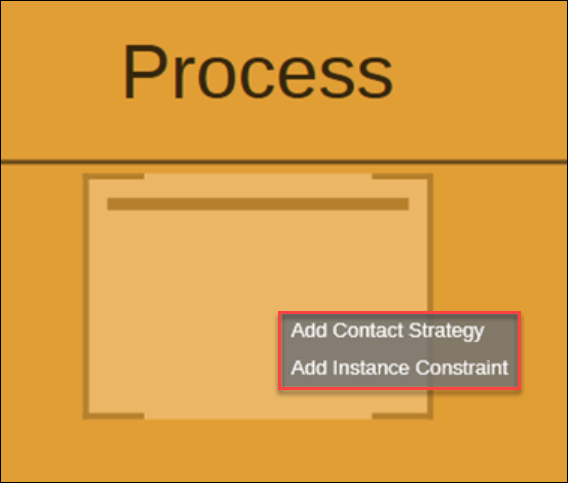
These new constraint options allow you to control how often people enter the process and how. If you don't use these options, then people can enter the process any number of times.
Note
If you’ve applied constraints at area or campaign level etc, and then apply process constraints, your process constraints don’t override your area or campaign level constraints. All constraints are applied at the level which they are set.
See Process constraints.
Improved Orbit audiences in PeopleStage for transactional processing
When creating a booking-level campaign (any level below people), then we’ll display applicable orbit audiences.
There are places where we didn’t support Orbit audiences in the PeopleStage UI (or PeopleStage processing). These are now supported and include:
- Transactional orbit audiences appear in the transaction colour in the library
- Transactional orbit audiences appear in the response colour if usable in the response step
You can now use these Orbit audiences in the following places:
- In the audience (and we should know if it is a transaction segment)
- In the content step as a selection or as a filter on a transactional variable
- In the response step as a response segment filter
In all these cases, campaigns continue to save, publish, and run, as expected.
Improved Campaign optimisation limit
We’ve increased the campaign optimisation limit for PeopleStage. Previously, you could only have 30 campaigns per area, whereas now you can have up to 50 campaigns.
Improved LinkedIn integration API upgrade
We’ve upgraded our LinkedIn integration from the API version 202306 to the latest version to avoid deprecation, as v202306 will be removed from the platform on 16/12/2024.
New UTM codes in AptecoEmail
If you add utm_ fields to your content in PeopleStage, and send these to AptecoEmail in Orbit, then the links have the appropriate utm_ codes applied.
However, for this process to work you need to turn on the ApplyUtmCodes option in your channel parameters. You will then find that your utm_ codes are applied to your sends,
Note
Transactional emails send all utm_ codes. Marketing emails will only apply utm_ codes where the values are equal (so no differentiation between recipients).
New SMS opt-outs
We’ve added in optouts to AptecoSMS. Keywords are now specified in the ResponseGatherer or Webhook.
We’ve also added Contractual or Promotional settings, so that you can decide if you want optouts applied. This process works on a mobile number.
Note
We’ve done some backend development in PeopleStage to support setting ‘To’, and ‘From’ dates when reporting on the target set for a goal or tracking an objective target.
For administrators
- Newtonsoft library update: The Apteco software platform has been updated from Newtonsoft version 11.0 to 13.0 in the licensing component.
- Emarsys retry logic: Retries for Emarsys have been increased to 5, with a stepped backoff of 1 s, 2 s, then 3 s.
Bug fixes
Push notification channel not working
We’ve fixed some packaging scripts within the FastStats Service to ensure that the correct Push Notification DLLs are included. You can now successfully set up your Orbit campaign to use a push notification channel, without generating error messages.
Unable to have content journeys and store actual value in history
We’ve found and fixed an issue that prevents content journeys from storing actual value in history when tracked content was both split and sourced from a database.
Unable to set % on volume constraints in PeopleStage
We’ve found and fixed an issue that prevented you from setting percentages on volume constraints in PeopleStage.
SMS not applying defaults when no personalisation is sent
We’ve found and fixed an issue preventing SMS from applying defaults when sent without personalisation. This issue occurred when you created a template with personalisation/sent a campaign without personalisation, causing the message to be sent incorrectly.
Sending SMS with invalid phone numbers errors
We’ve fixed an issue causing SMS messages sent with invalid phone numbers (using 0 rather than 44) to generate an error.
Q3 2024
11 September, 2024
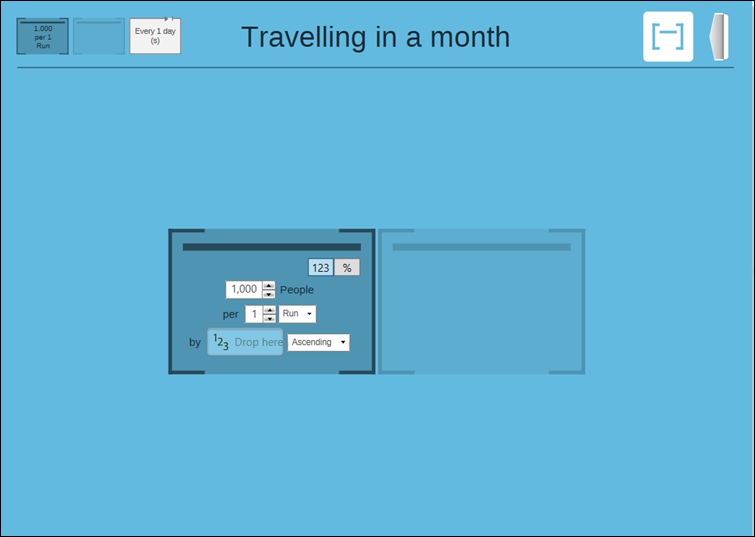
New Sort records by numeric variable
You can now sort records by a numeric variable in PeopleStage. This allows you to apply a top or bottom order to the values before setting a volume limit.
New Record Apteco Email bounces
You can now record hard and soft bounces from Apteco Email in the response history, adding these details to the FastStats communication history. This update does not include displaying stats in Orbit or existing reports in PeopleStage.
New Voucher code logging
You can now log instances where voucher codes have been over allocated in PeopleStage. If you assign voucher codes and they are over allocated, this action is automatically recorded in alerts.
Bug fixes
- Fixed an error that occurred when running a preview count on an audience containing a content or broadcast journey, where the previous audience in the campaign had not yet been processed.
- You can now add more than 5 response items in a PeopleStage campaign without encountering an error.
- You can now set both MESSAGEPERIOD and RESPONSEPERIOD for dotdigital responses, allowing you to track responses from one period while messages are sent in another.
- Preview counts in PeopleStage now persist when you navigate away and return, as long as you are in edit mode.
- Preview counts in PeopleStage now work in both live and edit modes without needing to save the diagram in live mode.
Q2 2024
17 May, 2024
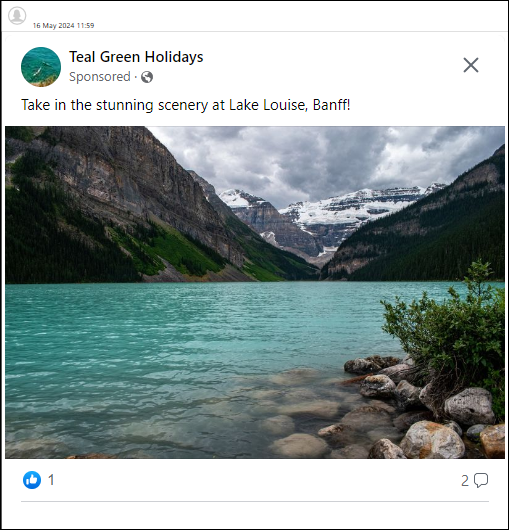
New Meta Ads browser preview
PeopleStage users can now view Meta Ads previews in a modern embedded browser. PeopleStage now uses the MS WebView2 component, and if this isn't found then it is automatically downloaded and installed. You can also optionally choose not to allow automatic installation (via an option in the PeopleStage configuration tool). If you select this option, then your system administrator must download and install the component manually. The PeopleStage UI shows the URL used for manual download.
Q1 2024
21 March, 2024
New Single Database Multiple Schema mode
PeopleStage now uses the Single Database Multiple Schema (SDMS) mode, eliminating the need for SQL Server file system access. PeopleStage can now operate on various cloud databases, including Azure SQL Database. SDMS mode allows grouping tables under different schemas within a single database, enhancing your PeopleStage organisation and efficiency.
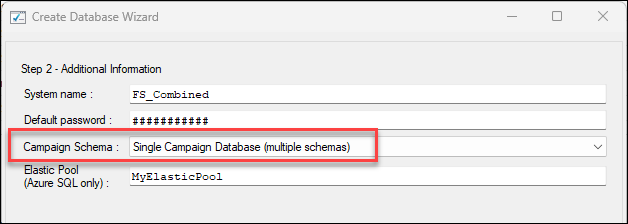
The Q1 2024 Apteco software release introduces the Single Database Model for compatibility with Azure SQL database. It allows Azure SQL databases to group into an elastic pool for efficient sharing of SQL Server resources and licence costs.
You can now use Single Database Multiple Schemas (SDMS) mode in PeopleStage, eliminating the need for SQL Server file system access. This allows PeopleStage to operate on various cloud databases, including Azure SQL database.
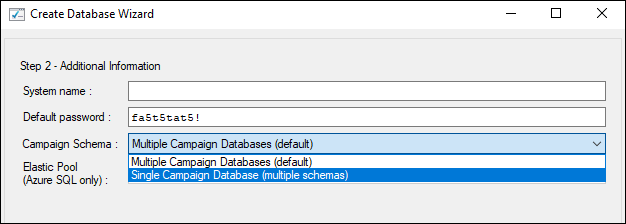
For first-time system configurations, administrators can now choose between multiple databases or a single database within the database creation wizard, and specify an elastic pool if utilising Azure SQL.
| Vendor | Database service | Available from |
|---|---|---|
| AWS | Amazon RDS for SQL Server | Q4 2023 |
| Cloud SQL for SQL Server | Q4 2023 | |
| Azure | SQL Server on Azure Virtual Machines | Q4 2023 |
| Azure | Azure SQL Managed Instance | Q4 2023 |
| Azure | Azure SQL Database | Q1 2024 |
Improved Bulk Copy Program
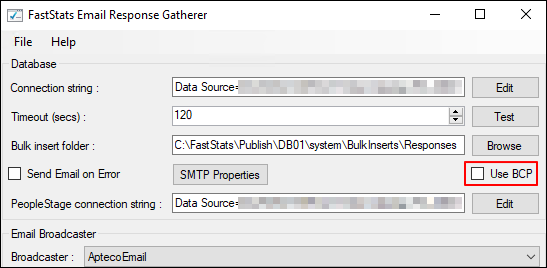
We have removed the Bulk Insert dependency in PeopleStage. By shifting away from bulk insert methods to Bulk Copy Program (BCP), this feature opens doors to previously excluded technologies like Azure SQL, enhancing compatibility and expanding usage possibilities.
In the Q4 2023 Apteco software release, the dependency on Bulk Insert in PeopleStage was replaced with the Bulk Copy Process (BCP) option for inserting data into SQL Server for both FastStats PeopleStage and the Response Gatherers. This transition enhances compatibility and expands usage possibilities, especially with technologies like Azure SQL.
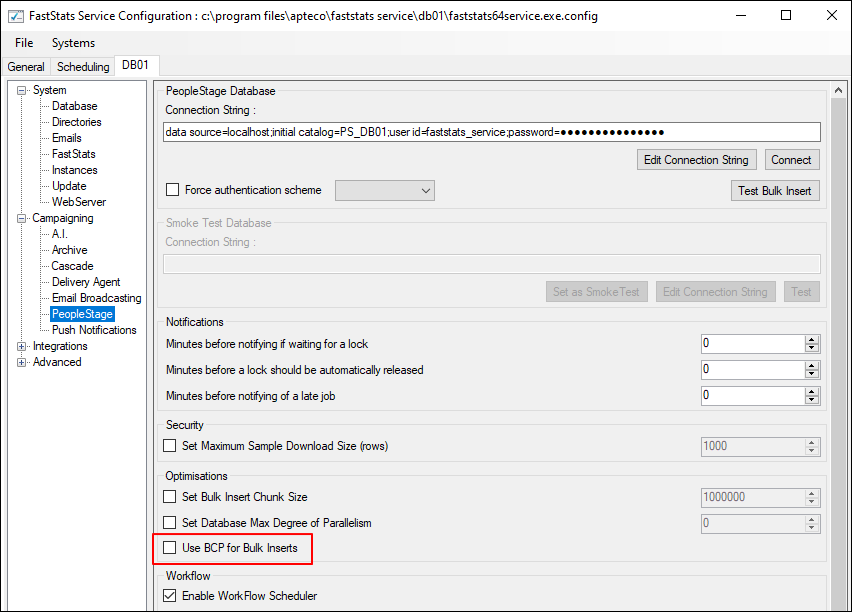
To enable this feature:
- Open the FastStats Service Configurator.
- Expand Campaigning in the side menu, then select PeopleStage.
- Check the box next to Use BCP for Bulk inserts.
Bug fixes
- Fixed an error in PeopleStage when running a preview count. This error occurred specifically when the audience contained a content or broadcast journey and the previous audience in the campaign had not yet been run.