Orbit release notes 2026
2.3.13 Latest release
9 July, 2026
Headline Behaviours
Behaviours give you recency, frequency, and value (RFV) statistics directly from your customer and transaction data. Orbit resolves the results on the fly, so you can start analysing transactional aggregations without the need to build audiences first.
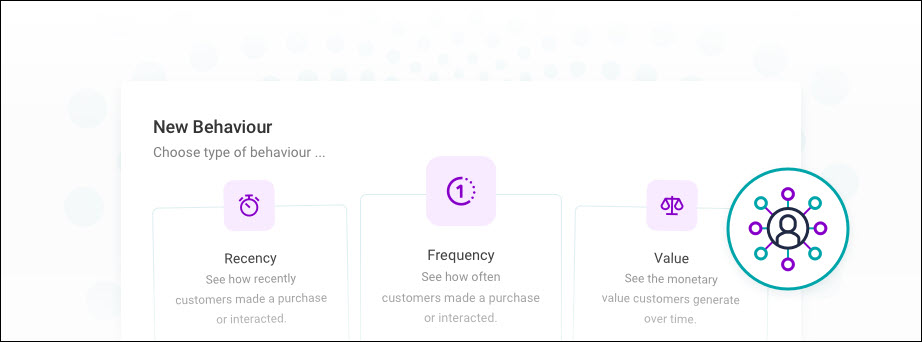
Each behaviour targets a different aspect of customer engagement:
- Recency retrieves the most recent (or earliest) value of a transaction variable for each contact
- Frequency counts transactions per contact, optionally filtered to a specific subset
- Value aggregates a numeric or currency variable across transactions, such as total spend or average profit
You can apply behaviours in the following locations:
- Charts, cubes, and data grids as dimensions or measures
- Number tiles as measures
- Venn sets to define the sets within a diagram
- Calculated measures — for example, year-one frequency as a proportion of lifetime frequency
- Dashboard filters and analysis filters — to build an interactive RFV summary view across a dashboard
- Audience filters — to select contacts based on recency, frequency, or value criteria; Orbit shows an RFV icon next to each clause
Note
Behaviours require a parent–child relationship between tables in your data model. If the Behaviours tab does not appear in the variable picker, contact your system administrator.
For more detail, see Behaviours.
Improved Custom labels for fixed value comparisons
When you compare a number tile against a fixed value, you can now give the comparison a custom label using the new Value Title field. Previously, the label always displayed as "Target" regardless of what the value represented.
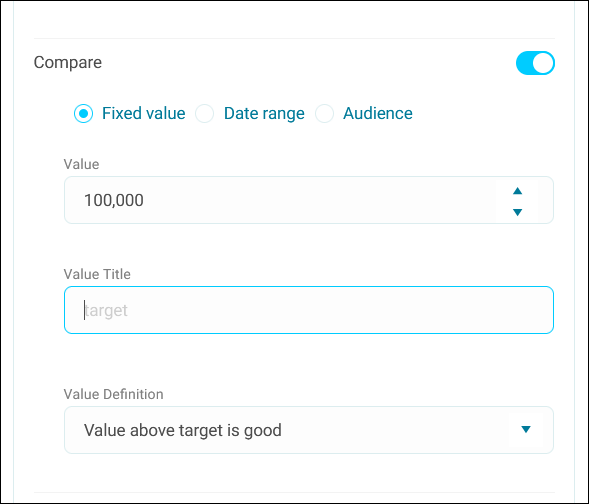
This is useful when your fixed value represents something more specific, like a budget figure, a forecast, or a performance benchmark. The label appears on the tile in place of the default "Target" text.
Bug fixes
- The search field on the Existing File tab now aligns correctly with the content above and uses reduced vertical padding.
- Icon badges styled in the success colour now display with the correct icon shade.
- Saving a dashboard no longer resets the table level of an analysis filter. Previously, saving could switch the table level to an automatic selection, causing tiles to profile at the wrong level.
- Audiences sourced from FastStats selections that use
Now,ThisMinute, orThisHourdate rules now load correctly in Orbit.
2.3.12
25 June, 2026
This release delivers multi-factor authentication for Orbit, improvements to on-demand audience count management, and a redesigned audience export interface.
Headline Multi-factor authentication
Requires Apteco software version Q1 2026 or later.
Multi-factor authentication (MFA), also known as two-step or two-factor authentication, is now available in Orbit. MFA protects your users' accounts against stolen or reused passwords by requiring a one-time passcode (OTP) at login, generated by an authenticator app. Even if a password is compromised, an attacker cannot access the account without the second factor.
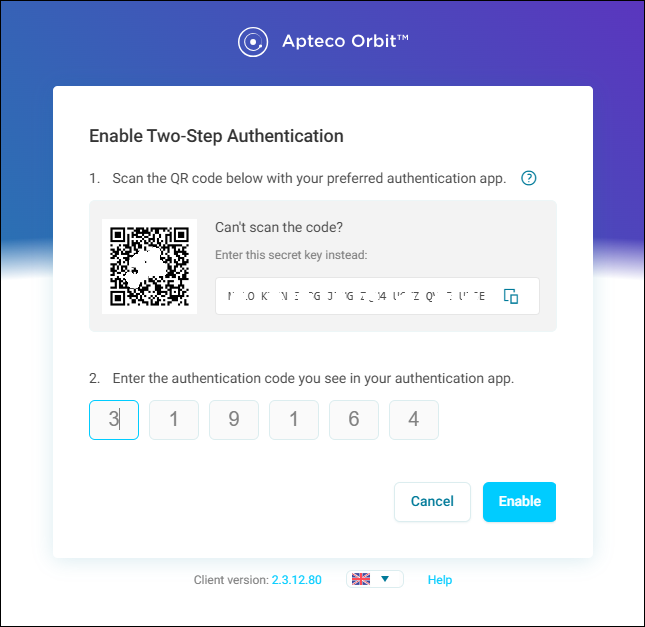
Administrators can leave MFA as an opt-in for individual users or enforce it across a group or the whole system via permissions, giving you flexible control over your account security.
What this means for your users
After upgrading to Apteco software version Q2 2026, users who log in to Orbit will start seeing a prompt to set up MFA. They can set it up straight away or dismiss the reminder for 30 days.
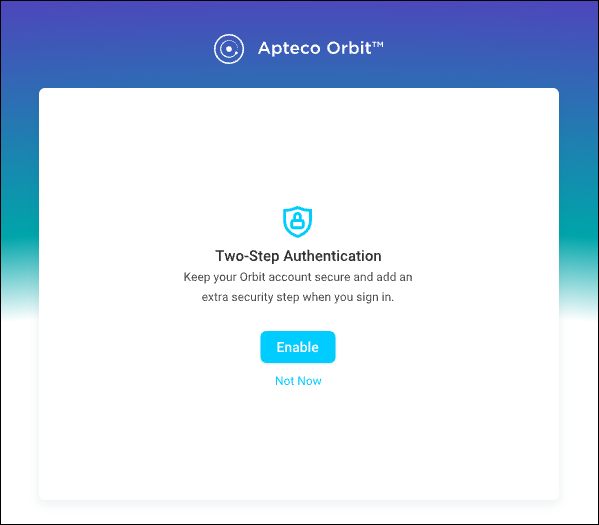
See Multi-factor authentication.
What you need to do
MFA requires one configuration change before it is available. You must configure the OrbitAPI with a connection to the FS_Config database. Full instructions are in the admin guide. If you already have the Orin AI assistant configured on your system, this change is likely already in place.
Improved Manual preview counts
When manual preview counts is enabled, audience counts are never triggered automatically when working with draft campaigns. Counts only update when you manually select Refresh Counts.
Refresh Counts is available on draft campaigns only, both when a draft is in edit mode and view mode. While a count is in progress, the option is disabled and a loading indicator appears. Once complete, you can trigger another refresh at any time.
Note
This feature is not enabled by default. Go to Application Settings > Features to enable it or contact your Apteco administrator.
Improved Updated audience export design
We've redesigned the audience export interface. Delimiter and encloser options are now visible by default for relevant export formats, making it easier to configure file output without navigating additional settings. The export behaviour is unchanged.
Bug fixes
- The Mean PWE value on profile tiles now calculates correctly and matches the equivalent result in FastStats.
- The Application filter options on the Tags to Resource view now show Select and Campaign instead of FastStats and PeopleStage.
- The PeopleStage icon now displays correctly for campaign resources when filtering by resource type in Permissions.
- You can now adjust the string length of an expression column from the default of 20 characters, up to a maximum of 32,767 characters.
2.3.11
11 June, 2026
This release introduces on-demand preview counts in the campaign summary panel and prevents concurrent system processes from conflicting.
New Preview counts on campaign summary
The campaign summary panel includes a Refresh Counts option against the audience section, letting you trigger an audience count update on demand rather than having counts refresh automatically.
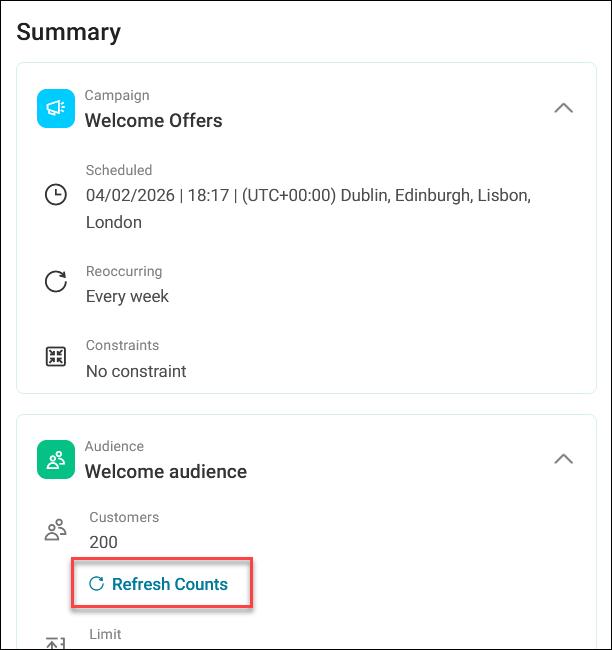
Refresh Counts is available on draft campaigns only, both when a draft is in edit mode and view mode. While a count is in progress, the option is disabled and a loading indicator appears. Once complete, you can trigger another refresh at any time.
Note
This feature is not enabled by default. Go to Application Settings > Features to enable it or contact your Apteco administrator.
Improved Build and import process locking
Orbit now prevents Connect system builds, CDP imports, and merge processes from running concurrently. If any one of these processes is active, the others are locked until it completes, reducing the risk of conflicts or inconsistent data during processing.
Bug fixes
- Expand and collapse arrows in list items now render as icon buttons, and all icons within those buttons are correctly sized.
- Expressions using functions such as
AddStr()andFormatNumber()now correctly return string values rather than numeric. - Denying the Receive Share to All permission no longer prevents users from seeing dashboards they own.
- Dropdown menus on multiple choice buttons now display with the correct background and padding.
- Objective reports now continue to work correctly after a system rebuild and cache reset.
- Audience filters on objectives are now visible to all licensed users, regardless of who created the campaign.
2.3.10
28 May, 2026
This release publishes a public library of PowerShell script examples for Orbit API automation and improves on-demand audience count access throughout the draft campaign experience.
New Orbit API script examples on GitHub
Requires Orbit API version 2.3.10 or later
A public GitHub repository of PowerShell script examples is now available to help administrators automate common setup and management tasks across Orbit systems. The scripts cover authentication, dashboard management, dashboard themes, and Connect system variables. We've designed each script as a starting point that you can customise, adapt, or extend to suit your environment.
The repository includes scripts for individual operations as well as combined workflows, such as reverting a dashboard to a previous version or standardising system variable properties from a CSV file. We've also included guidance notes on using the scripts together, ideas for extending them, and tips on using AI to create or modify scripts.
Visit the repository on GitHub
Warning
These scripts are provided as examples only. They are not officially supported and are intended as a starting point for your own automation.
Always test scripts in a non-production environment before running them against live systems, and review each script carefully before use.
Improved On-demand counts in draft mode
The Refresh Counts option in the target segment side panel is no longer restricted to first-time use or edit mode. In draft mode, it remains active at any point in your journey-building session, provided you have segments added and no count job is already running.
Bug fixes
- Filters on a Venn chart that include at least one excluded segment now produce correct results across all tiles.
- String expressions in audience expression filters now return the correct output type instead of always being treated as numeric.
- Copying an audience split with incomplete paths no longer triggers an unexpected stay and save prompt.
- The Go to Home and Go to Login buttons on the Terms of Use screen now navigate correctly when Orbit is deployed under a sub-path.
2.3.9
14 May, 2026
This release adds a direct CiviCRM integration, three improvements across Orin, journey steps, and CDP data structures, and introduces automatic cleanup of repair backup files.
Headline CiviCRM data source
Connect Orbit directly to your CiviCRM instance via its native API, making contact and organisational data available for analysis and campaigning without manual exports.
Once connected, you can select specific tables and columns to define your dataset. For more precise data shaping, the JSON query parameter field supports row-level filtering, field selection, and joins between CiviCRM entities.
See CiviCRM.
Improved System context in Orin responses
When you copy a response from Orin, Orbit now automatically appends contextual metadata to the clipboard. This makes shared responses self-explanatory for colleagues who may not have access to the source system.
The context includes:
- The name of the data system Orin is referencing
- The date the underlying data was last updated
- A disclaimer that Orin can make mistakes and important information should be reviewed
Note
This is Orin's default behaviour, but you can turn it off in Application Settings.
New Hold participants indefinitely
The new Hold participants option on the Exit campaign step lets you keep participants at the end of a campaign journey indefinitely, rather than exiting them immediately.
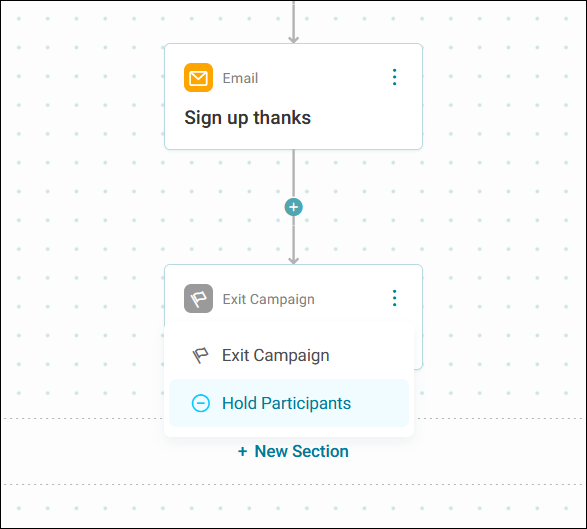
This is useful when you have a triggered event campaign where participants reach milestones independently and at different times. Instead of using a time delay to keep participants in the diagram, you hold them indefinitely and let your triggered events handle progression and exit.
See Journey steps.
Improved Transaction attributes as join keys
When defining your system in the Apteco CDP, you can now use any transaction attribute as a join key between tables, not just Transaction ID or Transaction Source URN. This gives you greater flexibility in how you structure and relate your data.
This means you can attach additional child tables to transactional data already loaded through the CDP, using whichever transaction attribute best suits your data model.
Improved Automatic backup file cleanup
When an administrator uses the Repair option in the Orbit Updater Configurator, Orbit now automatically removes temporary backup files that are more than 30 days old. This prevents repair-related backups from accumulating and consuming unnecessary server storage over time.
Backup files created within the last 30 days are left untouched, and the process only targets files created by the repair process itself.
Bug fixes
- Goal and objective time windows no longer drift when you repeatedly edit a campaign.
2.3.8
30 April, 2026
This release features the Q1 2026 release webinar, updates to workbook page name preservation on favourites, and improved combo chart labels on export.
Q1 2026 release webinar
Watch the Q1 2026 release webinar to see the latest Apteco features demonstrated in context.
Apteco UK founder and MD James Alty walks through the highlights from this quarter's release, including:
- Orin, Apteco's new AI assistant
- Intelligent dashboard summaries
- Transactional data in the Apteco CDP
- Behavioural modelling and pattern match enhancements for FastStats
Watch the Q1 2026 release webinar
Improved Page names preserved on favourite
When adding a favourite to a renamed workbook page, Orbit no longer overwrites the page name with the favourite name.
Improved Combo chart labels on export
When exporting a combo chart, labels now have a white background matching the in-dashboard display.
Bug fixes
- The number of remaining messages displayed in the Orin chat window now updates immediately after using the summarise dashboard option.
- Orin can now build audiences successfully when an unrelated system or dataview within the same OrbitAPI is unavailable.
- Users on the Analyser bundle can now calculate profile tiles on a dashboard without encountering an error.
- Channel costs now display the correct currency symbol when the currency is set to something other than GBP.
- Applying multiple filters on a Venn dashboard tile no longer causes a serialisation error in the API.
- Toggling a filter clause between Is Any Of and Is None Of no longer causes the picklist panel to flicker.
2.3.7
16 April, 2026
This release introduces folder-level volume and contact strategy constraints, three dashboard filter improvements, enhanced CDP attribute validation, and role-based folder management.
Headline Constraints at the folder level
Requires Apteco software version Q1 2026 or later.
You can now apply volume and contact strategy constraints directly to campaign folders, giving you a single point of control over communication limits across every campaign and subfolder within that folder.
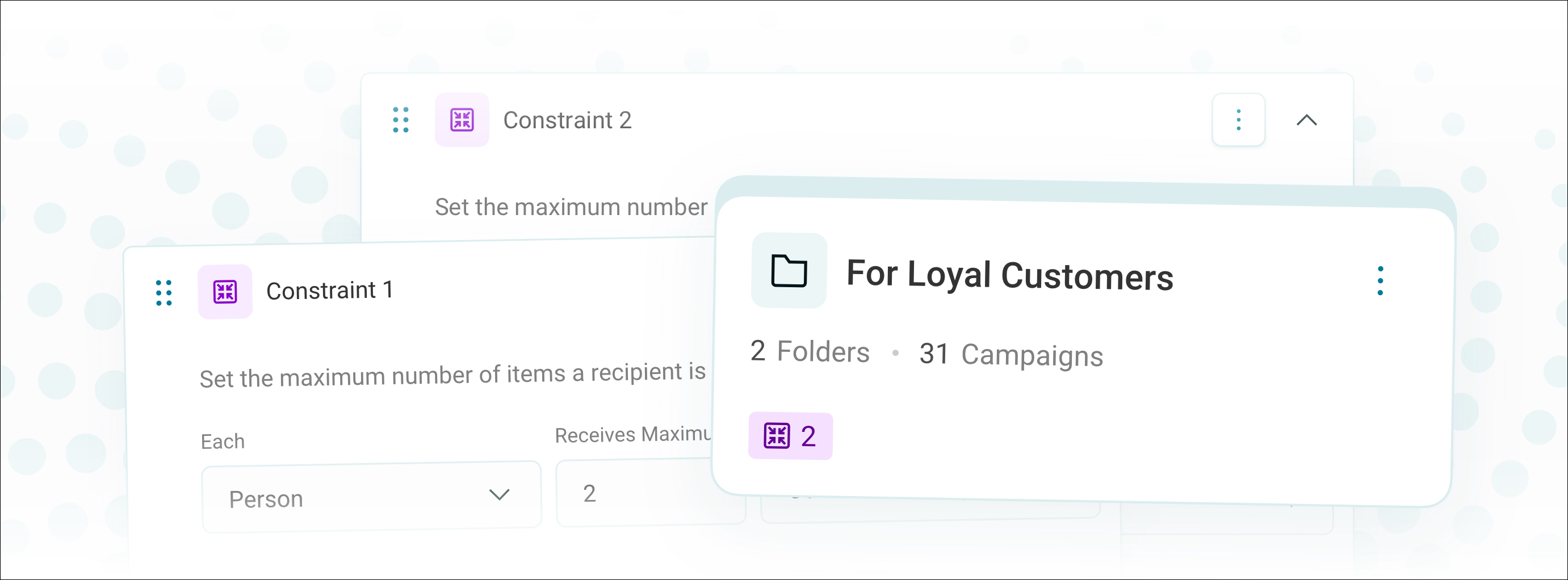
Key capabilities:
- Set a volume constraint to cap the total number of recipients who can enter the campaigns in a folder within a defined time period
- Folder constraints apply automatically to all campaigns within the folder, including those in subfolders, without needing to configure each campaign individually
- Set a contact strategy to limit how many times, via which channel, or across how many concurrent campaigns a recipient can be contacted
- Folder constraints work alongside campaign-level constraints. Where both are present, the most restrictive rule applies
- Constraint badges on folders in Grid and List view let you see which folders have active constraints at a glance
- Drop-offs from folder constraints appear as named steps in target segment counts, so you can identify exactly where and why recipients are being excluded
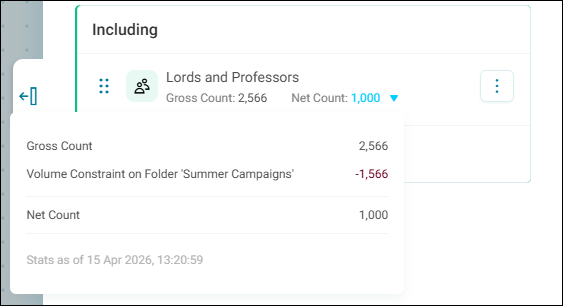
For more detail, see Folder constraints.
Improved CDP custom attribute validation
When creating custom attributes for individuals, contact points, or transactions, validation rules now default to the correct type for the selected variable rather than defaulting to Text in all cases. The allowed value range is also surfaced in validation messages, so you can see at a glance what constraints apply when adjusting defaults.
New Exclude filter categories in charts
When selecting chart categories on a dashboard, you can now choose to exclude them from a filter rather than only adding them. This gives greater control over audience building, without needing to manually adjust your filters in the side panel.
Excluded selections appear in the filter panel as "Is none of" conditions, grouped together at the end of the filter clause, separate from "Is any of" inclusions. Multiple exclusions are combined with OR logic, ensuring selections are treated as a single "Is not any of" set rather than compounding as separate AND conditions.
For more detail, see User filters.
Improved Consistent Venn tile filters
Venn tiles now apply filters using the same tightly coupled logic as comparison number tiles. When you apply filters from a child table, Orbit evaluates all conditions together as an AND chain like the rest of the dashboard.
Previously, adding a filter from a child table would produce an AND ANY clause, decoupling it from other applied filters and returning inconsistent results. Venn diagrams now evaluate dashboard filters, tile filters, and user filters together, so segment counts reflect all applied conditions.
Note
If you need the previous behaviour, create a saved audience with the transactional condition applied, then add it as a filter at the parent level rather than filtering the child table directly.
Improved Publisher role required for folder actions
Folder actions like creating, renaming, and adding constraints now require the Publisher role. Deleting a folder does not require the role.
Bug fixes
- Manually entering a custom start time in minutes for an export or campaign schedule no longer causes an error.
- Renaming a folder now updates the path in the structure history table.
- Orin's available actions restore after logging out and back in without a full browser refresh.
2.3.6
2 April, 2026
This release adds multilingual support to Orin, expands Orin's audience-building capabilities with exclusion logic and relative date rules, and introduces transactional filters on data grids.
Headline Orin responds in your language
Orin now replies in whichever language you use to ask a question. If you switch language mid-conversation, Orin will follow your lead. Data formatting throughout, like numbers, dates, and currencies, respects your configured locale conventions.
For generated summaries, such as dashboard and campaign summaries, Orin uses the language set in your Orbit regional settings rather than inferring it from your prompt.
For more detail, see Orin AI assistant.
New Transactional filters on a data grid
When analysing a data grid against a lower-level table, you can now apply transactional filters directly to the analysing table in the data properties side-panel. This lets you narrow down grid results based on specific conditions without altering your core audience definition.
New Build audiences using exclusions with Orin
Orin can now populate the Excludes section when building an audience. Previously, Orin could only construct the include side of an audience definition, meaning any prompt requiring exclusion logic would produce an incomplete result.
You can now ask Orin to build audiences using natural language that combines inclusion and exclusion criteria, for example, excluding contacts by geography, behaviour, or contact preference alongside positive selection conditions.
For more detail see Orin capabilities.
New Relative date rules with Orin
Orin can now apply relative date rules when building audiences, rather than being limited to fixed dates or ranges. This makes it possible to create audiences that stay current without needing to update date criteria manually.
Supported date rule types are:
- Predefined ranges: Today, yesterday, last year, and similar presets
- Custom ranges: A combination of relative and fixed dates
- Custom rules: Dates that shift forward or backward by a specified number of days, weeks, months, or years
- Fixed dates or date ranges
Note
Date rules can be complex to set up and interpret, so always review your results to ensure they match your expectations.
For more detail, see Orin capabilities.
Bug fixes
- Amending the custom query on an existing Salesforce data source now updates correctly on import.
- Previewing a Salesforce custom query data source no longer errors when columns have been removed since the last import.
- Links to the Technical Documentation section of help.apteco.com provided by Orin now resolve correctly.
- The count of users a dashboard is shared with no longer includes users from other systems when sharing with a group.
- The share search now only returns users and groups belonging to the current system.
- You can now successfully delete filter clauses on a cube tile with a single audience reference dimension.
- Viewing a limit on an audience within a target segment no longer causes Orbit to become unresponsive.
- The People table flag on a Customer Data Table can now be unchecked after it has been set, without needing to remove and re-add the table.
- You can now add User Defined Tables as child tables to a CDP transaction table.
2.3.5
19 March, 2026
This release introduces A/B testing in campaign journeys, consistent transactional filter behaviour on comparison tiles, percentage-of-total chart labels, and improved transactional load validation.
Headline A/B testing in campaign journeys
Requires Apteco software version Q1 2026 or later.
Orbit now supports A/B testing within campaign journeys, letting you compare email versions across a defined test segment before sending the winning version to your remaining audience. You configure the test audience size as a percentage of your total audience, set a test duration, and assign a distinct email template to each version path in the journey builder.
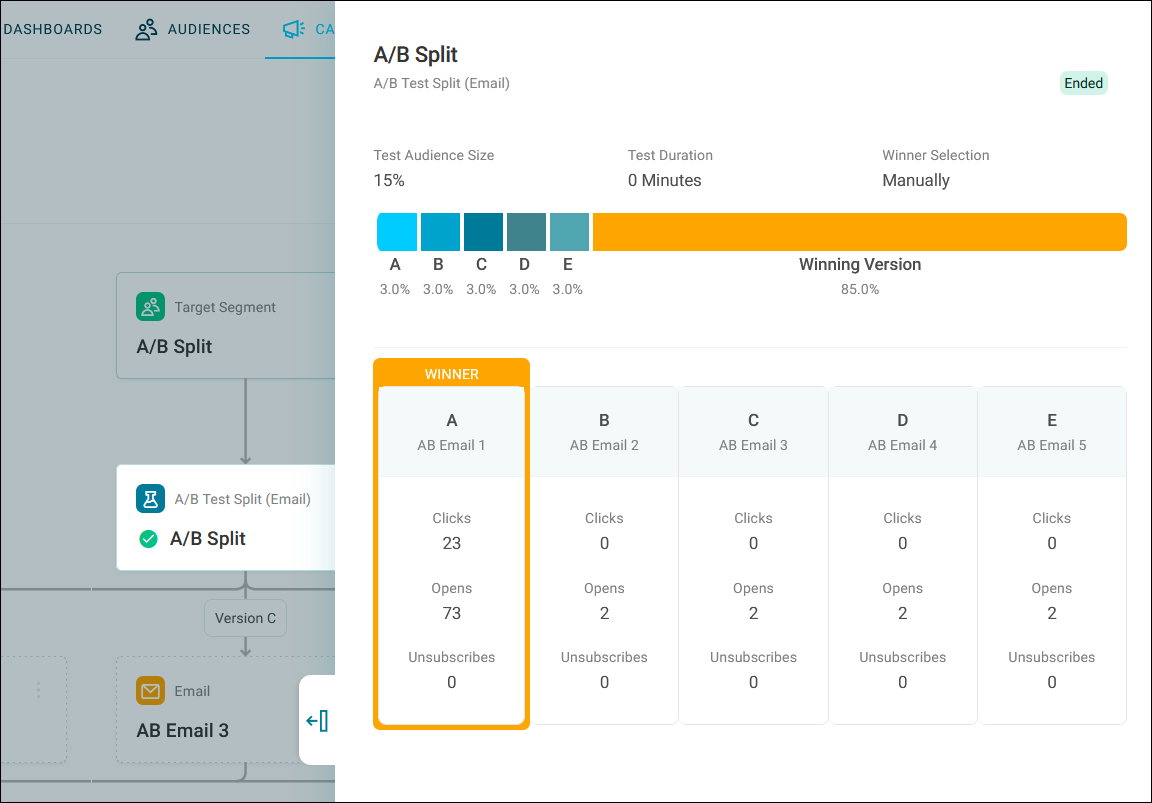
Once the test completes, Orbit surfaces response statistics for each version so you can make an evidence-based decision. Selecting a winner dispatches that version to the remaining audience and, in multi-stage campaigns, consolidates all recipients at the end of the A/B test step so the journey continues as normal.
Key capabilities include:
- Up to five versions per test, each mapped to a separate email template
- Configurable test audience size and duration
- Per-version engagement statistics (opens, clicks, unsubscribes)
- Compatible with sections and reusable across journeys
- Cancel a running test if results are inconclusive or you need to change something, without affecting the rest of the journey
For more detail, see A/B testing.
Improved Consistent comparison tile filters
Comparison tiles on dashboards now apply filters to the same transaction, ensuring consistent behaviour across tile types.
Previously, adding a filter to a child table (for example, Bookings) would decouple it from other conditions on the same table, producing a loosely joined result. Filters on the same table are now tightly coupled by default, so all conditions are evaluated together as a strict AND chain.
Example
If you're counting bookings in the last month and add a destination filter on the Bookings table, the tile now counts only bookings that match both the date range and the destination — not bookings that match either condition independently.
If you need the previous behaviour, create a saved audience with the transactional condition applied (e.g. "People who've booked to Australia"), then add that audience as a filter at the parent level rather than filtering the Bookings table directly. This keeps the two conditions separate, so they are evaluated independently rather than combined.
New Display percentage of total as chart labels
You can show category values as a percentage of the total directly on chart labels, giving you a faster way to interpret proportional data without needing to calculate it separately. When enabled under Data Labels, each label displays the category's share of the sum of all categories, factoring in any active filters.
Improved Transactional load validation
You can no longer proceed with a transactional import when the mapping is not a valid one.
Bug fixes
- Navigating to Voucher Codes administration no longer throws an error on data views with multiple systems configured.
2.3.4
5 March, 2026
This release adds administrator-configurable custom URL links to the Orbit system footer.
New Custom URL links in Orbit footer
Orbit now supports custom URL links in the system footer, giving system administrators greater control over the legal and navigational links displayed to users. You can rename the existing Privacy Policy label and configure an additional custom link as needed via the API configurator.
Note
Custom labels are not translated. Mobile and tablet layouts are not optimised for the additional links.
Bug fixes
- You can now delete an audience that previously appeared locked due to an incorrect dependency caused by a deleted dashboard.
- You can now browse files and audiences in the journey builder without encountering errors on systems with a large number of tables.
- Loading indicators no longer remain on screen indefinitely when saving, loading, or publishing a journey on slower systems.
- Adding an expression column to a Data Grid tile no longer triggers an unknown error.
- Charts now redraw correctly when applying property changes in quick succession.
- The floating action panel now stays visible when selecting rows that fall below the fold in a tall dashboard table.
- Editing the title or notes on a map no longer triggers repeated re-renders that slow down as you type.
- The + New Data Mapping button no longer appears after completing a CDP import action.
- You can now add an audience as a measure on a dashboard table tile.
- Communication history is now stored correctly on the first run of a campaign when the setting is enabled.
- Dashboard tiles now include a "no flags" category when showing all records for a dimension that uses a flag array.
- Cube tiles no longer run out of memory when applying a value limit to high cardinality dimensions.
2.3.3
19 February, 2026
This release introduces scheduled merges of CDP records, folder status indicators, Orin version awareness, and improvements to message personalisation.
Headline Scheduled CDP record merges
You can schedule automatic merges of CDP records based on your identity resolution rules. Orbit runs your selected rules against existing records at regular intervals, helping you maintain data quality without manual intervention.
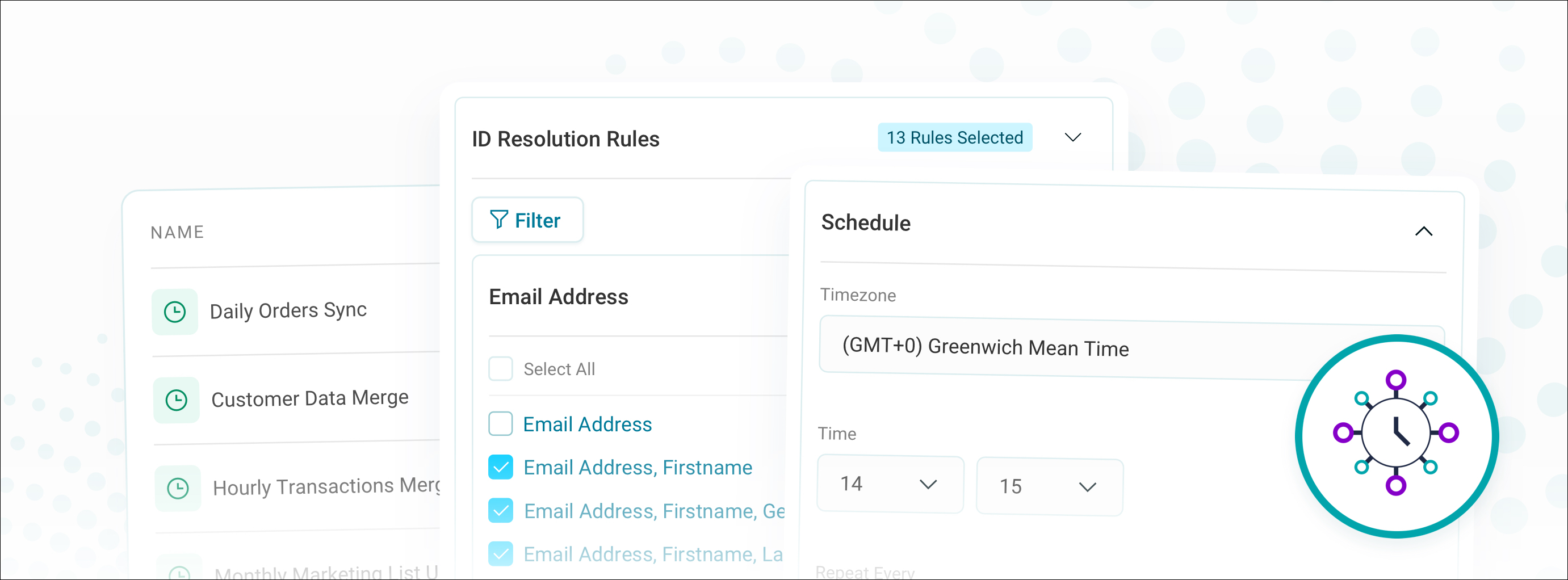
Scheduled merges complement your automated identity resolution by catching duplicates that weren't matched during initial data loads. Your system automatically pauses merges during data loads and system builds, then resumes when complete. Each merge keeps a log showing which records were consolidated.
For more detail, see Merge records.
New Folder status indicators
Campaign folders display status badges that show the number of campaigns requiring approval and campaigns with errors, both grid and list views. You have immediate visibility into folder status without needing to open individual campaigns.
Key improvements:
- Approval count badges show how many campaigns are pending review
- Error count badges highlight campaigns requiring attention
New Orin version number knowledge
Orin can now provide its current version number when you ask. This makes it easier to report issues or verify that you're using the latest version.
Improved Personalisation UI improvements
Message personalisation now features expandable content fields and split branches. Branches appear nested within their parent content field for clearer visual hierarchy. You can also change content types and delete elements without affecting the entire structure.
Bug fixes
- The Orin chat window header now remains accessible when you scroll through a long conversation.
- You can now refresh the deduplication merge progress log without encountering an error.
- Orin now correctly formats dashboard summaries that include multiple currency values with dollar signs.
- Hyperlinks on datagrids with URL parameters now work correctly when you select the encoded description option.
- Audiences now correctly identify their dependencies and no longer become associated with unrelated resources that share the same ID as a referenced dashboard.
- You can now only specify whitelisted URLs in password reset requests, preventing arbitrary URL injection.
2.3.2
5 February, 2026
This release launches Orin's dashboard summary capability, adds content search by recent activity, and introduces a visual indicator for the dashboard tile limit.
Headline Orin dashboard summaries
Orin can generate intelligent summaries of your dashboards, providing instant overviews of the insights and visualisations they contain. When you request a dashboard summary, Orin analyses the content and creates a concise description that you can share with colleagues or use to quickly understand unfamiliar dashboards.
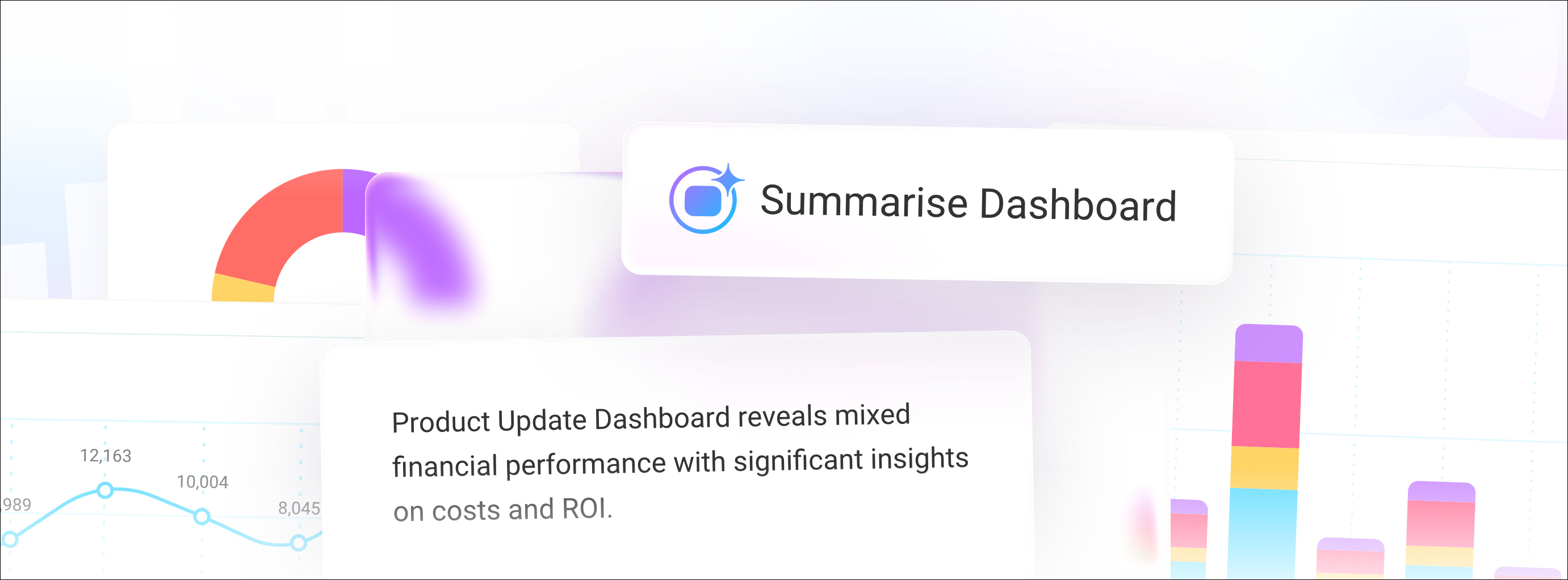
This feature helps you:
- Get up to speed quickly when working with dashboards created by colleagues
- Share dashboard insights with stakeholders without manually writing descriptions
- Onboard new team members more efficiently by providing context about existing analytics
Note
You access the summary function through the option menu in Orbit, rather than typing in the Orin chat window.
For more details, see Orin capabilities.
New Find recent content with Orin
Orin's data navigator functionality now helps you quickly locate dashboards, audiences, and campaigns based on recent activity. When you ask Orin about these items, it retrieves up to 10 of the most relevant results and can filter or sort them to match your needs.
New Dashboard tile limit indicator
You can now see when you've reached the maximum of 15 tiles per dashboard tab. A visual indicator appears on the dashboard tab and in the details side panel when you're at the limit.
Note
Text tiles don't count towards this limit. The 15-tile maximum applies to all other tile types.
Bug fixes
- You can select profile tile columns with category limits applied to nested variables, and the filter correctly returns the expected results instead of unrelated categories.
- You can select a folder when creating an audience campaign without permissions enabled.
- You can no longer create a custom attribute in the Apteco CDP with the same name as a transactional table attribute when that table is disabled in the mapping.
- Orin retains your unsent message when you close and reopen it.
- Comparison tiles now correctly calculate the same period last year instead of using the previous period.
- Maps in audience workbooks now correctly retain your pan and zoom settings on the first attempt.
- The Orbit API now correctly applies your log settings when reading configuration from the FS_Config database.
- The ChatAPI correctly creates temporary tokens with UTC timestamps to prevent authentication failures in time zones behind UTC.
2.3.1
22 January, 2026
This release adds expression support in data grids, manual record merging, streamlined CDP configuration across five workflows, and a confirmation step when Orin creates a solution.
Headline Expression support in data grids
You can now add custom Orbit expressions as columns in data grids used in dashboards and audience workbooks.
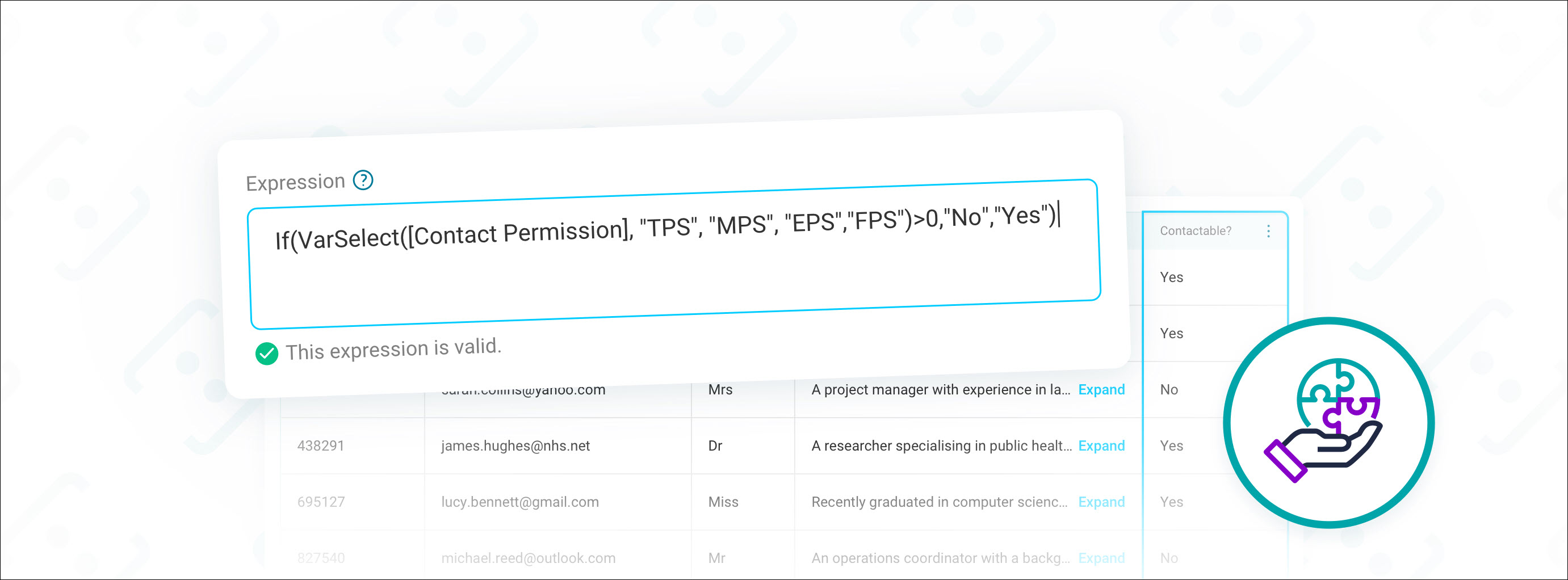
This gives you the flexibility to create calculated fields and transform data that can be combined with, and output alongside standard variables, in a single export.
For more detail, see Adding data grids as dashboard tiles.
New Manual merge for individual records
You can now manually merge duplicate Individual records in Orbit connect that automated identity resolution hasn't linked. This gives you direct control to consolidate records when you've identified specific duplicates through supporter contact, data audits, or external system information.
When you merge records, Orbit creates a new Individual record using details from the most recently updated record and links all associated data to it, including source URNs, contact details, and transactions. The system preserves original records in the full dataset and logs each merge operation for your reference.
For more detail, see Manually merging records.
Improved CDP mapping preview
When configuring a Customer Data Table, the data preview now highlights the column you're editing and keeps the header row visible when scrolling, matching the experience you already have when mapping a User Defined Table.
New Add all CDP tables in one step
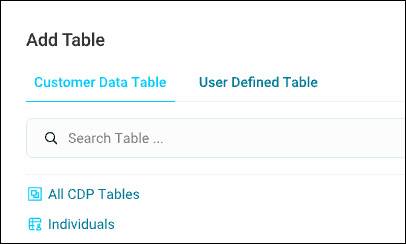
When you create a new system build using Apteco CDP data, you can now add all mapped CDP tables and defined transaction tables at once, along with their relationships. You no longer need to manually select individual tables and configure their relationship structure separately.
Improved Column mapping prevents duplicates
When mapping data source columns, the system now removes columns from the dialogue once assigned. This prevents duplicate mappings that could cause data conflicts. Once you map a column to an attribute, it disappears from the dropdown list and search results.
Note
You can still map multiple columns to Email Address, Mobile Phone Number, and Landline Phone Number attributes.
Improved Automatic attribute mapping
When you map new data to your table columns, Orbit now automatically maps columns to your custom Individual and Contact Point attributes as well as the standard data structure fields, matching them by name regardless of capitalisation, spaces, or underscores. This means you no longer need to manually map custom attribute columns each time you import a new dataset.
New External attributes in personalisation
You can now use external attributes to personalise your messages in Orbit campaigns. External attributes are custom data fields stored in your external database.
These attributes give you more flexibility to tailor messages based on customer data that sits outside your core system. You also have the ability to select specific categories within each attribute for precise targeting.
Improved Orin AI solution acceptance
When Orin creates a solution for you (such as an audience), you now see a confirmation dialogue that lets you accept the solution before it's finalised. This gives you a clear checkpoint to review Orin's work and ensure you're satisfied with the AI-generated output before proceeding.
Bug fixes
- When you open data settings for Summary Profile tiles, the default View As setting now correctly shows as Variables.
- You now see the correct folder name when creating a campaign from a template at the root of your folder structure.
- You can now select map definition properties that are not strings without encountering an error.
2.3.0
12 January, 2026
This release launches the Orin AI assistant, adds transactional data support to the Apteco CDP, and delivers dashboard tile copying, profile tile filtering, and three further improvements to menus and folder management.
Headline Orin AI assistant
Orin is your new AI assistant that helps you work with your Orbit system.

Orin provides three levels of assistance to help you get the most from Orbit, depending on your bundle level:
- Knowledge guide: Orin helps you understand the capabilities of the Apteco Orbit platform
- Data navigator: Orin uses the details of your data to help you navigate the tables, variables, values, and resources in your system
- Solution builder: Orin helps you create your own resources
For more detail, see Orin AI assistant.
New Transactional data in the CDP
You can now load transactional data directly into your Apteco CDP, creating hierarchical relationships between transaction types and individuals. Build multi-level transactional data structures, such as orders and order items, all linked to individual customer records, with support for incremental updates and custom attributes.
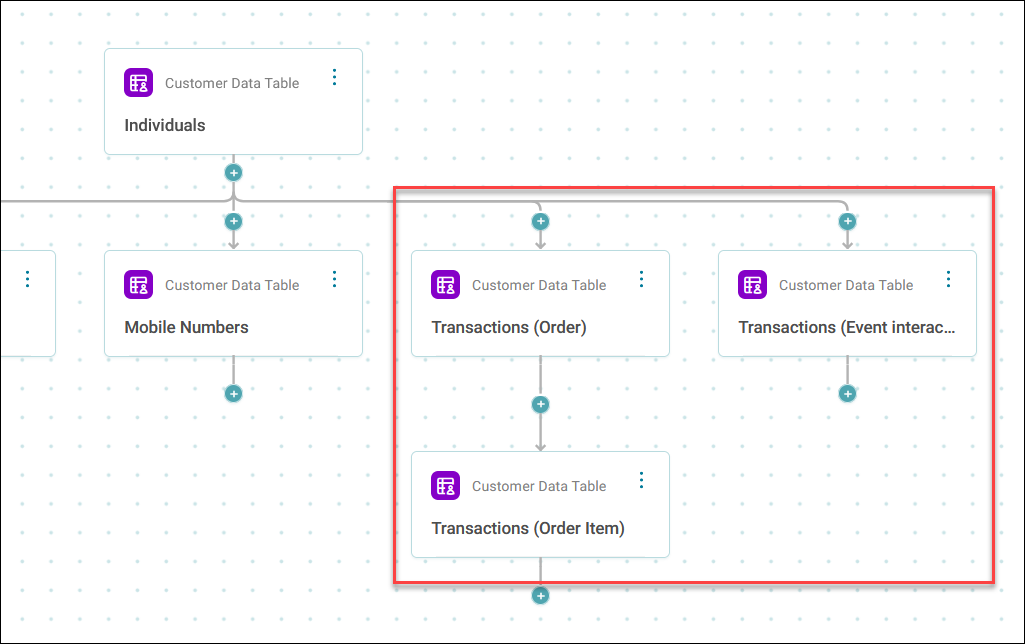
For more detail, see Loading transactional data to the CDP.
Improved Copy dashboard tiles to multiple tabs
Copy a tile to multiple tabs within the same dashboard in a single action, saving time when you need to replicate tiles across your dashboard structure.
New Filter data on profile tiles
You can now select categories directly on detailed profile tiles and add them to your user filters on your dashboard.
For more detail, see Profile tiles.
Improved N Per limits with text ordering
N per limits can order records using text variables such as email address, with ascending or descending sort options. This extension gives you more flexibility when applying contact strategy rules to your audiences.
For more detail, see N Per limits.
Improved Clearer campaign menu labels
The campaign option menu now uses simplified labels with panel headers updated to match.
Improved Manage folders in folder view
You can now rename and delete folders directly from the option menu while viewing the folder's contents, with changes reflected immediately in the breadcrumb navigation.
Bug fixes
- We've fixed an issue where individual attributes didn't update correctly when an individual had multiple values for the same attribute.
- Folder menus, filters, search, and grid layout options are now properly disabled when you view campaign overview and monitoring pages.
- Cell borders correctly display when you export a multi-column cube to PDF.
- You can now undo date changes in filters without encountering an error.
- You can now use the Return all values option in tables without incorrectly reverting when you saved your dashboard.
- The Venn chart segment filter preview now correctly displays when you exclude segments from your filter conditions.
- Text is now readable when selecting items in data grids, cubes, and tables by ensuring the text colour inverts correctly with the Orbit Default theme.
- Text tiles on dashboards now retain bold text and list formatting when you export to PDF.
- Comparison number tiles now correctly apply filters when you edit and reapply them without making changes.