Q2 2023 release
📅 Released: 15 June, 2023
| Apteco software | Build version numbers |
|---|---|
| Apteco FastStats Server | 5.8.4 |
| Apteco FastStats | 1.1.23114 |
| Apteco PeopleStage | 1.0.23114 |
| FastStats Designer | 1.3.23114 |
| Web Service | 1.0.23114 |
| FastStats Service | 1.3.23114 |
| Digital Integration | 1.0.23114 |
Info
For instructions on applying patches, see Applying patches.
Patch 22: Launcher failure due to expired binary certificate
4 April, 2024
FastStats PeopleStage
We have identified and resolved a bug that caused Apteco software launchers to fail due to an expired binaries certificate. This bug was introduced in 2021 when the launcher was configured to check the code certificate's expiry date.
If you're using an application launcher based on versions of the Apteco software between Q2 2021 and Q4 2023 and this issue affects you, then you need to upgrade your launcher(s) to a newer version.
To apply this fix:
- Install the FastStats Configurator version 1.3.23114.87 or later contained within the WebService.zip file.
- Use the FastStats Configurator to upgrade the FastStats Binaries to version 1.1.23114.84 or later.
- If this issue also affects PeopleStage, use the FastStats Configurator to upgrade the PeopleStage Binaries to version 1.0.23114.103 or later.
Patch 21: FastStats Service crash
6 March, 2024
FastStats Service
We've found and fixed an intermittent bug causing the FastStats service to crash. This crash was occurring on startup or deployment when querying the LicenseUsage database table, which uploads licence usage information to the relevant servers.
To apply this fix:
- Install the FastStats Configurator version 1.3.23114.84 or later contained within the WebService.zip file.
- Use the FastStats Configurator to upgrade the FastStats Service to version 1.3.23114.113 or later.
Patch 20: Banding issue in FastStats modelling environment
6 March, 2024
FastStats Service FastStats
We've found and fixed an issue where users encountered difficulty changing bandings of standard numeric dimensions in the FastStats modelling environment. Despite attempting to customize bands, the changes were not retained. You can now successfully customise and retain your own bands in the modelling environment.
To apply this fix:
- Install the FastStats Configurator version 1.3.23114.84 or later contained within the WebService.zip file.
- Use the FastStats Configurator to upgrade the FastStats Service to version 1.3.23114.113 or later.
-
Use the FastStats Configurator to upgrade the FastStats Binaries to version 1.1.23114.77 or later.
Note
FastStats Local users need to install version 1.1.23114.77 or later, contained within the FastStatsLocal.zip file.
Patch 19: Add option to send transactional emails with Emarsys
11 January, 2024
FastStats Service PeopleStage Digital Integration
We've added the option to send transactional emails via the channel editor with Emarsys. This fix is mainly for contractual emails, as it does not use the normal opt-out process. Parameter settings in the Emarsys channel now have a parameter named 'Communication Basis'. From this parameter you can now select either 'Contractual' or 'Promotional'.
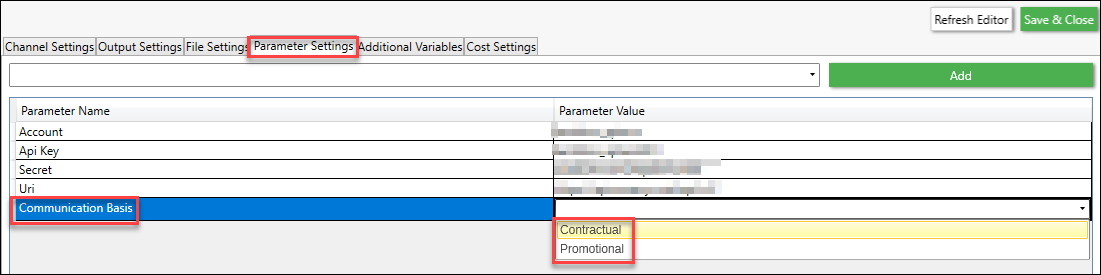
Implementation
Set the channel with the additional parameter of: CommunicationBasis=Contractual
Then, setup the external triggers in, link them to an email, and activate the email.
We then trigger the emails in batches of 1000 and record the email that was sent, although we don't gather responses.
We link to existing fields but you can also add in transactional fields (these are anything you don't have a main field for).
These can be referenced in the email as {{ event.global.<variable> }}
To apply this fix:
- Install the FastStats Configurator version 1.3.23114.80 contained within the WebService.zip file.
- Use the FastStats Configurator to upgrade the FastStats Service to version 1.3.23114.107.
-
Use the FastStats Configurator to upgrade the PeopleStage Binaries to version 1.0.23114.90.
Note
PeopleStage Local users need to install version 1.0.23114.90 or later, contained within the FastStatsLocal.zip file.
-
Update to version 1.0.23114.79, or later of the Email Response Gatherer, contained within the DigitalIntegration.zip.
Patch 18: Performance improvement for core system connections
13 December, 2023
Designer
We've fixed a performance issue in Designer that caused a delay when connecting to the core system. The delay, especially when working with DateTime variables, has been reduced by eliminating unnecessary code and description retrieval from the core system.
To apply this fix:
- Install FastStats Designer version 1.3.23114.65111 or later contained within the Designer.zip file.
Patch 17: Unable to join tables where the key fields have mapping applied in Designer
11 October, 2023
Designer
We've found and fixed a Designer bug causing a 'mis-join' between two tables, if the key fields have mapping applied. With this issue, mapping is only applied to the parent key (not to the child key), with the result that not all the matching records in the child table may join to the parent table.
This bug could occur for:
- All table types when using the enhanced build process
- MPL lookups when using the standard build process
To apply this fix:
- Install FastStats Designer version 1.3.23114.65109 or later, contained within the Designer.zip file.
Patch 16: WebP library security flaw in Apteco FastStats
4 October, 2023
FastStats Service FastStats
We have addressed and fixed a security concern related to Chromium in FastStats.
To mitigate the security flaw (CVE-2023-4863) in the WebP library, we have updated Chromium to version 116.0.230 within FastStats.
To apply this fix:
- Install the FastStats Configurator version 1.3.23114.74 or later contained within the WebService.zip file.
- Use the FastStats Configurator to upgrade the FastStats Service to version 1.3.23114.101 or later.
-
Use the FastStats Configurator to upgrade the FastStats Binaries to version 1.1.23114.62 or later.
Note
FastStats Local users need to install version 1.1.23114.62 or later, contained within the FastStatsLocal.zip file.
Patch 15: Meta API version 17
11 September, 2023
FastStats Service
We've updated Meta Facebook API from version 15 to version 17.
To apply this update:
- Install the FastStats Configurator version 1.3.23114.73 or later, contained within the WebService.zip file.
- Use the FastStats Configurator to upgrade the FastStats Service to version 1.3.23114.100 or later.
Patch 14: Crashes when running distributed processing
7 September, 2023
FastStats Service FastStats
We've found and fixed a code issue in response to crash dumps when running distributed processing, plus some fixes for crashes occurring on multi-threaded systems.
To apply this fix:
- Install the FastStats Configurator version 1.3.23114.73 contained within the WebService.zip file.
- Use the FastStats Configurator to upgrade the FastStats Service to version 1.3.23114.100.
-
Use the FastStats Configurator to upgrade the FastStats Binaries to version 1.1.23114.61.
Note
FastStats Local users need to install version 1.1.23114.61 or later, contained within the FastStatsLocal.zip file.
Patch 13: Unable to edit from-file virtual variables
18 August, 2023
FastStats Service FastStats
We've found and fixed an issue preventing the ability to edit from-file virtual variables created through the Import Data Wizard. Previously, a message appeared reading 'failed to launch the wizard'.
To apply this fix:
- Install the FastStats Configurator version 1.3.23114.68 or later, contained within the WebService.zip file.
- Use the FastStats Configurator to upgrade the FastStats Service to version 1.3.23114.94 or later.
-
Use the FastStats Configurator to upgrade the FastStats Binaries to version 1.1.23114.55 or later.
Note
FastStats Local users need to install version 1.1.23114.55 or later, contained within the FastStatsLocal.zip file.
Patch 12: Crash running FastStats Designer virtual package
11 August, 2023
FastStats Service FastStats Designer
We've found and fixed a query issue that can cause a crash when a list of variables is updated. Typically this results in a crash when running the FastStats Designer virtual package (in multi-threaded mode), but could also be responsible for crashes in the FastStats Service after virtual variables are refreshed.
To apply this fix:
- Install the FastStats Configurator version 1.3.23114.67 or later, contained within the WebService.zip file.
- Use the FastStats Configurator to upgrade the FastStats Service to version 1.3.23114.93 or later.
-
Use the FastStats Configurator to upgrade the FastStats Binaries to version 1.1.23114.53 or later.
Note
FastStats Local users need to install version 1.1.23114.53 or later, contained within the FastStatsLocal.zip file.
-
Install FastStats Designer version 1.3.23114.55241 or later contained within the Designer.zip file.
Patch 11: Folder refresh issue for data grid exports in FastStats
11 August, 2023
FastStats Service FastStats
We've found and fixed an issue preventing data grids from being refreshed via the File Explorer. Previously, you were required to close the specified folder, and then reopen it for a refresh to occur and the file to appear. The refresh now works as expected.
To apply this fix:
- Install the FastStats Configurator version 1.3.23114.67 or later, contained within the WebService.zip file.
- Use the FastStats Configurator to upgrade the FastStats Service to version 1.3.23114.93 or later.
-
Use the FastStats Configurator to upgrade the FastStats Binaries to version 1.1.23114.53 or later.
Note
FastStats Local users need to install version 1.1.23114.53 or later, contained within the FastStatsLocal.zip file.
Patch 10: Link shortening for dotdigital SMS provider
11 August, 2023
FastStats Service PeopleStage
We've added functionality for the dotdigital SMS provider by allowing link shortening for SMS messages. If you use the dotdigital integration for your SMS campaigns, links will shorten in SMS messages by default.
To get this functionality:
- Install the FastStats Configurator version 1.3.23114.67 or later, contained within the WebService.zip file.
- Use the FastStats Configurator to upgrade the FastStats Service to version 1.3.23114.93 or later.
-
Use the FastStats Configurator to upgrade the PeopleStage Binaries to version 1.0.23114.76 or later.
Note
PeopleStage Local users need to install version 1.0.23114.76 or later, contained within the PeopleStageLocal.zip file.
Patch 9: Can't purchase data and incorrect balance displayed via German or Dutch language in Orbit
28 July, 2023
Orbit
We've found and fixed a translation issue preventing data purchase via the Orbit export/browse tab on an existing audience with German or Dutch language. When purchasing, the load dialog was presenting an incorrect balance and displaying the following error message: There is not enough credit in the account to fulfil this order.
To apply this fix:
- If you have auto-update turned on for Orbit, then the patch will update automatically.
- If not, please refer to the software releases page on the Apteco portal to download the latest version of Orbit.
Patch 8: Reliability of virtual variable change detection on multi-server FastStats installs
28 July, 2023
FastStats Service FastStats
We've found and fixed an issue on multi-server FastStats installs where updates to virtual variables were not detected. This lead to failed requests after a variable is updated because not all the servers detect the change. The patch fix now ensures consistent change detection without the need for regular service restarts.
To apply this fix:
- Install the FastStats Configurator version 1.3.23114.63 or later, contained within the WebService.zip file.
- Use the FastStats Configurator to upgrade the FastStats Service to version 1.3.23114.87 or later.
-
Use the FastStats Configurator to upgrade the FastStats Launcher Binaries to version 1.1.23114.46 or later.
Note
FastStats Local users need to install version 1.1.23114.46 or later, contained within the FastStatsLocal.zip file.
Patch 7: Varcodes sync issue for virtual variables
28 July, 2023
FastStats Service FastStats
We've found and fixed an issue that prevented virtual variable varcodes from synchronising properly between FastStats and Orbit. When creating a selector virtual variable in FastStats to use in Orbit, the variable can be found. However, selecting the variable results in errors when trying to retrieve the list of categories. Orbit was not updating its internal representation of selector virtual variable categories from the details held in the FastStats Service in a timely fashion, but this has now been fixed.
To apply this fix:
- Install the FastStats Configurator version 1.3.23114.63 or later, contained within the WebService.zip file.
- Use the FastStats Configurator to upgrade the FastStats Service to version 1.3.23114.87 or later.
-
Use the FastStats Configurator to upgrade the FastStats Launcher Binaries to version 1.1.23114.46 or later.
Note
FastStats Local users need to install version 1.1.23114.46 or later, contained within the FastStatsLocal.zip file.
Patch 6: PeopleStage locale not set for export requests
28 July, 2023
FastStats Service PeopleStage
We've found and fixed an issue in PeopleStage where the locale was not being properly set for export requests. Now, instead of using a default locale for exports, PeopleStage ensures that the locale matches that of the server.
For more information, see Change FastStats Service Locale in the Technical Services Hub.
To apply this fix:
- Install the FastStats Configurator version 1.3.23114.63 or later, contained within the WebService.zip file.
- Use the FastStats Configurator to upgrade the FastStats Service to version 1.3.23114.87 or later.
-
Use the FastStats Configurator to upgrade the PeopleStage Binaries to version 1.0.23114.69 or later.
Note
PeopleStage Local users need to install version 1.0.23114.69 or later, contained within the PeopleStageLocal.zip file.
Patch 5: Exception deleting BULK INSERTED files after recording communications
28 July, 2023
FastStats Service PeopleStage
We've found and fixed an intermittent issue causing loss from PeopleStage journeys due to bulk insert issues during the postdeliveryflow process. We've now made improvements to the file deletion process and recommend turning off the SMB2 file redirect caches on the FastStats Service to remedy this issue.
To apply this fix:
- Install the FastStats Configurator version 1.3.23114.63 or later, contained within the WebService.zip file.
- Use the FastStats Configurator to upgrade the FastStats Service to version 1.3.23114.87 or later.
-
Use the FastStats Configurator to upgrade the PeopleStage Binaries to version 1.0.23114.69 or later.
Note
PeopleStage Local users need to install version 1.0.23114.69 or later, contained within the PeopleStageLocal.zip file.
Patch 4: Key mapping issue in FastStats Designer's Enhanced build mode
13 July, 2023
Designer
We've found and fixed an issue in FastStats Designer's Enhanced build mode where mapping on join keys was not supported. The problem arose when joining a lookup to a Postal Sector variable with a mapping to convert postcodes to a sort-formatted Postal Sectors. The lookup join was performed without applying the mapping causing an incorrect number of records to be joined.
To apply this fix:
- Install FastStats Designer version 1.3.23114.49781 or later, contained within the Designer.zip file.
Patch 3: Virtual variables could not be edited from a non-numeric expression
29 June, 2023
FastStats
We've found and fixed an issue where virtual variables could not be edited from a string expression. Previously, users encountered a problem when attempting to edit virtual variables through the Calculate Expression wizard if the expression was not numeric.
To apply this fix:
- Install the FastStats Configurator version 1.3.23114.59 or later, contained within the WebService.zip file.
-
Use the FastStats Configurator to upgrade the FastStats Binaries to version 1.1.23114.42 or later.
Note
FastStats Local users need to install version 1.1.23114.42 or later, contained within the FastStatsLocal.zip file.
Patch 2: User codes missing on audience exports in Orbit
16 June, 2023
Orbit
We've found and fixed an issue in Orbit where user codes were excluded from downloaded or exported files created by an audience export.
To apply this fix:
- If you have auto-update turned on for Orbit, then the patch will update automatically.
- If not, please refer to the software releases page on the Apteco portal to download the latest version of Orbit.
Patch 1: Expression parser error in FastStats when using Case functions that include an If function returning a date in the value section
16 June, 2023
FastStats
We have found and fixed an issue with the expression parser in FastStats concerning the DateShift function. The parser was unable to correctly interpret an expression containing a Case statement with a value part comprising an If function that returns a Date. Some valid expressions incorrectly displayed parser warnings such as 'Number, numeric function, numeric field or numeric expression expected'.
To apply this fix:
- Install the FastStats Configurator version 1.3.23114.58 or later, contained within the WebService.zip file.
-
Use the FastStats Configurator to upgrade the FastStats Binaries to version 1.1.23114.40 or later.
Note
FastStats Local users need to install version 1.1.23114.40 or later, contained within the FastStatsLocal.zip file.