Q3 2023 release
📅 Released: 29 September, 2023
| Apteco software | Build version numbers |
|---|---|
| Apteco FastStats Server | 5.8.5 |
| Apteco FastStats | 1.1.23213 |
| Apteco PeopleStage | 1.0.23213 |
| FastStats Designer | 1.3.23213 |
| Web Service | 1.0.23213 |
| FastStats Service | 1.3.23213 |
| Digital Integration | 1.0.23213 |
Info
For instructions on applying patches, see Applying patches.
Patch 25: Meta integration API upgrade
3 September, 2024
FastStats Service
We've upgraded our Meta integration from API version 18 to 20, providing improved validation handling to align with Meta's latest changes. Deprecated post insight metrics have been removed.
To apply this fix:
- Install the FastStats Configurator version 1.3.23213.101 or later contained within the WebService.zip file.
- Use the FastStats Configurator to upgrade the FastStats Service to version 1.3.23213.123 or later.
Patch 24: Limits issue
24 July, 2024
FastStats Service FastStats Designer
We've found and fixed an issue with the query component, where in rare situations we didn't fully clear the limit properties between queries. This could cause a query limit clause to be mistakenly applied to a subsequent query.
To apply this fix:
- Install the FastStats Configurator version 1.3.23213.100 or later contained within the WebService.zip file.
- Use the FastStats Configurator to upgrade the FastStats Service to version 1.3.23213.122 or later.
-
Use the FastStats Configurator to upgrade the FastStats Binaries to version 1.1.23213.48 or later.
Note
FastStats Local users need to install version 1.1.23213.48 or later, contained within the FastStatsLocal.zip file.
-
Install FastStats Designer version 1.3.23213.49 or later contained within the Designer.zip file.
Patch 23: Send Email To Task Owner - not sending
20 June, 2024
FastStats Service
We've found and fixed an issue preventing the 'Send Email To Task Owner' step from occurring when there is an error in the FTP step. For example, when creating and saving a data grid, then scheduling an output CSV, an email should be created and sent to the logged in user account. Previously this did not send if an FTP step error occurred during the process.
To apply this fix:
- Install the FastStats Configurator version 1.3.23213.99 or later contained within the WebService.zip file.
- Use the FastStats Configurator to upgrade the FastStats Service to version 1.3.23213.121 or later.
Patch 22: Apteco Email response gatherer subject/message name display
20 June, 2024
Digital Integration
We've found and fixed an issue occurring when we record responses from Apteco Email. We now correctly record responses against the specified message name, rather than the subject line used in the email builder.
To apply this fix:
- Install the FastStats Email Response Gatherer version 1.0.23213.47 or later contained within the DigitalIntegration.zip file.
Patch 21: Attribute processing in Designer
31 May, 2024
Designer
We've found and fixed an issue where attribute processing fails in Designer due to ASCII NUL characters in the generated scripts. Now, attribute processing scripts generate correctly without causing failures.
To apply this fix:
- Install FastStats Designer version 1.3.23213.46 or later contained within the Designer.zip file.
Patch 20: Launcher failure due to expired binary certificate
4 April, 2024
FastStats PeopleStage
We have identified and resolved a bug that caused Apteco software launchers to fail due to an expired binaries certificate. This bug was introduced in 2021 when the launcher was configured to check the code certificate's expiry date.
If you're using an application launcher based on versions of the Apteco software between Q2 2021 and Q4 2023 and this issue affects you, then you need to upgrade your launcher(s) to a newer version.
To apply this fix:
- Install the FastStats Configurator version 1.3.23213.95 or later contained within the WebService.zip file.
- Use the FastStats Configurator to upgrade the FastStats Binaries to version 1.1.23213.42 or later.
- If this issue also affects PeopleStage, use the FastStats Configurator to upgrade the PeopleStage Binaries to version 1.0.23213.120 or later.
Patch 19: FastStats Service crash
6 March, 2024
FastStats Service
We've found and fixed an intermittent bug causing the FastStats service to crash. This crash was occurring on startup or deployment when querying the LicenseUsage database table, which uploads licence usage information to the relevant servers.
To apply this fix:
- Install the FastStats Configurator version 1.3.23213.90 or later contained within the WebService.zip file.
- Use the FastStats Configurator to upgrade the FastStats Service to version 1.3.23213.108 or later.
Patch 18: Banding issue in FastStats modelling environment
6 March, 2024
FastStats Service FastStats
We've found and fixed an issue where users encountered difficulty changing bandings of standard numeric dimensions in the FastStats modelling environment. Despite attempting to customize bands, the changes were not retained. You can now successfully customise and retain your own bands in the modelling environment.
To apply this fix:
- Install the FastStats Configurator version 1.3.23213.90 or later contained within the WebService.zip file.
- Use the FastStats Configurator to upgrade the FastStats Service to version 1.3.23213.108 or later.
-
Use the FastStats Configurator to upgrade the FastStats Binaries to version 1.1.23213.30 or later.
Note
FastStats Local users need to install version 1.1.23213.30 or later, contained within the FastStatsLocal.zip file.
Patch 17: Add option to send transactional emails with Emarsys
11 January, 2024
FastStats Service PeopleStage Digital Integration
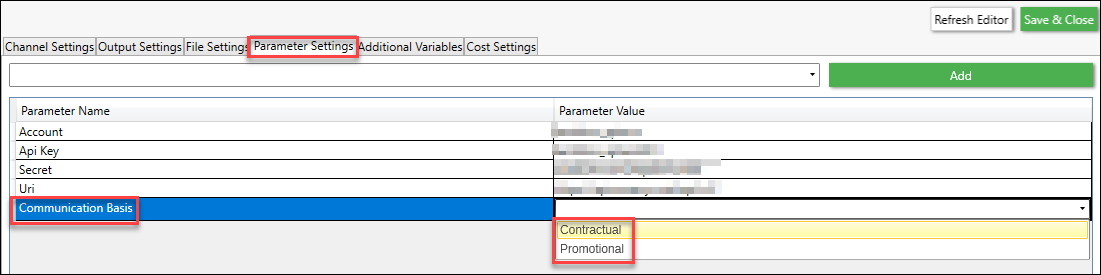
We've added the option to send transactional emails via the channel editor with Emarsys. This fix is mainly for contractual emails, as it does not use the normal opt-out process. Parameter settings in the Emarsys channel now have a parameter named 'Communication Basis'. From this parameter you can now select either 'Contractual' or 'Promotional'.
Implementation
Set the channel with the additional parameter of: CommunicationBasis=Contractual
Then, setup the external triggers in, link them to an email, and activate the email.
We then trigger the emails in batches of 1000 and record the email that was sent, although we don't gather responses.
We link to existing fields but you can also add in transactional fields (these are anything you don't have a main field for).
These can be referenced in the email as {{ event.global.<variable> }}
To apply this fix:
- Install the FastStats Configurator version 1.3.23114.80 contained within the WebService.zip file.
- Use the FastStats Configurator to upgrade the FastStats Service to version 1.3.23114.107.
-
Use the FastStats Configurator to upgrade the PeopleStage Binaries to version 1.0.23114.90.
Note
PeopleStage Local users need to install version 1.0.23114.90 or later, contained within the FastStatsLocal.zip file.
-
Update to version 1.0.23114.79, or later of the Email Response Gatherer, contained within the DigitalIntegration.zip.
Patch 16: Reports in PeopleStage
30 January, 2024
FastStats Service PeopleStage
Resolved an issue where reports utilising cached variable dimensions in PeopleStage were failing.
To apply this fix:
- Install the FastStats Configurator version 1.3.23213.86 contained within the WebService.zip file.
-
Use the FastStats Configurator to upgrade the PeopleStage Binaries to version 1.0.23213.99.
Note
PeopleStage Local users need to install version 1.0.23213.99 or later, contained within the PeopleStageLocal.zip file.
Patch 15: Unexpected change in access rights
19 January, 2024
FastStats Service FastStats
A pass through permissions issue for non-permission systems meant that users experienced altered access rights behaviour after a software upgrade. Users can now navigate the Public folder and access the Export subfolder without encountering File Explorer errors.
To apply this fix:
- Install the FastStats Configurator version 1.3.23213.85 contained within the WebService.zip file.
- Use the FastStats Configurator to upgrade the FastStats Service to version 1.3.23213.96.
-
Use the FastStats Configurator to upgrade the FastStats Binaries to version 1.1.23213.21 or later.
Note
FastStats Local users need to install version 1.1.23213.21 or later, contained within the FastStatsLocal.zip file.
Patch 14: PeopleStage errors on pre SQL Server 2014
18 January, 2024
FastStats Service PeopleStage
Resolved an issue where the PeopleStage job type PS_GETDASHBOARDINFORMATION encountered errors when running on versions of SQL Server before 2014. Users were experiencing an Unhandled Sql Exception with the message "Incorrect syntax near INDEX" due to the lack of support for inline INDEX creation in CREATE TABLE statements in older SQL Server versions.
To apply this fix:
- Install the FastStats Configurator version 1.3.23213.85 contained within the WebService.zip file.
- Use the FastStats Configurator to upgrade the FastStats Service to version 1.3.23213.96.
-
Use the FastStats Configurator to upgrade the PeopleStage Binaries to version 1.0.23213.98.
Note
PeopleStage Local users need to install version 1.0.23213.98 or later, contained within the PeopleStageLocal.zip file.
Patch 13: Campaign reactivation dependency in Apteco PeopleStage
18 January, 2024
FastStats Service PeopleStage
We have resolved the issue of being unable to reactivate a deactivated PeopleStage campaign when the campaign time window feature is not enabled.
To apply this fix:
- Install the FastStats Configurator version 1.3.23213.85 contained within the WebService.zip file.
- Use the FastStats Configurator to upgrade the FastStats Service to version 1.3.23213.96.
-
Use the FastStats Configurator to upgrade the PeopleStage Binaries to version 1.0.23213.98.
Note
PeopleStage Local users need to install version 1.0.23213.98 or later, contained within the PeopleStageLocal.zip file.
Patch 12: Thread culture changes between jobs log message
18 January, 2024
FastStats Service FastStats
We've found and fixed issue occurring when running job exports, changing thread culture, for example from UK to US format. A warning log diagnostic entry is now added if a thread culture changes between jobs exports. This helps identify jobs that are changing the current thread culture.
Note
This warning message only appears on faulty jobs that change the current thread culture.
To apply this fix:
- Install the FastStats Configurator version 1.3.23213.85 contained within the WebService.zip file.
- Use the FastStats Configurator to upgrade the FastStats Service to version 1.3.23213.96.
-
Use the FastStats Configurator to upgrade the FastStats Binaries to version 1.1.23213.21.
Note
FastStats Local users need to install version 1.1.23213.21 or later, contained within the FastStatsLocal.zip file.
Patch 11: Issue with fsIgnoreSearch functionality
13 December, 2023
FastStats Service FastStats
We've fixed an issue where fsIgnoreSearch hid folders from the FS file explorer.
To apply this fix:
- Install the FastStats Configurator version 1.3.23213.81 contained within the WebService.zip file.
- Use the FastStats Configurator to upgrade the FastStats Service to version 1.3.23213.91.
- Use the FastStats Configurator to upgrade the FastStats Binaries to version 1.1.23213.17.
Note
FastStats Local users need to install version 1.1.23213.17 or later, contained within the FastStatsLocal.zip file.
Patch 10: Performance improvement for core system connections
13 December, 2023
Designer
We've fixed a performance issue in Designer that caused a delay when connecting to the core system. The delay, especially when working with DateTime variables, has been reduced by eliminating unnecessary code and description retrieval from the core system.
To apply this fix:
- Install FastStats Designer version 1.3.23213.18 or later contained within the Designer.zip file.
Patch 9: CleverReach API attributes response
29 November, 2023
Digital Integration
We've updated the CleverReach API attributes response for group_id and groups_id.
To apply this update:
Patch 8: Improved Sparkpost response time
23 November, 2023
Digital Integration
We've improved the Sparkpost throttle time between paged requests from two minutes to one second response time by default, with a parameter now in place in the drop down menu to apply this change.
To apply this fix:
- Update to version 1.0.23213.11, or later of the Email Response Gatherer, contained within the DigitalIntegration.zip.
Patch 7: Query component crash
22 November, 2023
FastStats Service FastStats Designer
We've found and fixed a bug that can cause a crash in the FastStats query component, affecting FastStats Designer and the FastStats Service.
To apply this fix:
- Install the FastStats Configurator version 1.3.23213.76 or later, contained within the WebService.zip file.
- Use the FastStats Configurator to upgrade the FastStats Service to version 1.3.23213.86 or later.
-
Use the FastStats Configurator to upgrade the FastStats Binaries to version 1.1.23213.11 or later.
Note
FastStats Local users need to install version 1.1.23213.11 or later, contained within the FastStatsLocal.zip file.
-
Install FastStats Designer version 1.3.23213.12 or later contained within the Designer.zip file.
Patch 6: Improved handling of MailJet with Multiple Email Fields
15 November, 2023
Digital Integration
We've resolved a bug related to MailJet, which led to confusion when dealing with datasets containing multiple fields that hold email addresses. The import process now consistently prioritises the email address field, resolving any potential confusion and enhancing the reliability of email handling within MailJet.
To apply this fix:
- Install the FastStats Email Response Gatherer version 1.0.23213.8 or later, contained within the DigitalIntegration.zip file.
Patch 5: Enhanced Listname handling for MailJet
15 November, 2023
Digital Integration
We've made an improvement to MailJet to address a limitation where listnames were restricted to 60 characters, resulting in errors when exceeding this limit. Listnames are now automatically truncated to ensure they remain within the 60-character limit, preventing any errors related to listname length.
To apply this fix:
- Install the FastStats Email Response Gatherer version 1.0.23213.8 or later, contained within the DigitalIntegration.zip file.
Patch 4: Upload issue for all broadcast types in MailJet
15 November, 2023
Digital Integration
We've resolved an issue where the upload function was not working for all broadcast types in AptecoEmail.
To apply this fix:
- Install the FastStats Email Response Gatherer version 1.0.23213.8 or later, contained within the DigitalIntegration.zip file.
Patch 3: MailJet response retrieval
1 November, 2023
Digital Integration
We've addressed an issue preventing Mailjet responses from being received for subsequent data pulls when using the Execution setting to specify the start date.
To apply this fix:
- Install the FastStats Email Response Gatherer version 1.0.23213.7 or later, contained within the DigitalIntegration.zip file.
Patch 2: Unable to join tables where the key fields have mapping applied in Designer
11 October, 2023
Designer
We've found and fixed a Designer bug causing a 'mis-join' between two tables, if the key fields have mapping applied. With this issue, mapping is only applied to the parent key (not to the child key), with the result that not all the matching records in the child table may join to the parent table.
This bug could occur for:
- All table types when using the enhanced build process
- MPL lookups when using the standard build process
To apply this fix:
- Install FastStats Designer version 1.3.23213.6 or later, contained within the Designer.zip file.
Patch 1: Embedded expressions issue in Apteco PeopleStage
4 October, 2023
FastStats Service
We have found and fixed an issue that prevented the use of embedded expressions with paths as audiences in PeopleStage.
To apply this fix:
- Install the FastStats Configurator version 1.3.23213.67 or later contained within the WebService.zip file.
- Use the FastStats Configurator to upgrade the FastStats Service to version 1.3.23213.77 or later.