Apteco architecture overview
Most personal data processed in Apteco software is created and managed externally. Cascade and PeopleStage create new personal data. The following diagram shows an overview of how data flows through the Apteco software.
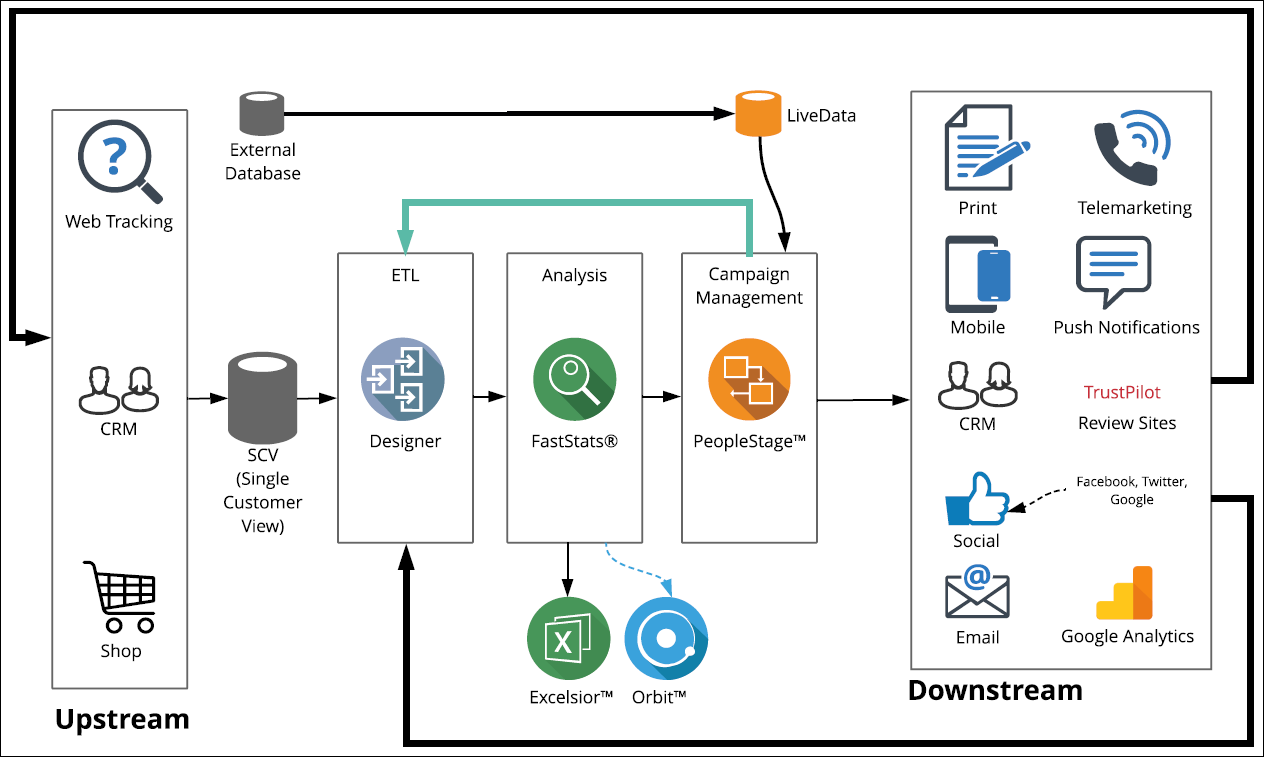
Apteco databases
Apteco software consists of the following databases:
| Database | Description |
|---|---|
| FastStats | The FastStats database contains the data built from the upstream systems; the data is a read-only non-permanent mirror of the SCV, often rebuilt daily. |
| PeopleStage / Smoke Test / Archive | PeopleStage databases can hold active and historic campaign information related to given individuals. PeopleStage creates limited new information, e.g. content history. Smoke Test is only populated when you are testing a campaign. The Archive database contains a snapshot of the PeopleStage database; the handling of archived data should be part of your data retention policy. |
| Cascade | The Cascade database stores URNs in the Communications table, together with the relevant campaign dates. |
| Response | The Response database tables: Broadcasts—stores the email address of a user to be notified after a successful broadcast. Response table—the email address and URN of the responder. ResponseDetails—can include personal data depending on the broadcaster or configuration. |
| LiveData | No personal data. |
| Orbit | The Orbit database tables: CollectionHits—Username or email address. Collections—Username or email address. CollectionShareUpdates—Username or email address. CollectionShareUpdatesUsers—Username or email address. UserCollectionSettings—Username. |
| The Facebook database tables: User—FacebookAppScopedUId, FirstName, LastName, Name. | |
| The Twitter database tables: User—TwitterUId, ScreenName, Name, Location, Description. | |
| No personal data. | |
| Push Notifications | No personal data. |