Supporting GDPR in your system
Before you begin—about versions
Are you using version Q1 2018 or later? This version includes the GDPR administration tool in PeopleStage. Anything earlier than this can be managed using SQL scripts—see Appendix A: GDPR SQL scripts.
If you're not using Cascade, PeopleStage, or the Response database, there is no need to do anything within the Apteco software.
Apteco and integrations
Apteco software has built-in functions to remove personal data. These functions do not apply to copies of data uploaded to downstream channels such as:
- Email broadcasting
- SMS messaging
- Social media platforms
- CRM systems
- Mobile push notifications
- Customer review platforms
- Programming languages
In each case, functions offered by the channel provider will need to be used to remove personal data from those systems.
Support a data subject's right to be forgotten
Article 17—Right to erasure: The upstream systems are responsible for the management of personal data and whether to include it in the data processed by FastStats. If a data subject asks you to remove their information and the data is removed from these source systems, that person is effectively removed from FastStats the next time the FastStats system reloads (typically daily).
GDPR Administration Tool
Some information that Apteco software creates is attached to an identifiable person—for example, campaigning activity in PeopleStage and responses gathered from email broadcasters. The GDPR Administration Tool in PeopleStage provides functions to manage this data.
The functions enable you to count, anonymise, or remove all instances of personal data related to a specified individual where PeopleStage or the Response databases hold the master copy.
First, add the GDPR Administration role to a user:
-
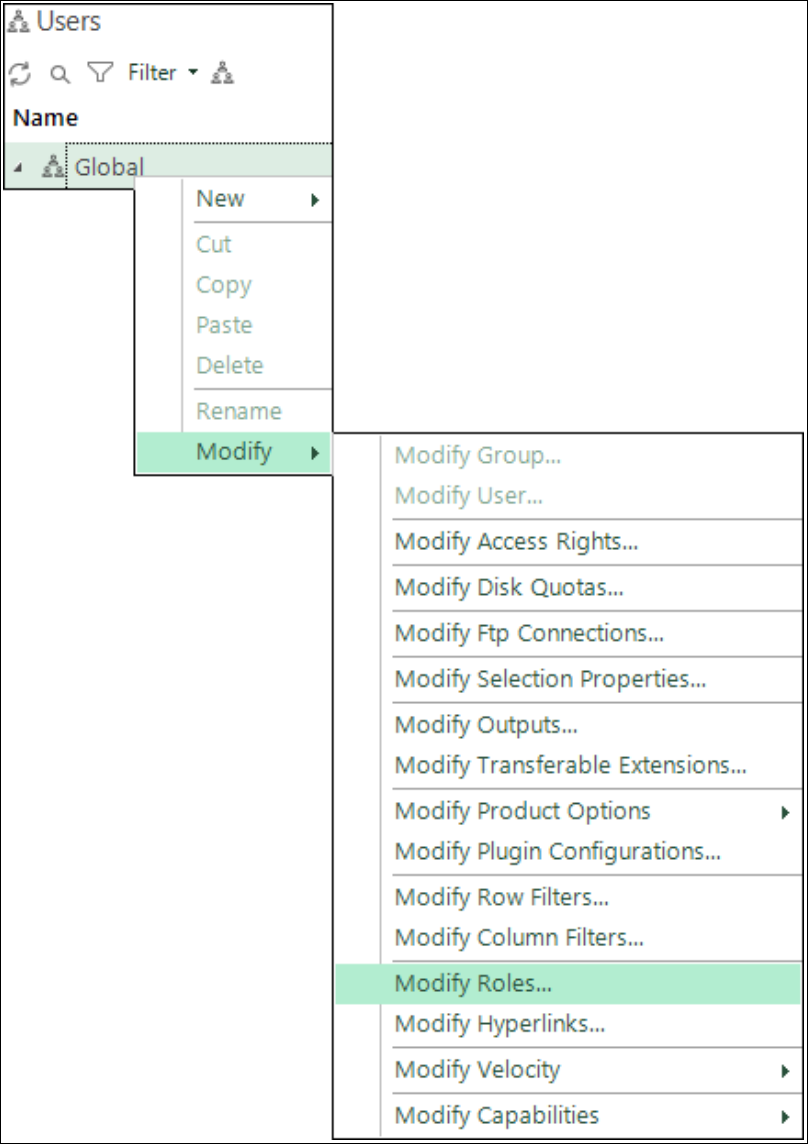
In FastStats, right-click on a user node and select Modify > Modify Roles.
-
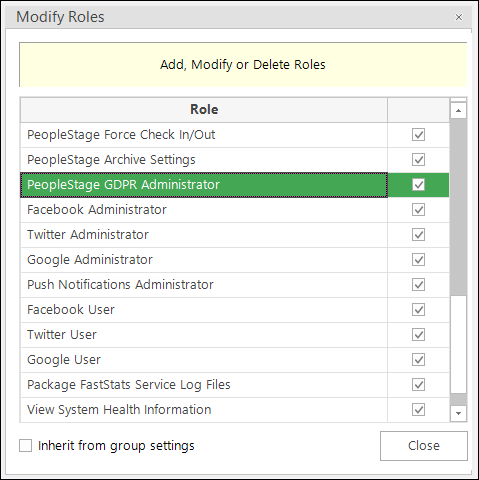
Select the PeopleStage GDPR Administrator check box.
The GDPR Administration Tool is available from the PeopleStage Administration menu. The dialogue provides strong data subject removal functions—you can choose to anonymise the data in place or remove all data.
Note
For a full description of how to use the tool, see the PeopleStage GDPR Administration Tool knowledgebase article.
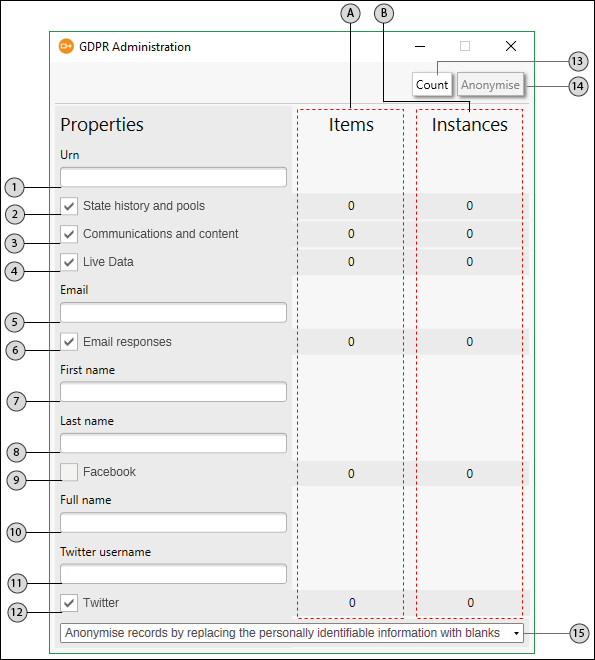
- A—Items: The number of records associated with the URN.
- B—Instances: For example, one email record may have 40 messages.
| Item | Label | How it is used |
|---|---|---|
| 1 | URN | Enter the Unique Reference Number (URN) for the data subject |
| 2 | State history and pools | Data tracking where an individual has passed through a campaign and where they currently are in a pool. Select to replace with blanks (Anonymise) or delete (Remove) all data for the selected URN |
| 3 | Communications and content | Instances of data in the PeopleStage communication history, including content variations and attribute values |
| 4 | Live Data | Data retained by PeopleStage from external live data sources. When selected, the internal copy is removed (does not cleanse data from the external live data sources) |
| 5 | Enter the relevant email address | |
| 6 | Email responses | Select to anonymise or remove data from the Email response database for the selected URN |
| 7 | First name | Enter the Facebook first name (used to identify the data subject in the Facebook response database) |
| 8 | Last name | Enter the Facebook last name |
| 9 | Select to anonymise or remove data from the Facebook database for the selected URN | |
| 10 | Full name | Enter the Twitter full name |
| 11 | Twitter username | Enter the Twitter username |
| 12 | Select to anonymise or remove data from the Twitter database | |
| 13 | Count | Perform a count of the selected items |
| 14 | Process | Anonymise or remove the selected data |
| 15 | Anonymise or Remove | Anonymise: replace personally identifiable information with blanks. Remove: delete all records from the database, including reference numbers |
GDPR SQL scripts
If you are running a version earlier than Q1 2018, use the SQL scripts described in Appendix A: GDPR SQL scripts. They are essentially in pairs—one to provide a count and one to execute the script:
- Cascade Remove Count / Execute—communications records in the Cascade database
- Facebook Anonymise Count / Execute—Facebook users and attributes
- Facebook Remove Count / Execute—Facebook users and attributes (full delete)
- PeopleStage Remove Count / Execute—communications, tracking history, email responses, and live data
- Twitter Anonymise Count / Execute—Twitter user table records
- Twitter Remove Count / Execute—Twitter user table records (full delete)
Support a data subject's right to access
Article 15—Right to access: Any data subject can, at any time, request that you provide all the personal data you have about them in a common, easily understood format. The information you must supply includes:
- Confirmation that you are processing their data
- What information you hold on the data subject and how you are using it
- Other supplementary information (mostly the information provided in your privacy notice)
Data grids
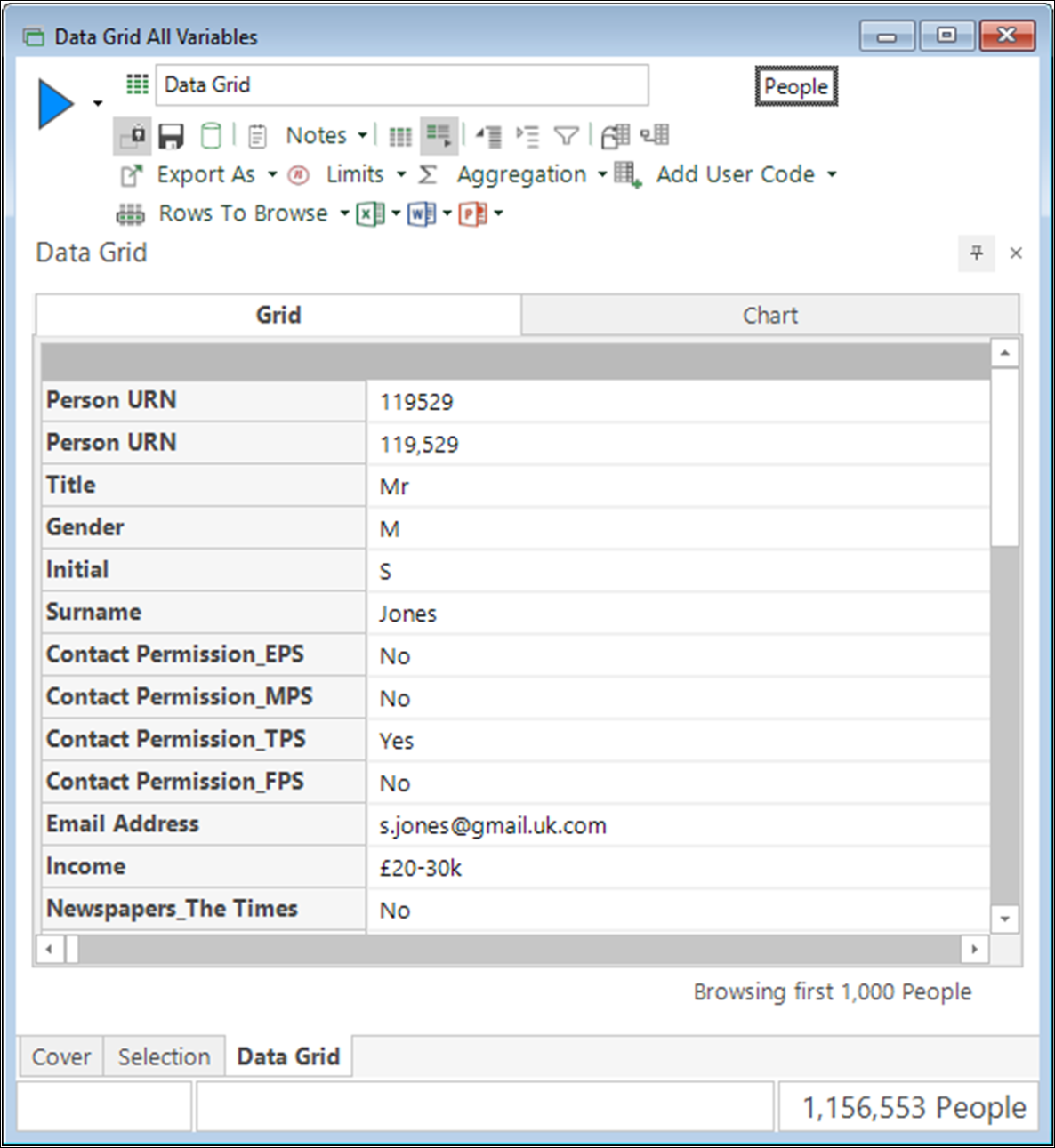
FastStats data grids provide a means to search for and identify personal data currently held:
- Limit the selection to the URN.
- Add all the variables to a data grid.
-
Click the Browse page view icon.
Why was I selected? function
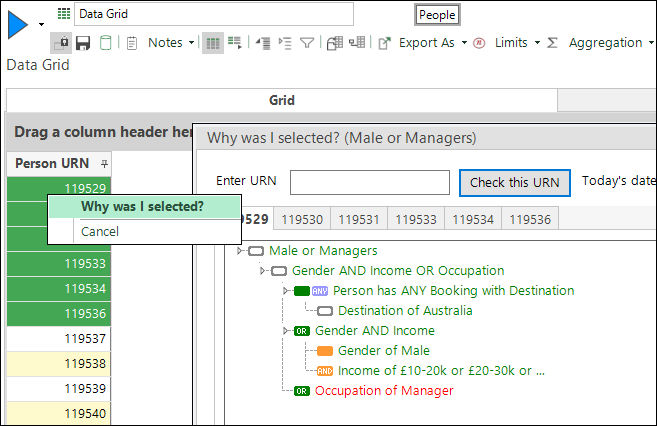
The Why was I selected? function can be used to determine why a certain type of person was selected. Right-click on a record in the data grid to see the menu option. Conditions marked in green are True; conditions marked in red are False for the selected person.
Note
See the Data Grid: Enhanced Why Was I Selected knowledgebase article for more information.
Support a data subject's right to portability
Article 20—Right to portability: There are no clear guidelines on how to perform this and it may not be possible to transfer data to another organisation due to the specificity of the data.
Copies can be sent to the data subject using a data grid (see above) and exporting a CSV file using a zipped, password-protected export from FastStats.
Data transfer to another organisation could use the same process or an alternate secure method of data transfer.