Finding your way around
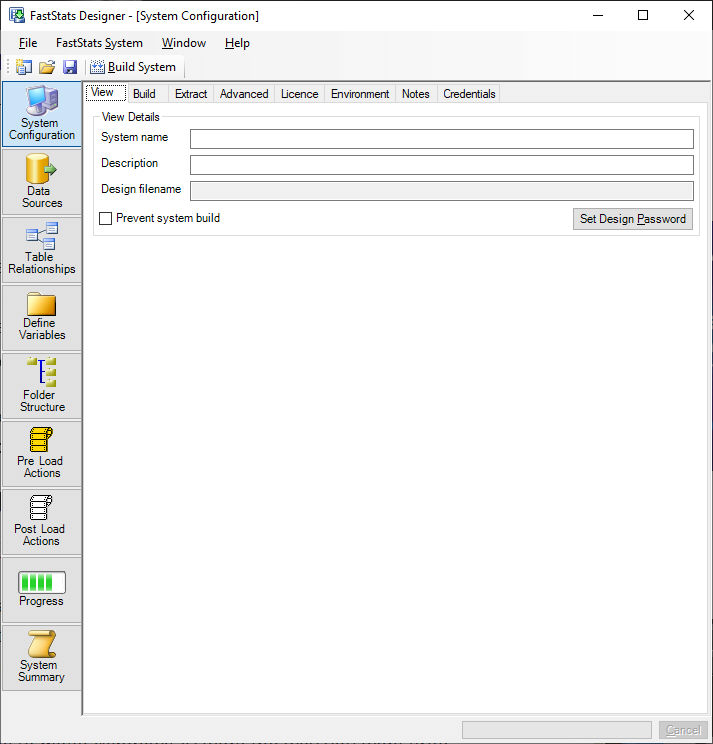
FastStats Designer uses 8 main windows to enable you to manage and edit the current FastStats design.
Main windows
- System Configuration specifies properties and preferences for FastStats Designer and the target FastStats system.
- Data Sources identifies the source data to be included in the FastStats build by connecting to database tables, views and files.
- Table Relationships are defined by dragging data sources into tables in the FastStats design and specifying the joins.
- Define Variables is used to edit properties of variables to be included in the target FastStats system.
- Folder Structure is used to define the default folder structure for users.
- Pre-Load Actions specified actions (such as batch files) to be run before a build.
- Post-Load Actions specified actions (such as deployment or scripts) to be run after a build.
- Progress shows a filterable log of the current build process.
- System Summary is used to view comprehensive information derived from the completed FastStats system including variable code frequencies, load and join statistics.
These windows open automatically and can be accessed by clicking the large button tab bar. The windows can be re-sized, minimised, tiled and cascaded (using the Window menu) to suit your working preferences.
If you have FastStats installed you can choose Open System in FastStats from the FastStats System menu.