Lookup relationships
The Table Relationships Panel can also be used to define lookup relationships between tables.
Note
Simple code-description lookups (e.g. product code to product description) are specified in Define Variables (see Decodes). In FastStats terms Lookup Tables are only required when multiple fields are required to be linked into the FastStats database.
Lookup relationships are often used as part of the flattening (de-normalisation) of database structures into the natural entities that are sensible for presentation to marketing analysts.
FastStats Designer supports various types of lookups. For example, it is possible to lookup the details of a product on a transaction record and retrieve the supplier, cost, margin etc. fields that can then be made available for analysis.
FastStats query performance benefits from the lookup because unlike a relational database, it does not need to make a join to another table to retrieve the lookup data, it is pre-retrieved at the time the data is loaded.
Define a lookup relationship
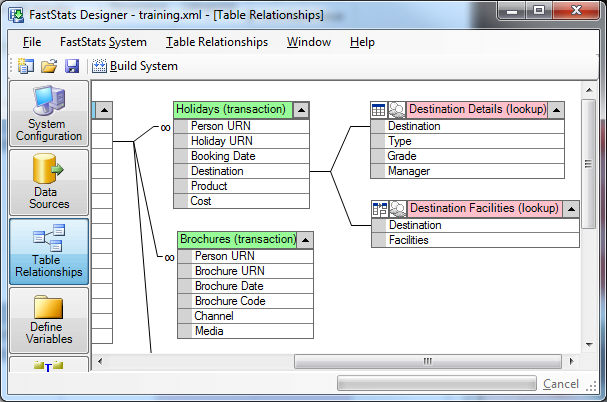
To create a lookup, right click on the relationship and choose Change to lookup relationship. Note that the infinity symbol is removed from the relationship line as the cardinality of the lookup relationship is no longer known (it could be that many records will lookup the same record, that the records will lookup one to one or that there are many matched records in the lookup table for each source record).
In this example the Destinations table has been defined as a lookup onto the Destination field in the Bookings table. The data from the lookup table can be considered as appended to the parent table (in this case Bookings). Each successful lookup will retrieve a whole lookup record (in this case a Destination). Unsuccessful lookups will return a blank record.
Transformation lookups
Once a lookup relationship has been defined, it can be changed to perform data flattening of several records into one. This is relevant in situations in which a small number of records from a lookup table need to be retrieved into a multi-valued FastStats variable i.e. into an array variable or flag array (bit array) variable.
For example, a data source may have a households table and a cars table in which the cars owned by each household are recorded. It would be possible to represent both tables in FastStats, but it is more elegant to represent the cars in an array variable presented as an attribute of the household. By using a multi row lookup, FastStats is able to retrieve a number of car makes from the cars table and flatten this information into a cars array variable on the household table. The FastStats user is then able to query for households that do (or do not) have particular cars simply by reference to the array variable rather than by using another table.
Array variables and Bit Array variables give a convenient representation to end users.
Define multiple record lookup relationship
First define a Lookup Relationship.
To amend the behaviour of the lookup, right click on the lookup table and choose Transform properties. You are then able to specify whether you wish to retrieve up to ten instances of a variable into an array or generate a flag array.
One Whole Record specifies a basic lookup returning one matching record (as in the Booking-Destination example). This is effectively the same as adding the extra columns onto the source of the parent table.
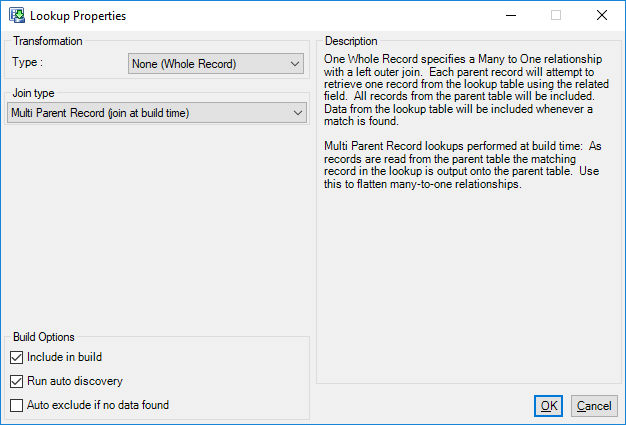
Array of one field from many records specifies a flattening of a maximum of 100 records into an array. For example creating a cars owned array against on a household record.
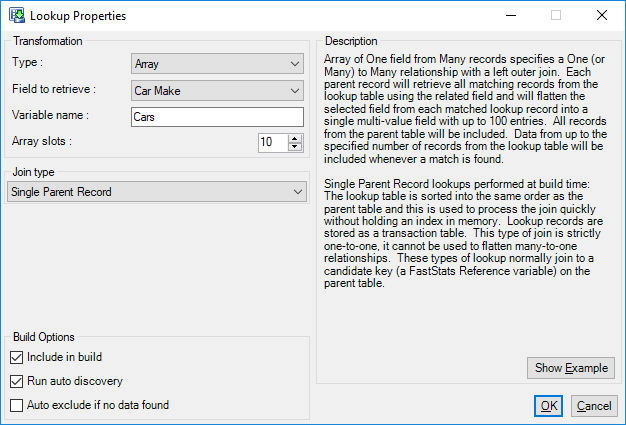
Consider the following table:
| Person URN | Car Make |
|---|---|
| 1 | Ford |
| 2 | Jaguar |
| 3 | Honda |
| 3 | BMW |
| 3 | Vauxhall |
| 4 | Ford |
| 4 | Honda |
| 5 | Vauxhall |
| 5 | Ford |
This an Array transformation will turn this into the following array variable:
| Person URN | Make 1 | Make 2 | Make 3 |
|---|---|---|---|
| 1 | Ford | ||
| 2 | Jaguar | ||
| 3 | Honda | BMW | Vauxhall |
| 4 | Ford | Honda | |
| 5 | Vauxhall | Ford |
Flag Array of one field from many records specifies a flattening of a maximum of 1600 unique records into a flag array. For example creating a products owned array against on a person record.
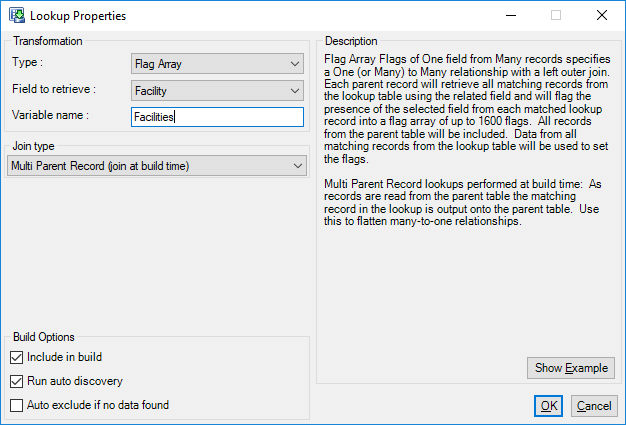
With the same input table above then the resulting Flag Array will look like this:
| Person URN | Ford | Jaguar | Honda | BMW | Vauxhall |
|---|---|---|---|---|---|
| 1 | Yes | No | No | No | No |
| 2 | No | Yes | No | No | No |
| 3 | No | No | Yes | Yes | Yes |
| 4 | Yes | No | Yes | No | No |
| 5 | Yes | No | No | No | Yes |
Lookup join types
FastStats Designer supports 4 different join types for lookup tables:
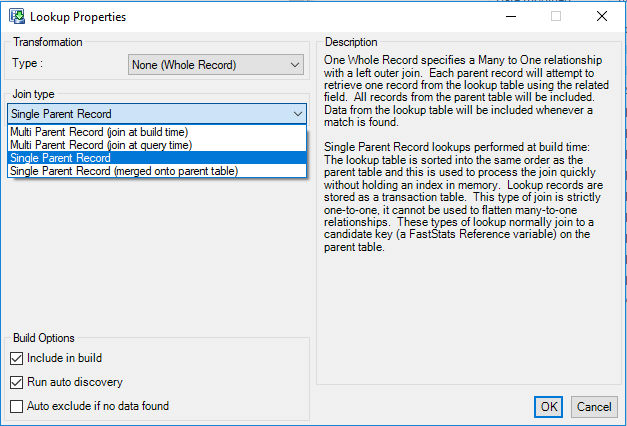
Multi parent record (join at build time)
Join at Build Time is the traditional way FastStats has handled multi parent lookups. An index is created at build time and as the parent table is read the relevant row is found in the lookup table and output as a record on the parent table. This works well if the lookup table is narrow (a few Selector columns) but can be inefficient if the lookup is wide.
Multi parent record (join at query time)
Join at Query Time is an alternative way of processing multi-parent lookup tables. At build time a 32 bit integer key is added to the parent table and this provides the row number of the lookup table. The data is retrieved from the lookup at query time. This can reduce the disk space required if the lookup table is wide. A typical use of this join strategy would be to link a wide Product Details lookup to an Order Line table.
Lookup tables loaded in this manner cannot have any more than 8.3m rows (8 * 1024 * 1024). If they do then FastStats Designer use the Join at Build Time strategy to load this lookup.
Single parent record lookups
Single Parent Record indicates that only each lookup row is only retrieved once. This knowledge enables FastStats to use a sorting strategy rather than index strategy which can increase load performance.
Single parent record lookup (SPL) examples
In the Booking-Destination example the same Destination details are retrieved many times for each matching booking. Therefore records in the Destination table have multiple parent records (Single Parent Record should be unchecked).
A good clue that a lookup should be marked as a SPL is if the key on the lookup table joins to a reference field on the parent table. Assuming there are no duplicate references (if you have duplicate references you will be warned of this at the end of the build).
How do I test to see if my source data is suitable for a single parent record lookup?
If your input data is in a database you can use a SQL query similar to this example to check that the lookup records are only matched once.
SELECT MAX(matched_rows) FROM
( SELECT COUNT(p.URN) matched_rows FROM People p,PeopleDetails pd WHERE p.URN = pd.URN GROUP BY p.URN ) matched_rows
This query will return the maximum number of matching records between People and PeopleDetails - if this result is 1 then the PeopleDetails table is suitable to be marked as a SPL. If it is greater than 1 then it must be a normal lookup.
In some cases FastStats Designer will be able to detect if a MPL lookup could be a SPL lookup. In this case you may see the following entry in the build log:
"Only single matches detected on lookup so this table could be implemented as single parent lookup"
Single parent record lookup types
Single Parent Record Lookups can be loaded in one of two ways:
-
Single Parent Record
This uses a sort strategy to perform the join and builds the data into a transaction table. At query time the appropriate record is loaded from the transaction table. This means that if the lookup does not match to all the records in the parent table then it will take less space.
-
Single Parent Record (merged onto parent table)
This uses a sort strategy to perform the join and builds the data onto the parent table (like an MPL at build time does). This can result in improved query performance for queries that involve the lookup fields but can waste a large amount of disk space if the lookup is sparsely populated.
Summary
| Lookup Type | Advantages | Disadvantages |
|---|---|---|
| MPL (join at build time) | Saves space if table is narrow (<40 bits wide). Less memory required at query time. | Wide lookups can waste space and take longer to build. |
| MPL (join at query time) | Saves space and build time if lookup records are wide. | May require 64 bit Designer and 64 bit Service to allocate enough memory to hold them. Limited to 10M rows. |
| SPL | Saves space if table is sparse. | Possible reduction in query performance. |
| SPL (merged onto parent table) | Maintains query performance and saves space if lookup is fully populated. | Wastes space and can be slower if table is sparsely populated. |