Language options
You can change the interface language for Orbit.
Only the interface, menus, and labels are changed, the FastStats system data is not affected.
Supported languages include:
- Australia
- Canada
- Canada (Français)
- Deutsch
- Nederlands
- United Kingdom
- United States
Switching language
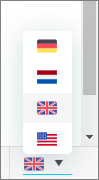
You can change the interface language at the login page or from the bottom right of the interface.
-
Select from the Switch language drop down menu
Other language options
You can set the default interface language for Orbit.
Orbit communicates using email to send a shared item, administrators can switch to a custom set of email templates.
Note
You can create your own set of translated custom email templates
See Email Templates.