Designer release notes 2024
Q4 2024
4 December, 2024
Improved Enhanced data builder sort parallelism
The data builder sort consists of 3 phases:
- Load parent keys
- Sort into chunks
- Merge chunks
Phase two shouldn’t be run in parallel with other processes, but phases one and three can be run in parallel.
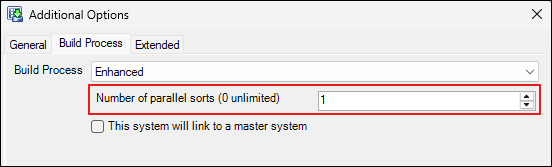
To control this new configuration, we’ve made updates to the Additional Options area of the Enhanced build process.
Improved Optimise virtual package process
We’ve optimised the virtual package process, which now only includes the relevant variables when specified by 'folder’. Previously, all variables would be transferred from the FastStats Service to FastStats Designer, even if only a subset of variables are refreshed. This optimisation now passes the list of folders to the FastStats Service to only package the required variables.
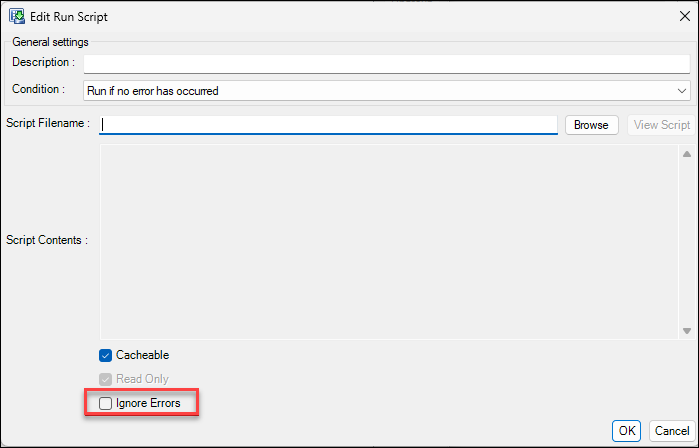
New Add 'ignore errors' for post-load action run script action
Designer now has an option to ignore errors for post load run-script actions.
Bug fixes
Paging file too small for operation to complete
We’ve fixed an error that occurred when the enhanced build process tried to load a large number of parent keys. This error, stating ‘The paging file is too small for this operation to complete.’, no longer occurs.
Delimited array variable causes failure if code size too small
If you set the code size to zero, then the Designer delimited array variable auto-detects code size. If you have a longer code in the data, then Designer no longer generates a failure error.
If you didn’t set the code size to zero, then the Designer delimited array variable wouldn’t extend the code size if longer data was detected, causing truncated codes.
Multi-line custom query does not display over multiple lines
Previously, when you added a data source with a custom query with multiple lines, then saved and reopened the design, everything was compressed onto a single line. Multi-line custom queries now display over multiple lines, as expected.
Virtual variable dependency not detected
The virtual variable dependency checker didn’t check the following tags for variables:
- InfoVariable
- GroupingVariable
- CustomValueVariable
- GroupingSequenceVariable
This could lead to missing dependencies and to failures refreshing variables using FastStats Designer Virtual Package.
Invalid relationships don’t prevent build
Designer no longer allows you to build a system with an invalid relationship.
7-zip build deployment character omission
When using 7-zip to build a deployment file, the first character is no longer stripped off filenames if your path contains a double \ slash.
Q3 parallel sort option causes hang on linked systems
Previously, if you increased the number of parallel sorts to >1 for a linked system build, then Designer would hang when it got to the build sort phase.
Q3 2024
11 September, 2024
New Specify compressed text block size
You can now specify the block size for compressed text in the Advanced tab in Designer. This update allows you to choose a block size larger than 32,000, reducing the size of compressed .dat files and decreasing I/O calls. This improves performance, particularly on systems with high latency and is also integrated into the Enhanced build process.
New Salesforce access token reuse
Designer now stores Salesforce access tokens and only refreshes them when necessary. This prevents extract failures due to API limits being hit, improving reliability when building from Salesforce data sources.
Improved Auto-generated unclassified codes
You can now customise how unclassified codes are auto-generated in Designer. Choose the character to represent unclassified values (default is !) and specify whether to right-pad or left-pad the character. This applies to both Selector and Array variables.
Improved Mitigated a Snowflake ADO.NET provider bug
Designer now automatically mitigates a known bug in the Snowflake ADO.NET provider that treats field names as case-sensitive. This eliminates the need for a manual workaround when using Snowflake as a data source.
Improved Parallel refresh cache post-load actions
You can now speed up the Refresh Cache post-load action by specifying the number of threads to use. On machines with multiple processors, this allows the task to run in parallel, significantly reducing the time required to rebuild cache entries.
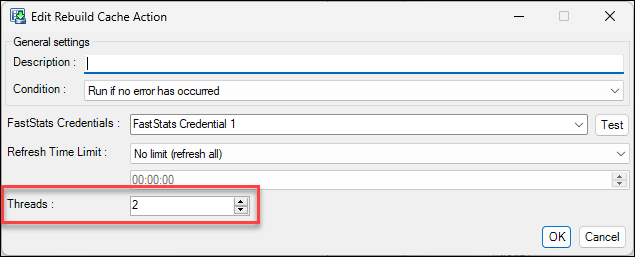
Set the thread count to 1 for sequential processing or 2 and above to enable parallel processing.
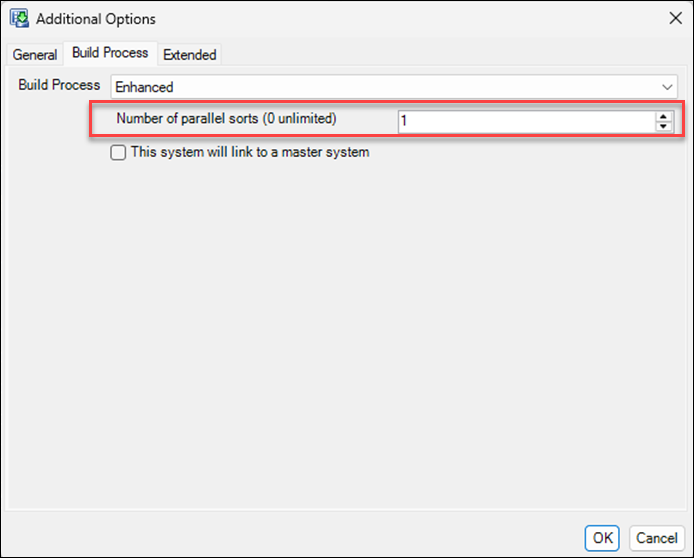
New Parallel sort option
A new Parallel Sort option is now in place, allowing the sorting of sibling tables in parallel. This runs the sequential parts of the sorts (loading keys, merging) in parallel. FastStats System administrators can try increasing the number of parallel sorts from the default of 1 to 2 or 3 to see if their builds run faster:
Improved Speed creating partial indexes
We found and fixed an inefficiency running the post-load actions to create the partial indexes. Depending on the number and size of partial indexes a system then this could save some build time.
Bug fixes
- Designer now correctly handles lookups on systems with tables larger than 4.3 billion records. A new file format for Selector
.valfiles ensures accurate counts, converting to 64-bit only when necessary. - Text variables in Designer now correctly follow the AutoDetectWidth setting, allowing data truncation when specified.
- Designer now disallows Auto key types in linked relationships, preventing join failures and errors during the build. Linked designs will now fail verification and log a warning if Auto key type is used.
- Designer now correctly handles joins to child tables that include aliases of the key field.
- Designer now correctly processes attributes without inserting
ASCII NULcharacters in the generated scripts, preventing script failures. - We’ve fixed a logging issue in the Web Service when memory consumption exceeds 2GB. The
PrivateMemoryandHeapSizecolumns now support larger values, and the Configuration Log Viewer has been updated to handle this. - Log messages for the Strip Characters pre-load action now display correctly.
- Salesforce trial systems will now use the Salesforce company currency local as the default for currency variables.
- Designer now correctly displays non-standard connection strings in the edit window.
- We fixed a bug causing slow service start-up when you have combine category variables with a large number of categories.
Q2 2024
17 May, 2024
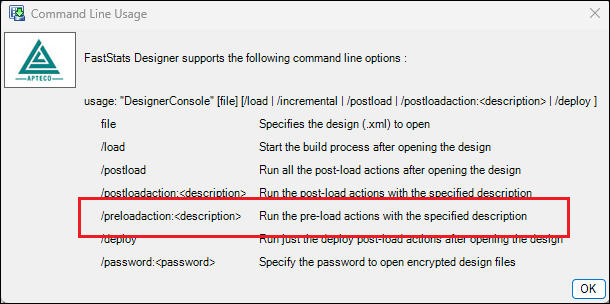
New Command line option to run pre-load actions
You can now run specific pre-load actions from the command line in Designer by specifying their description.
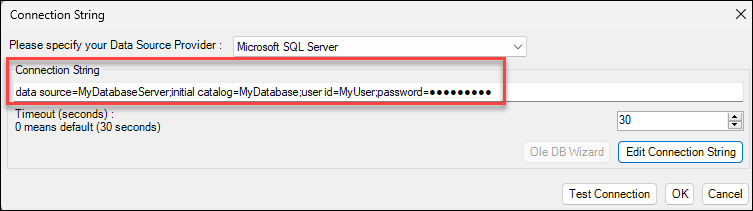
New Password detail masking
Password details are no longer exposed when editing connection strings within Designer.
Improved Store system load date as UTC in table metadata
The system load date is now stored into the table meta-data as UTC so that Orbit can present the load date in the users time zone.
Feature errata (10 July 2024)
Designer can now specify a maximum of 4,000,000 selector codes, up from the previous 200,000 maximum.
Bug fixes
- We've found and fixed an issue that prevents date description formats without punctuation (e.g. ddmmyyyy). Date description formats are now allowed with or without punctuation.
- We’ve fixed a couple of issues in the ‘merge design’ functionality. Database credentials are now correctly merged and the enabled state for pre and post-load actions are now also correctly merged.
- We’ve fixed an Incremental Extract DateTime Min/Max issue. This can cause all records to appear in the unclassified category when using cube year bandings.
- Designs with tables not included in the relationship diagram no longer present them in the folder structure editor.
- The ‘Run Script’ post load action now expands environment variables used in the script path.
- You can now build a core and linked system without causing Designer to crash.
Q1 2024
21 March, 2024
Improved Bulk Copy Program
FastStats Designer now supports a modern Bulk Copy Program (BCP) library. Added support for the Microsoft Open Database Connectivity (ODBC) Driver for SQL Server (versions 17 & 18). This update allows you to use current libraries for BCP extracts within Designer, removing requirement for the legacy SQL Server Native Client v11.
Improved Larger table capacity in Enhanced Build Process
The Enhanced Build Process now supports building tables with up to 33 billion records, an extension from the previous limit of 4.1 billion records. This modification enables the Enhanced Data Builder to process larger structures, specifically for systems containing over 4.2 billion records. The FastStats System file format has been updated to accommodate this increased limit.
Note
Systems with tables exceeding 4.2 billion records are not backwards compatible with older versions of FastStats due to the file format change.
We’ve added support for additional join key types in the Enhanced Build Process, specifically GUID and Int64. Previously, only 32-bit integer keys and 80-byte text keys were supported for table joins. This inclusion of 64-bit integer keys and GUID keys enhances join efficiency, as joining these key types as text was inefficient.
Improved Additional join key support
We’ve added support for additional join key types in the Enhanced Build Process, specifically GUID and Int64. Previously, only 32-bit integer keys and 80-byte text keys were supported for table joins. This inclusion of 64-bit integer keys and GUID keys enhances join efficiency, as joining these key types as text was inefficient.
New .dti file generation with post-load action
We’ve added a Designer post-load action to facilitate the generation and deployment of the .dti file (an index file used for Distributed Processing). Previously, this file was generated on demand, leading to slow distributed query performance after a deployment. With this update, the index file is now generated as part of the build process, ensuring its availability immediately upon successful deployment of the system.
Improved Increased processing efficiency
We’ve made the design XML loading and saving functions more efficient.
Bug fixes
- Resolved an issue in the Enhanced Data Build process where the Zero load statistic for Date & DateTimes wasn’t being populated correctly.
- Resolved a slow start-up issue in Designer for core and linked systems. We’ve removed unnecessary retrieval of codes & descriptions from Core system during the system build, reducing delays.
- Addressed an issue in Designer related to loading a variable of type Array. The bug caused incorrect loading of records, specifically missing values due to trailing slashes. This fix ensures correct loading and data display in FastStats.
- Resolved an issue in FastStats Designer where the Post-Load Action Run Script didn’t support UTF-8 encoding for virtual variable scripts. Previously, adding UTF-8 encoded scripts corrupted the data as Designer assumed all scripts were in ANSI format. The fix includes auto-detection of encoding to ensure proper handling.
- Fixed an issue in Designer causing an orphaned indicator on an excluded table to generate a SOURCETABLE build error. Previously, attempting to add an Orphan Indicator to an excluded table triggered a warning about a missing SOURCETABLE during the build process.