Designer release notes 2025
Q4 2025
9 December, 2025
New FIPS compliant virtual package processing
Virtual package processing in Designer now supports FIPS compliance by using SHA256 hashing instead of MD5. When FIPS mode is enabled on your server, Designer now automatically uses FIPS-compliant SHA256 hashing for virtual package operations.
New External browser for Salesforce OAuth
You can now obtain Salesforce OAuth refresh tokens using an external browser. This update adds support for the OAuth Client Credentials flow.
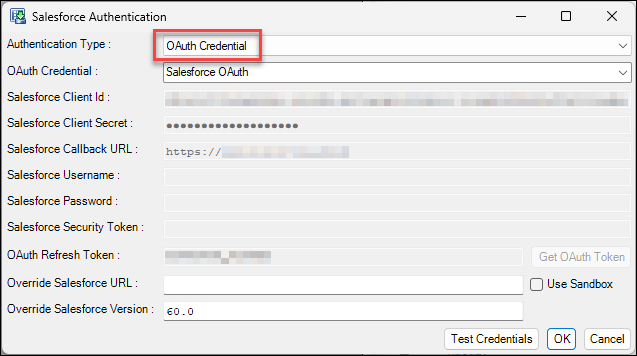
When you configure OAuth credentials, you can choose between refresh token authentication and client credentials flow.
Note
For refresh token authentication, configure your Salesforce Connected App with a redirect URI set to http://localhost:portno/. For Client Credentials flow, enable the flow in your Connected App settings and configure the Run As user.
New OAuth for SMTP connections
Designer now supports OAuth authentication for SMTP connections, providing an alternative to basic authentication which Microsoft is deprecating in Exchange Online services in April 2026.
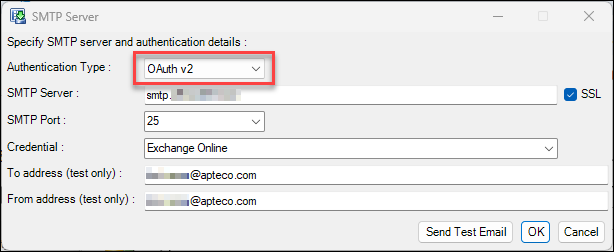
This enhancement ensures continued email functionality for pre-load notifications, post-load notifications, and build error alerts.
Note
OAuth refresh tokens expire after 90 days of inactivity but remain valid longer when actively used. You must configure your OAuth credentials in Azure Entra before setting up the connection in Designer.
New Microsoft.Data.SqlClient provider
Designer now includes the Microsoft.Data.SqlClient ADO.Net provider as a new built-in plugin called Microsoft.Data. This provider supports modern authentication methods such as OAuth, which enables connections to Microsoft Fabric and other cloud-based data sources.
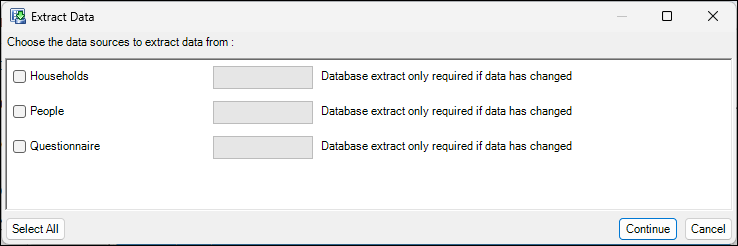
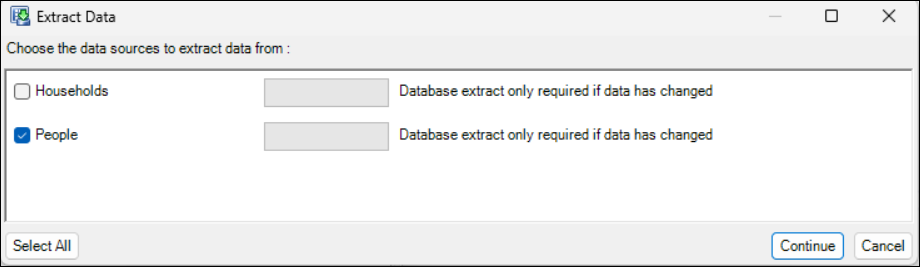
New Optional extraction for dynamic data sources
You can now control whether dynamic database sources are extracted during the rebuild process. If the underlying data hasn't changed, you can manually prevent extraction and use previously extracted data instead.
Note
This feature applies only to dynamic database sources.
For administrators
.NET Framework 4.8 required
FastStats Designer now requires .NET Framework 4.8. The installer validates that .NET Framework 4.8 is present on your system before proceeding with installation.
Note
Windows Server 2008 (non-R2) is no longer supported. Windows Server 2008 R2 and later versions remain supported.
See Technical update for more information.
Bug fixes
- We’ve removed invalid currency values from the currency symbol drop-down list in Designer.
- The FastStats Designer Refresh Package no longer incorrectly marks some definitions as impossible to refresh when handling complex dependency chains that include delete definitions.
- We’ve fixed an issue preventing you from removing the Response property from a table.
- The variable scanner now correctly displays only the date in the creation date column.
- We’ve resolved an issue that caused an exception when opening a design after copying a table and adding it to the table relationships diagram.
- Systems with tables containing more than 4.3 billion records now return correct counts when a primary selector is defined.
Q3 2025
25 September, 2025
New Time zone customisation for date time fields
FastStats Designer now handles DateTime formats that include time zone information. For each DateTime variable a TimeZone can be specified:
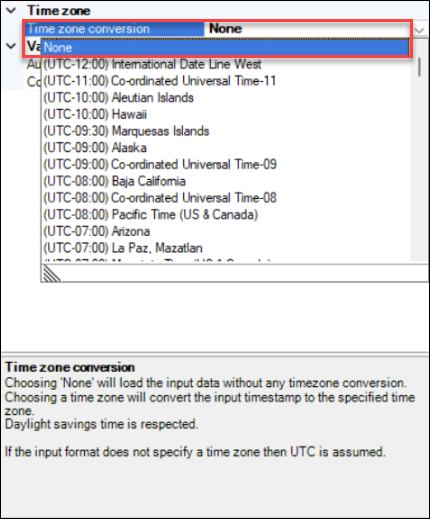
- If the input data contains a specified time zone such as “2009-06-15T13:45:30-07:00” or “2009-06-15 13:45:30Z” then this timestamp is converted into the specified time zone
- If the input data doesn’t contain a specified time zone, then the data is assumed to be in the build machine’s time zone, and is converted into the specified time zone
- If the time zone conversion is set to ‘None’, then no conversion is performed
This feature is especially useful for data sources such as Salesforce and MS Dynamics that store timestamps as UTC but where the users are in a different time zone.
Improved Leading and trailing currency character
Input data can sometimes contain currency characters either leading or trailing in the field itself.
This feature removes non-numeric characters from your data prior to parsing numeric fields in the enhanced build process.
Note
This improvement is for enhanced build process only.
Improved Single-digit date format
This feature expands upon existing accepted date formats to include single digit day and month sections for date variables.
For example, both 3/2/2025 & 03/02/2025 are now supported while previously 3/2/2025 would not have been.
These single digit formats are already supported for datetime variables.
Note
This improvement is for enhanced build process only.
Improved Scientific 'e' notation for numeric types in Enhanced Build
We already support the scientific 'e' notation for floating point and double numeric types.
This feature adds further support for this notation when also using standard numeric variable types.
Enhanced build process only.
Improved Nested folders in dynamic database sources
The existing dynamic database data source feature allows the creation of a single level of folder structure.
For example: Folder1\Variable
This feature adds further ability to nest folders within other folders, when defining dynamic database sources, allowing you to implement greater organisation and flexibility to the folder structure being produced.
For example: Folder1\folder2\variable
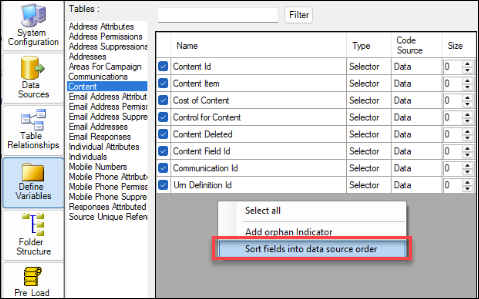
New Sort by data source order in Define Variables
The define variables panel allows you to sort by various properties; Name, Type etc.
This feature allows you to sort the variables into the same order specified in your data source.
Right-click in the define variables panel to find the new option:
New OAuth for Snowflake
This feature provides a more seamless experience when using Snowflake data sources in Designer.
We now authenticate directly with Snowflake's OAuth mechanism, rather than relying on MS Entra as an external OAuth provider for Snowflake.
Improved System summary HTML
The System Summary HTML now presents all variables in a single, consolidated table, making it easy for you to see which table each variable belongs to through a dedicated column.
The variable reference is now included in the folder structure section of the report.
Bug fixes
Known issue
Incorrect counts on systems with primary selectors and large tables. Systems with a primary selector defined and tables with more than 4.3 billion records may generate incorrect counts in your results.
Workaround: Rebuild your FastStats system without defining a primary selector.
Exclude orbitresource paths from virtual package
On systems that can access Orbit and FastStats, Virtual Package .zip files are now built up correctly, as expected.
Previously, the .zip file packaging failed with an 'invalid characters in path' message.
Salesforce custom query error in Designer
We’ve fixed an error generated when using a custom SOQL query whilst retrieving data from a Salesforce data source.
With this issue, when using a custom SOQL query in FastStats Designer, including a field from a different table, for example: SELECT Id,Account.Id FROM Contact, Designer generated an error.
Unclassified code goes missing
We’ve fixed an issue causing the single field delimited array variable to lose unclassified code on its second build.
With this issue, clearing the codes meant that the unclassified code was added back on the next build.
Attributes: unclassified category for selector variables
Specifying boolean dynamic variable properties such as ‘AddUnclassified’ or ‘Selectable’ in Dynamic Data Sources has now been extended to allow additional true values instead of just ‘1’. If the first character contains any of ‘1TtYyXx’ then the property is set to true.
Combine categories pla has incorrect instant counts
We’ve fixed an issue with the Combine categories post load action causing incorrect instant counts when summary codes were incorrectly specified.
Q2 2025
16 May, 2025
Improved User-defined primary selectors in Enhanced Build Process
A ‘user-defined primary selector’ is a Selector variable located on the master table of a FastStats system. Queries that have an 'and' clause with the primary selector run faster than other types of queries.
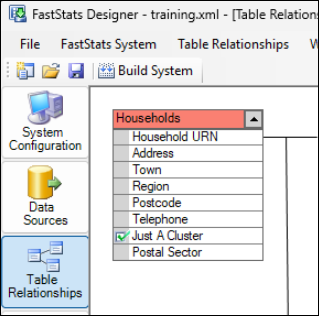
Support for user-defined primary selectors has been added to the Enhanced build process.
Improved People table specification
When building ‘Core’ and Linked systems, this feature allow you to choose a table from the linked system for licensing purposes, overriding what may have been already specified in the Core system.
New Palantir Foundry connections
We now support connections to Palantir Foundry using the ‘ODBC for Foundry‘ data provider.
New Override Salesforce version number
The Salesforce APIs are versioned and new versions are regularly released. This new Salesforce data source functionality allows a system Designer to specify the version of the API to use when exporting data from Salesforce. Setting this version number to the latest Salesforce API version will enable the most recent data layout to be retrieved.
Improved Additional options for default unclassified codes
Unclassified code settings (the Code, Description and Alignment) can now be set to be the System Default. This default is configured on the Advanced tab of the system configuration.
These properties are now exposed in the Define Variable property grid making it easier to change these properties for multiple variables at once.
Improved KeepAlive for ODP.Net connections
The connection string parameter ‘KeepAlive=true’ is now added automatically for all Oracle ODP.Net connections. This setting improves extract reliability when connecting to Oracle using ODP.Net.
New Combine files pre-load action
You now have the optional action to shift multiple incremental extract files.
This pre-load action has 2 optional sub actions:
- Shift files
- Combine files
Example
The intended scenario for this enhancement is where a number of incremental extract data sources containing monthly transactions are defined.
Daily incremental extracts are appended to the end of Month01, but the other Month?? data sources are static.
At the end of the month, Month01 becomes Month02, Month02 becomes Month03, etc.
This pre-load action performs the required file moves (including the .info.xml files that hold the extract metadata), to avoid re-extraction of all the data sources.
In this example, Month04.txt then becomes Month04.bak, and Month04.bak is overwritten on future runs of the pre-load action.
This enhancement saves re-extraction of the Month?? data when it has already previously been extracted.
For administrators
Systems built with Q2 2025 Designer are no longer backwards compatible with earlier versions.
Bug fixes
Known issue
Incorrect counts on systems with primary selectors and large tables**
Systems with a primary selector defined and tables with more than 4.3 billion records may generate incorrect counts in your results.
Workaround: Rebuild your FastStats system without defining a primary selector.
Linked system fails to connect to core system
We’ve fixed an issue that occurred when you tried to create a new linked system. This generated an error connecting to the core system when using the linked system dialog.
Writing build log to Oracle gives a warning
Writing the build log to Oracle is not supported. We’ve found and fixed an issue which caused the following warning message to be generated when attempting to write the build log to Oracle.
Warning
Could not write Build Statistics Log to database: ORA-00911: invalid character
This warning was displayed but didn’t stop the build. If you now specify an Oracle provider for your database, then this error/warning is no longer displayed.
Input values longer than 255 characters cause missing decodes
We’ve fixed a missing decodes issue introduced in Q4 2024.
This bug prevented the auto-discovery process from finding new decodes once a value longer than 255 characters was encountered.

Process priority not overridden when run as a scheduled task
We’ve fixed an issue preventing process priority from being overridden when run as a scheduled task. Now, if the option is checked, then Designer overrides process priority and sets itself back to Normal priority, with log messages to indicate this.
Virtual package doesn’t refresh all variables if folders specified in design XML
When you created a virtual package post load action, specified to ‘Refresh variables by folder’, and change this to All variables, Designer retained the folders setting and refreshed any variables in folders rather than all variables, as expected.
Error if key sizes are longer 255 bytes
Some of our users with unsupported key sizes > 255 bytes reported that they started to get a crash when building a system. We now generate an error message when this is the case, and limit the key size to 255 to avoid a crash.
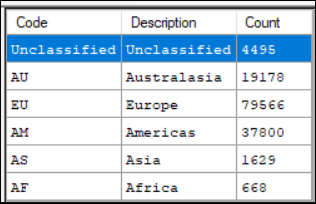
Combine categories from database uses unclassified description as the code
Some users reported that when using the combine categories post-load action from a database the unclassified description was used as code. For example if the code was specified as ‘!’ and the description was specified as ‘Unclassified’ then the code table would be incorrect (see below), this issue has been fixed.
Extract dependency waits forever
We’ve fixed an issue that would cause Designer would wait for an extract dependency to complete even if that extract was not specified to extract. This would cause Designer to wait forever.
Combine categories unc path issue (.dat file does not get created)
We’ve fixed an issue encountered when building a Combine Categories virtual variable with the virtual directory on a UNC path, preventing the .dat file from being created, with only the .val files being created.
Load statistics always zero for lookups when using the enhanced build process
We’ve fixed an issue encountered when using the enhanced build process, causing load statistics to always display as zero for lookups. This issue was encountered when using the enhanced data builder.
Database log credential reverts to default even if cleared
We’ve fixed an issue causing the database log credential to revert to default, even when cleared.
Although the credential was specified as default, it now stays blank, as expected.
Q1 2025
13 February, 2025
New Query support for extended text fields
FastStats now supports storing and querying text data up to 32,000 characters, which is a significant increase from the previous 255-character limit. This improves data handling and also enables more comprehensive text analysis.
Key enhancements:
-
Increased text storage capacity
FastStats text fields can now store up to 32,767 bytes.
- For ASCII systems, this corresponds to 32,767 characters
- For UTF8 systems, characters may consume between 1 & 4 bytes
-
Text block size increased
To support extended text fields and improve text field compression, the text block size has been increased from 32,760 bytes to 1MB. As a result:
- We’ve removed the configuration option for virtual text block size and compression type from the FastStats Configurator
- We’ve applied overrides in the FastStats Service and Designer Virtual Package
- We’ve removed the configuration option in Designer and set it to 1MB
-
Improved performance for text variable processing
Extended text blocks improve compression ratios and reduce I/O operations, leading to better performance, particularly on file systems with high latency. Testing has shown reduced compressed text
.datfile sizes and fewer I/O calls. -
User interface and build process updates
- AutoDiscovery has been modified to automatically detect extended text fields
- The Standard and Enhanced Build Processes have been updated to support extended text fields
New DuckDB data provider
This release introduces support for the DuckDB data provider in Designer. This allows you to browse tables, use the ' placeholder, choose tables/views, and run custom queries on a DuckDB database.
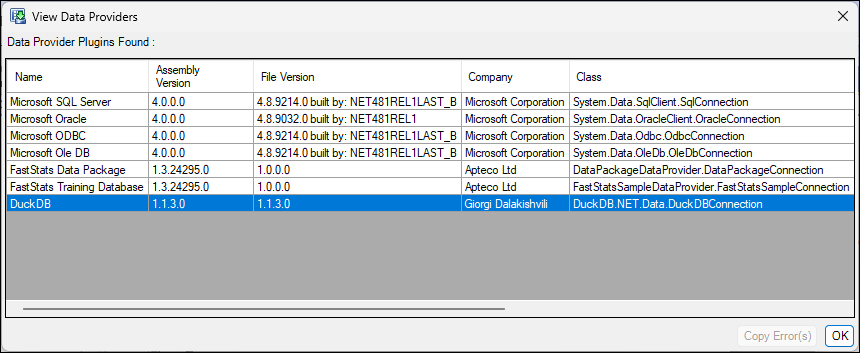
In addition to the native DuckDB functionality, this update also enables support for reading the following file types directly via custom queries:
JSONJSON.gzParquet
For more detail, see Reading Parquet and JSON files with DuckDB and DuckDB’s documentation.
Improved Generate partial index
We’ve introduced the ability to generate partial indexes in parallel, offering a significant reduction in generation time for large systems. You can now generate up to ten partial indexes simultaneously, alongside the existing sequential option.
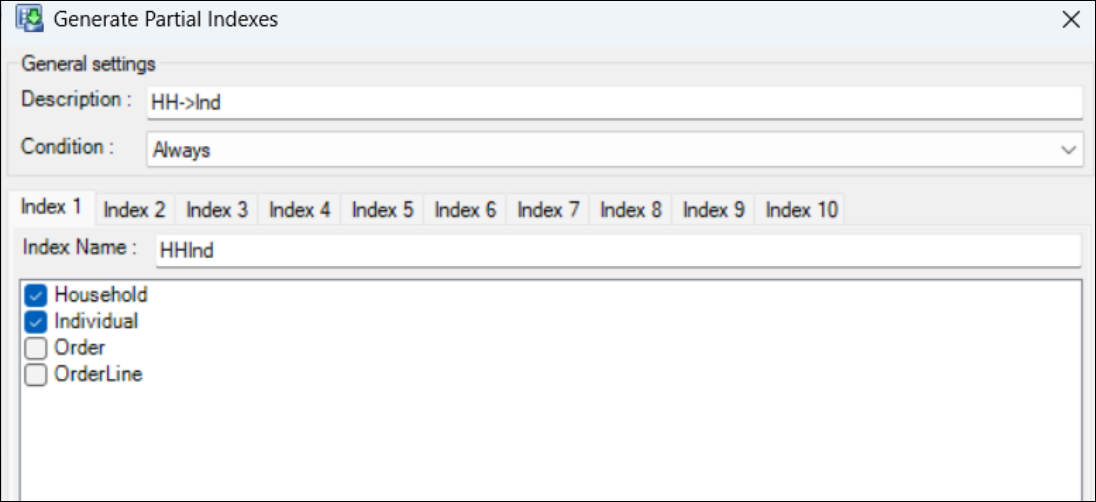
Key updates:
- Added UI to support generating multiple partial indexes at once
- Up to ten partial indexes can now be generated in parallel, greatly reducing generation time on large systems
- Partial Indexes help speed up multi-table queries and optimise system performance
New Environment variables in FastStats scripts
You can now use environment variables in the post-load action ‘Run Script’ in Designer. This makes it easier to set up duplicate systems by allowing scripts to use parameterised values rather than fixed ones.
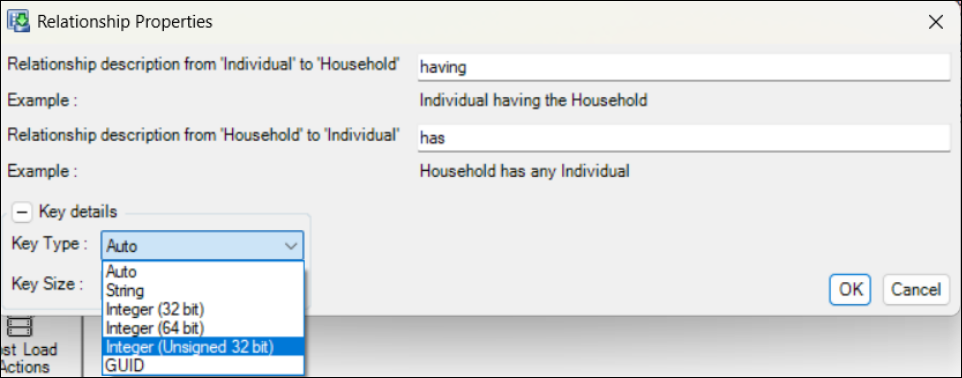
New UInt join key type
The Enhanced Build process in FastStats Designer now supports a 32-bit UInt (unsigned integer) join key type. This is useful for systems with keys between 2.1 billion and 4.2 billion, allowing you to use efficient non-hashable join logic. This expands on the existing Int64 and GUID join key types and allows parent tables to support larger datasets.
New Hide sensitive data in build logs
Build logs in Designer now have an option to hide sensitive data, such as environment variable values and full directory paths. This option is enabled by default for Apteco Cloud servers, improving security by preventing exposure of sensitive information.
New Delete .dat files during sort
Designer now includes an option to delete .dat files during the sort phase of the build process. This can free up significant temporary disk space during the build on large systems, particularly once the merge processing has started.
However, if the build is using a delta strategy and an error occurs, then a full rebuild is required as the deleted .dat files are no longer be available.
Bug fixes
- We’ve fixed a bug that caused a crash when creating a Dynamic Virtual Variable while Global Filters are applied. Previously, this left behind invalid
.valand.datfiles that could cause the service to crash on start-up. - Running a post-load action from the command line now correctly finds and executes actions located within groups.
- The standard build process no longer creates invalid
$ftoSORTED$files withNULcharacters when Use Optimised Temporary Sort Files is unchecked. - We've improved the efficiency of retrieving large job results from the FastStats Web Service. Previously, the full compressed results were repeatedly retrieved and decompressed for each chunk request, causing high resource usage. Now, retrieval is optimised to reduce unnecessary processing and improve performance.
- The Preview Categories query in Combine Categories post load actions now correctly applies environment variables, preventing errors when resolving table names.
- Environment variables are now correctly applied to the Answers query in Dynamic Database Data Sources.
- When copying a lookup table in Designer, array field names now retain their original references and do not revert when added to the Relationships page. This prevents unintended renaming issues across copies.