Build log database
FastStats Designer can output progress log messages and build statistics to a build log database. The FastStats Configurator tool contains a database script to create this database. The database can be hosted on SQL Server, or any other standard relational database that supports standard SQL.
The connection to the build log database can be specified on the Build tab:
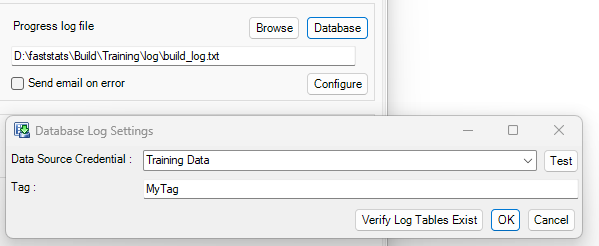
Each of the build log database tables contains a tag column that can be populated by the tag parameter specified on the dialog. This can be specified with an environment variable.
Build log database definition
The build log database consists of the following tables:
Logtable
| Field Name | Data Type | Notes |
|---|---|---|
| Id | int | |
| MessageName | datetime | Build machine time |
| Severity | char(5) | INFO/WARN/ERROR/FATAL |
| Message | nvarchar(max) | |
| Tag | nvarchar(255) |
Cardinality: one row per log message
Buildstatistics
| Field Name | Data Type | Notes |
|---|---|---|
| SystemName | nvarchar(2000) | |
| Tag | nvarchar(255) | |
| BuildStart | datetime | Build machine time |
| ExtractFinish | datetime | Build machine time |
| AutoDiscoveryFinish | datetime | Build machine time |
| SortFinish | datetime | Build machine time |
| LoadFinish | datetime | Build machine time |
| PostLoadActionsFinish | datetime | Build machine time |
| BaseSystemSize | bigint | Bytes |
| VirtualSystemSize | bigint | Bytes |
Cardinality: one row per build
Buildstatisticsdetails
| Field Name | Data Type | Notes |
|---|---|---|
| SystemName | nvarchar(2000) | |
| Tag | nvarchar(255) | |
| BuildStart | datetime | |
| TableName | varchar(2000) | |
| Records | bigint | |
| Orphans | bigint | |
| Extract | float | Time taken: 1.0 = 24 hours |
| AutoDiscovery | float | Time taken: 1.0 = 24 hours |
| Sort | float | Time taken: 1.0 = 24 hours |
| Build | float | Time taken: 1.0 = 24 hours |
| FileSize | bigint | Bytes |
Cardinality: one row per table per build