Pre-sorting input data
FastStats pre-calculates the join relationship between its input tables by sorting all the input data before creating the column compressed version of the data. This sort can take a significant proportion of the data load time.
Pre-sorting input data can yield significant performance gains for a FastStats data load but can be tricky to get right. Make sure you have investigated all other options for speeding up your data load before attempting to pre-sort your input data.
There are multiple ways valid ways of pre-sorting input data. The following is just an example – there are many other ways of doing it.
The overall aim of the pre sort is to get each table into an order where FastStats can simultaneously read through a table and a matching child table knowing that the next record it will need to match from the child table will be the next in the file.
If you use pre-sorted data then all your data must be pre-sorted, you cannot use FastStats to continue sorting some of your input data.
This document gives an example of how to pre-sort some input data. This example focuses on an example where a primary selector is not defined on the master table. Defining a primary selector means that the master table has to be sorted in primary selector order and this makes the process far more complicated especially if a mapping has been applied to the primary selector.
Example data
Households
| Household URN | Town |
|---|---|
| 4 | Warwick |
| 1 | Leamington Spa |
| 2 | Coventry |
| 5 | Birmingham |
People
| Person URN | Household URN | Name |
|---|---|---|
| 1 | 1 | Simon |
| 4 | 3 | Tim |
| 5 | NULL | Adam |
| 2 | 2 | James |
| 6 | 4 | Pete |
| 3 | 2 | Rob |
Brochures
| Brochure URN | Person URN | Brochure Code |
|---|---|---|
| 2 | 2 | 04 |
| 5 | NULL | 12 |
| 1 | 1 | 14 |
| 3 | 2 | 21 |
| 4 | 3 | 13 |
Holidays
| Holiday URN | Person URN | Destination |
|---|---|---|
| 5 | 2 | Sweden |
| 6 | 5 | Senegal |
| 3 | 1 | South Africa |
| 2 | 1 | Sierra Leone |
| 1 | 1 | Kuwait |
| 7 | NULL | Australia |
| 4 | 2 | Mali |
Things to note about the sample data:
- The record order is random
- There are parent records that have no children on each join.
- There are orphaned records – both direct orphans and also indirect orphans (orphans in lower table created by orphans between parent tables).
- There are 2 tables joining on the same key to the People table.
Example sort
The first rule is to always sort the child table into the same order as its parent table.
Orphaned records should either be removed or sorted to the end of the file. We will remove them as we work down the relationships by using inner joins.
Households (master table)
Sort by household urn:
| Household URN | Town |
|---|---|
| 1 | Leamington Spa |
| 2 | Coventry |
| 4 | Warwick |
| 5 | Birmingham |
The Household table is our Master table and dictates the overall order of the records in the system. The order we choose for the Master table affects the order of the records in all the other tables.
People (join table)
Aim: Sort into the same order as the Households table, remove orphans.
Sort by Household URN, Person URN. Use an inner join to remove the 2 orphaned records (Person URN’s 5 and 4).
We sort by Person URN because we will need to know that we have specified this order for the child tables that match on this key.
We save this query as a View that we can use to simplify our next two sorts.
CREATE VIEW PeopleNoOrphans AS
SELECT p.* FROM People p,Households h
WHERE p.[Household URN] = h.[Household URN]
| Household URN | Person URN | Name |
|---|---|---|
| 1 | 1 | Simon |
| 2 | 2 | James |
| 2 | 3 | Rob |
| 4 | 6 | Pete |
Brochures (transaction table)
Aim: Sort into the same order as the People table, remove orphans.
Since we created a view on the People table that has already removed orphans between the household and people tables then we can re-use this to keep our queries simple.
We do not need to sort by the Brochure URN since we do not have any child tables beneath this one (it's a transaction table).
Sort by Household URN, Person URN. Use a left outer join to remove orphans from PeopleNoOrphans to Brochures:
CREATE VIEW BrochuresNoOrphans AS
SELECT b.* FROM Brochures b,People_NoOrphans p
WHERE b.[Person URN] = p.[Person URN]
| Brochure URN | Person URN | Brochure Code |
|---|---|---|
| 1 | 1 | 14 |
| 2 | 2 | 04 |
| 3 | 2 | 21 |
| 4 | 3 | 13 |
Holidays (transaction table)
Aim: Sort into the same order as the People table, remove orphans.
We do not need to sort by the Holiday URN since we do not have any child tables beneath this one (it’s a transaction table).
Sort by Household URN, Person URN. Use an inner join to remove orphans from PeopleNoOrphans to Holidays:
CREATE VIEW HolidaysNoOrphans AS
SELECT h.* FROM Holidays h,People_NoOrphans p
WHERE h.[Person URN] = p.[Person URN]
| Holiday URN | Person URN | Destination |
|---|---|---|
| 3 | 1 | South Africa |
| 2 | 1 | Sierra Leone |
| 1 | 1 | South Africa |
| 4 | 2 | Mali |
| 5 | 2 | Sweden |
Lookups
There are no lookup tables in this example. There are 2 kinds of lookups:
-
Single Parent Record – these must be sorted in the same way as a transaction table but there must be only 1 row for every matching parent row.
-
Indexed – these can be left unsorted. FastStats will build an index and perform the join using this index.
Marking data as pre-sorted in FastStats Designer
Define your data sources as usual in Designer but you may need to use the ‘Order By’ dialog to add ordering if you are building from Views or you can specify the order in a Custom Query.
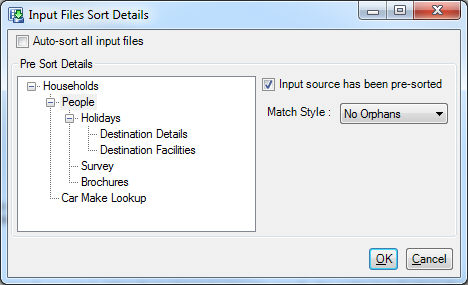
Uncheck the ‘Auto sort all input files’ check box and mark each table as ‘Pre-sorted’ with a match style of ‘NoOrphans’.
Checking for orphaned records
Orphaned records are those records in a child table that do not match any record on the parent table. You can count orphaned records between two tables by running either of the following SQL queries on your source database (the first is easier to understand, the second will probably run faster):
SELECT COUNT(*) FROM ChildTable LEFT OUTER JOIN ParentTable ON ChildTable.ParentURN = ParentTable.URN WHERE ParentTable.URN IS NULL
The sorted join approach currently requires all orphans to be removed from the source data. FastStats can do this when it does the sort, but if you declare the tables as pre-sorted (see below), you must remove the orphans.
Pre-sorting the input data files
A FastStats join involves two stages – sorting the input files and performing the join. If you can extract the input files with the required sort already applied then there is no need for FastStats to perform the sort process - saving both processing time and disk space.
You can specify a table as pre-sorted by selecting the ‘Input Sort Setting’ menu option while viewing the table relationships diagram in FastStats Designer, and then un-checking ‘Auto sort all input files’. In this case, you must ensure the data is correctly sorted. You can do this by explicitly including an Order By clause in a custom query, or by using the ‘Order By’ function in the FastStats Designer Database Data Source, or by ensuring file data sources are correctly sorted. If you are attempting to pre-sort the input data for performance improvement, it is important that all input files (other than indexed Lookups) are correctly sorted and marked as ‘Input already sorted’. Otherwise, FastStats will have to read and extract sort keys from all tables down the hierarchy to the unsorted table and you will lose almost all benefit of pre-sorting.
The sort order of each pre-sorted table is very important – if the sort order is wrong then records will not be matched and consequently not all data will be loaded. The only warning of this will be the final result message in the progress log that highlights that fewer records were loaded than were found in the verification stage of the build.
Loading orphans with pre-sorting (not supported)
Pre-sorted load does not support loading orphans. Orphans must be removed, or sorted to ends of each file so they can be excluded during the load.
Pre-sort (no orphans, no primary selector defined)
This is the simplest case for pre-sorting the input files. Ensure that all orphaned records are removed from the input files. The master table should be sorted in the order of its primary key (typically an ID or URN). Any child tables of the master table should be sorted in the same order as the parent table and the primary key of the lower table. Transaction tables need to be sorted in the same sequence as the parent records and grouped by the parent key.
Pre-sort (no orphans, primary selector defined)
When a primary selector is defined the Master table (and consequentially child tables) must be sorted in primary selector order. Note that mappings (such as a mapping to change a postcode into a sort formatted postcode) defined on the primary selector may affect the order. Unclassified primary selector codes must come at the start of the file.
Pre-sort (orphans, primary selector defined)
For the case where orphaned records are included in the input files you must ensure you have a simple, single key sort sequence (i.e. only one join) and define the match style to tell FastStats that the keys can be interpreted in Ascending or Descending manner to detect which records are orphans (and hence skip over them).