Expression: datetime functions
DateTime functions are provided to manipulate FastStats datetime fields.
TimeDiff
TimeDiff calculates the difference between 2 DateTimes, measured in the specified units. If no units are specified, seconds are used.
Note
If only 1 DateTime is specified, it will compare to the current date and time.
TimeHour
TimeHour(DateTime). Calculates the hour of day of a DateTime.
For example, 17-06-2010 16:43:24 returns 16.
TimeMinute
TimeMinute(DateTime). Calculates the minute of hour of a DateTime.
For example, 17-06-2010 16:43:24 returns 43.
TimeSecond
TimeSecond(DateTime). Calculates the second of minute of a DateTime.
For example, 17-06-2010 16:43:24 returns 24.
MakeDateTime
Creates a DateTime from constituent parts. For example, 17-06-2010 16:43:24
SelectedHours
SelectedHours calculates the number of hours between two date time values.
For example:
.png)
In the above example the first date-time is a variable and the second is constructed using the MakeDateTime function. The day pattern is made up of 1 and 0 to represent which days of the week to consider (Monday to Sunday). The start and end times indicate the hours within a day to consider. Therefore in this example we are only considering the hours in a working week, Monday to Friday between 8.30am to 5.30pm (24 hour time display).
TimeNow
TimeNow returns the current DateTime shifted by a specified number of seconds.
The above example will return the date for today and the time 300 seconds in advance of the current time when the request to process is started.
For example, if the date and time were 16/05/2018 11:10:25, the result returned would be 16/05/2018 11:15:25.
FormatTime
FormatTime takes the numeric value in the parameter and formats it as an elapsed time string in seconds.
The above example will return 3 minutes and 50 seconds (230 seconds) as 00:03:50.
BuildDateTime
Returns the build date and time.
The above will return the exact build date and time.
BuildDateTime(Number) returns the build date and time and optionally adds the "Number" in seconds.
For example, BuildDateTime(3600) returns the datetime 1 hour after the build datetime..
DateTimeShift
Returns a datetime by incrementing the given datetime by the defined number of units.
For example, DateTimeShift([Order DateTime], 12, "Hours") returns the datetime 12 hours after the order datetime.
Note
Valid "Units" are years, quarters, months, weeks, days, hours, minutes, or seconds.
AgeHours
Returns the age in hours of the datetime value.
For example, AgeHours([Order DateTime]) returns the number of hours ago that the order datetime was.
AgeMinutes
Returns the age in minutes of the datetime value.
For example, AgeMinutes([Order DateTime]) returns the number of minutes ago that the order datetime was.
AgeSeconds
Returns the age in seconds of the datetime value.
For example, AgeSeconds([Order DateTime]) returns the number of seconds ago the order datetime was.
DateTimeStart
Returns a datetime by shifting a datetime to the start of the unit and then offsetting it by the defined number of units.
For example, DateTimeStart([Order DateTime], 0, "Hours") shifts the order datetime to the start of this hour.
Note
Valid "Units" are years, quarters, months, weeks, days, hours, minutes, or seconds.
DateTimeEnd
Returns a datetime by shifting a datetime to the end of the unit and then offsetting it by the defined number of units.
For example, DateTimeEnd([Order DateTime], 0, "Hours") shifts the order datetime to the end of this hour.
Note
Valid "Units" are years, quarters, months, weeks, days, hours, minutes, or seconds.
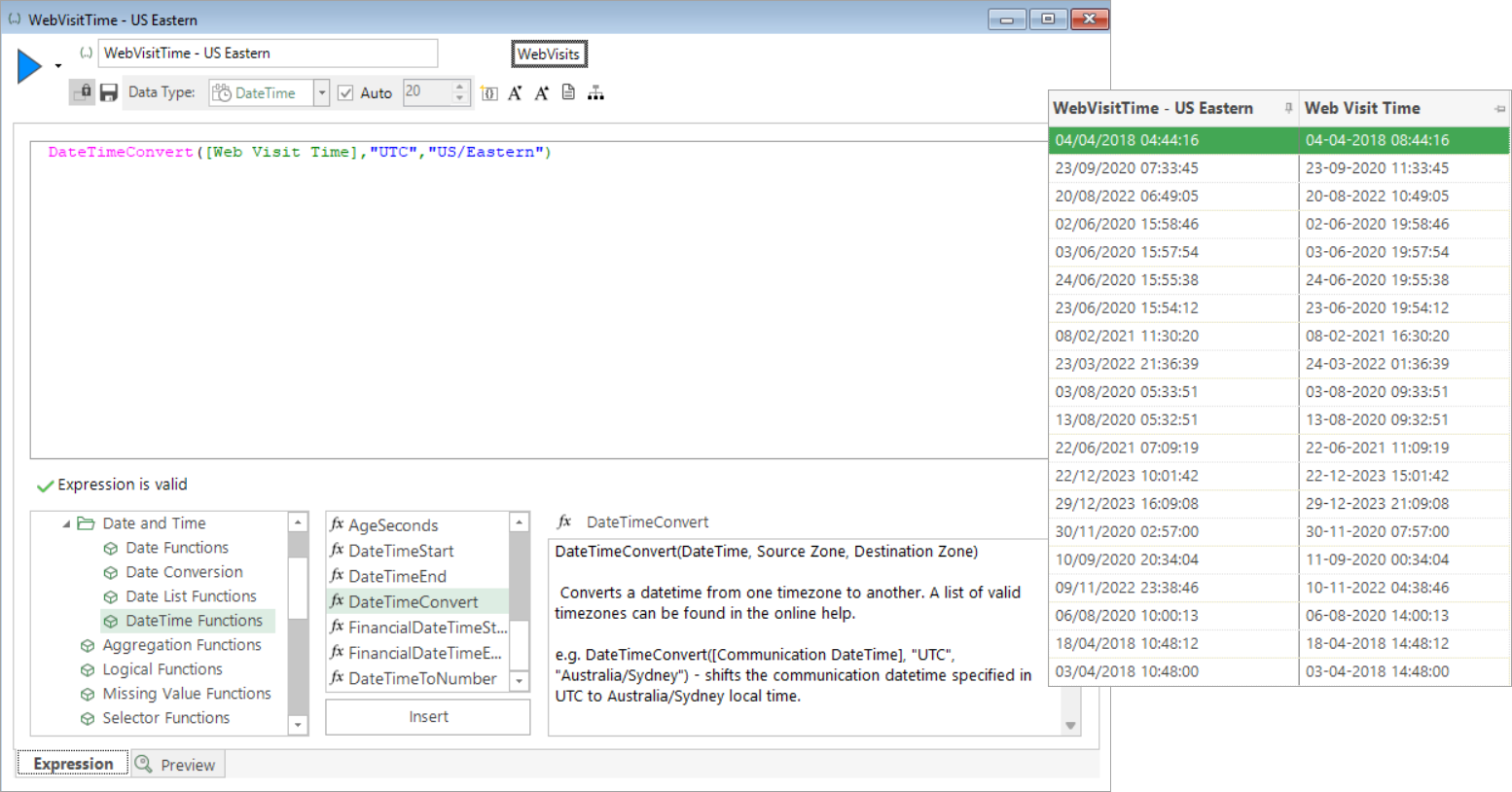
DateTimeConvert
Converts a datetime from one timezone to another.
For example, DateTimeConvert([Communication DateTime], "UTC", "Australia/Sydney") shifts the communication datetime specified in UTC to Australia/Sydney local time.
For further information, including a list of valid timezones, see Considerations when working with the DateTimeConvert function.
FinancialDateTimeStart
Returns a datetime by shifting the datetime to the start of the financial unit and then offsetting it by the defined number of units.
For example, FinancialDateTimeStart([Order DateTime], 0, "Years") returns the start of the financial year in which the order datetime falls.
Note
Valid "Units" are years, quarters, or months.
FinancialDateTimeEnd
Returns a datetime by shifting the datetime to the end of the financial unit and then offsetting it by the defined number of units.
For example, FinancialDateTimeEnd([Order DateTime], 0, "Years") returns the end of the financial year in which the order datetime falls.
Note
Valid "Units" are years, quarters, or months.
DateTimeToNumber
Converts the datetime to a number in the form YYYYMMDDHHMMSS.
For example, DateTimeToNumber([Order DateTime]) returns the order datetime as a numeric.
StringToDateTime
Returns a datetime value from the string in the first parameter, given the format in the second parameter.
For example, StringToDateTime("29-09-2025 12:34:56", "dd.mm.yyyy") returns a datetime value for 29th September 2025 at 12:34:56.
The following are valid date formats for the second parameter, which must be specified exactly:
dd.mm.yyyymm.dd.yyyydd.mmm.yyyymmm.dd.yyyyyyyy.dddyyyy.mm.dd
Note
Invalid values will return a missing datetime.
Considerations when working with DateTimeConvert
DateTimeConvert(DateTime, “SourceZone”, “DestinationZone”) -> DateTime.
The DateTimeConvert function takes a datetime and allows you to specify:
- Source zone - the time zone that the datetime belongs to.
- Destination zone - the time zone that you want to convert the datetime to.
The result of the expression is the datetime in the second zone.
Please be aware of the following when working with the DateTimeConvert function:
-
The time zone database is only supported on Windows 10 version 1903 or Windows Server 2022 or later:
Using the function on a version which can't access the necessary time zone database will return missing values and a message in the debug log from the server indicating that the information cannot be found.
-
The source and destination zones are strings, and may be variables.
-
The valid values for the source and destination zones are taken from the IANA database of valid time zones, which can be found here:
List of tz database time zones - Wikipedia
The values in the TZ Identifier column are the relevant and important ones.
-
If you specify a time that exists twice - such as, for example, during the shift between BST and GMT when the clocks go back - the DateTimeConvert function will return the earliest of the two times.
-
If you enter an input time which falls into a time that doesn't exist - such as, for example, during the shift from GMT to BST when the clocks jump forward - the DateTimeConvert function will return a missing value, and a supporting message to that effect.