Set functions
A set is a list of numerical values that contains no duplicates. These could be specific numeric values or, alternatively, might contain indexes into a product variable. Set functions provide the flexibility to interrogate your data and select in numerous ways.
For example, based on having sets to represent products purchased this year and last year, you can identify:
IntersectionSets
The common products a person has purchased.
UnionSets
The products a person has purchased in one year or the other.
EqualSets
If people have purchased the same products in one year and the other.
DisjointSets
If people have purchased entirely different products in one year and the other.
DifferenceSets
Which products people purchased last year but not this year.
SymmetricDifferenceSets
The products a person has purchased in just one of the years.
IsSubset
If the products purchased in the first year are a subset of those purchased in the second year.
IsSuperSet
If the products purchased in the first year are a superset of those purchased in the second year.
In addition to the above:
InMinMaxSets
Takes N sets and, given a minimum and maximum value, returns a set that contains values which appear within the >=Min and <=Max sets defined.
There are a number of generic functions to work with sets, including:
CreateSet()
To create a set object out of numbers, lists, sets or selector/array/flag array variables.
CountSet()
To return the number of items in the set.
StrSet()
To turn the set into a delimited text string (maximum 32767 characters).
SetContains()
To return the index of the first of the test values that are in the set.
VarDesc()
This function is not new but has been extended to allow for the second parameter to be a set.
There are a number of analogous functions already working on lists, which now have set variants:
- RankSet
- NTileSet
- FilterSet
- TrimSet
Example use case
Let’s consider an example in practice, based on Apteco’s Holidays data set: Select people who have purchased holidays to at least 2 of the same destinations at least once in both 2017 and 2018
Some of these people and their destinations are shown in Data Grid below:
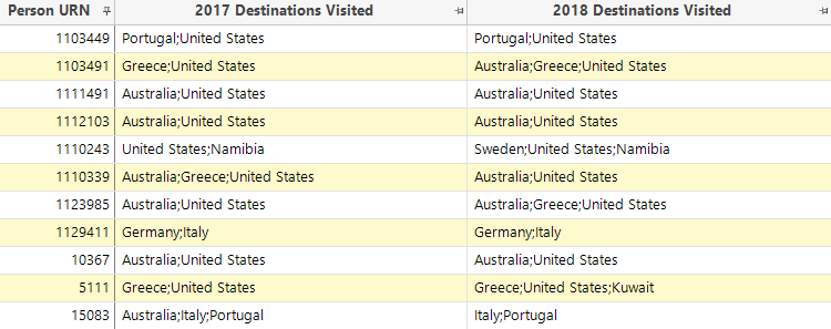
In order to achieve this, the first task is to create two flag array Virtual Variables – one that represents destinations visited in the year 2017 and another for 2018. See Wizards and Virtual Variables for information on using the Transaction Summary Wizard.
With these two Virtual Variables it is then possible to:
- use a combination of set functions to create a set out of the destinations visited in each of the two years
And then:
-
take the intersection of those sets and count to determine the number of common destinations visited – as follows:

When the expression is dragged on to a new selection, it behaves like a numeric variable and allows us to count and return people who have had holidays to at least 2 of the same destinations at least once in both 2017 and 2018.
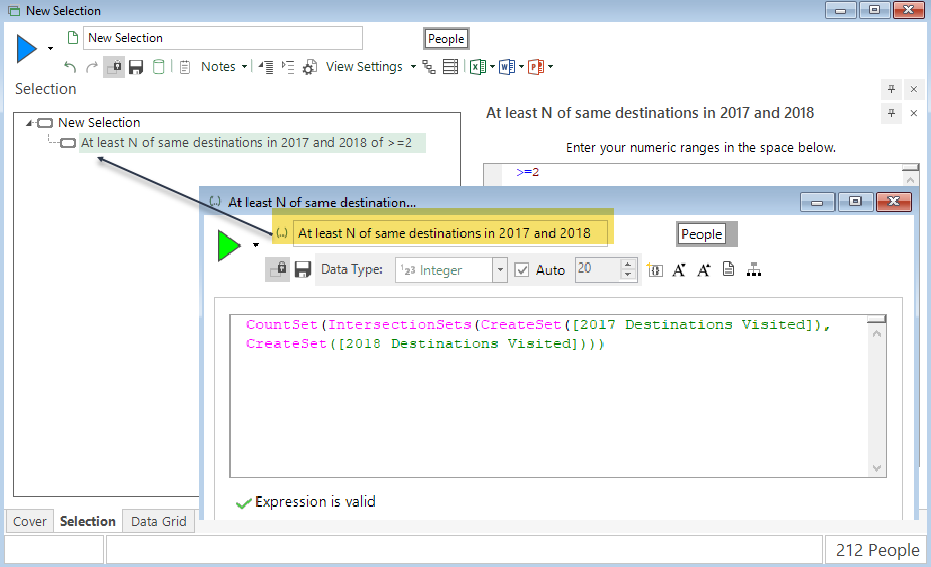
In this example, there are 212 people who satisfy the criteria. To verify:
- Drop a Data Grid over the selection
- Right-drag the 2017 Destinations Visited variables onto the grid and select Add as a single column; repeat for 2018
- Build the display
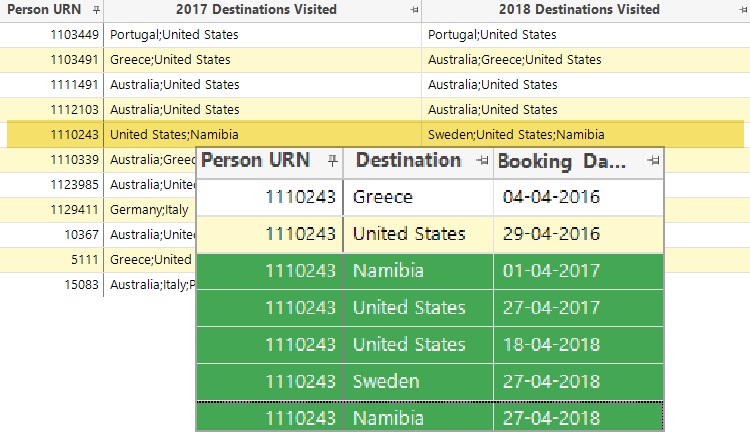
You can see that Person URN 1110243 has been selected because they have been to the United States and Namibia at least once in each year. To further examine and verify this:
- Left click and drag Person URN 1110243 from the Data Grid to create a new selection
- Drop a new Data Grid over this selection
-
Left drag the Destination and Booking Date variables onto the grid and build
-
Right click on Booking Date and Sort Ascending
You can now see all 7 bookings made by this person, including the 5 made in 2017 and 2018 – 4 of which satisfy the defined criteria for inclusion in the selection.
Other Set functions can be used in place of ‘IntersectionSets’ to change the analytical question you want to ask and answer.