Date selection dialogue
You can use a date range when creating an Audience using date criteria in either the Includes or Excludes sections, and in a Dashboard filter either applied to the dashboard or a tile that uses a date variable.
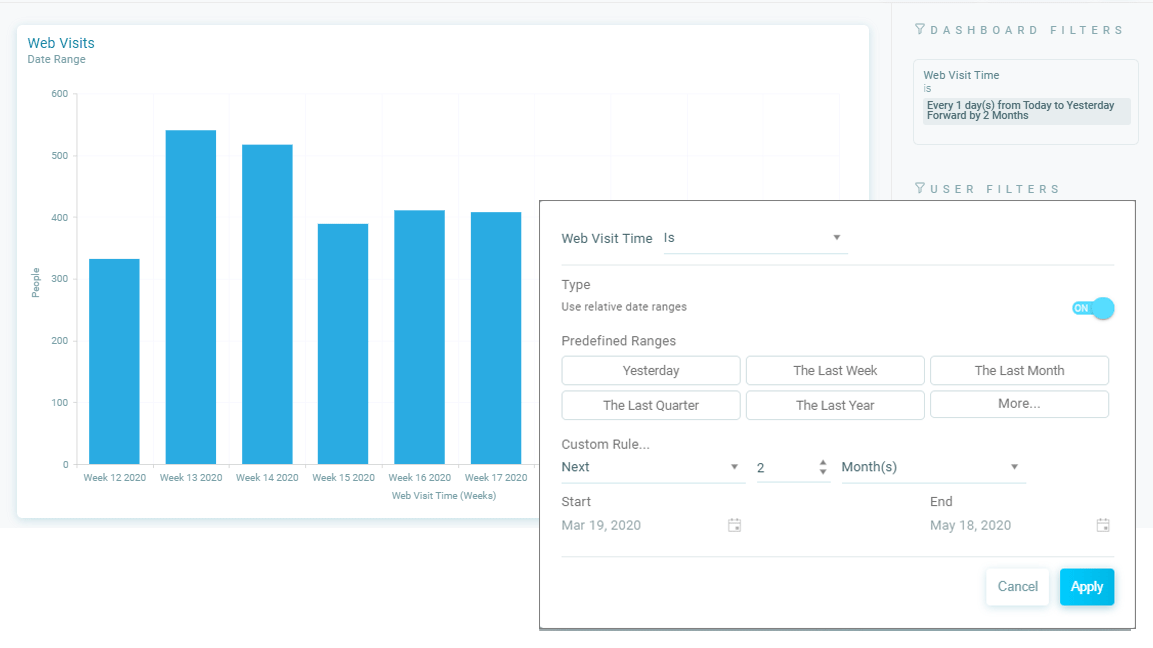
When selecting a date range you have two options:
- Fixed date range - Select a Start and End date from the date selection dialogue
- Relative date range - You can select relative date ranges either using a predefined option or create a custom date range
The date ranges available include the following Predefined Ranges:
- Yesterday
- Today
- Tomorrow*
- The Last Week
- The Last Month
- The Last Quarter
- The Last Year
- The Next Week*
- The Next Month*
- The Next Quarter*
- The Next Year*
(Available from the *More** button)
Using a custom date range
The Custom Rule option available from the More button allows Previous and Next ranges, for example the previous 2 days, the next quarter.
To apply a relative date range, click the Use relative date range switch and select from the available options, when a relative date range is active the switch is highlighted ON.
Note
When you switch from a fixed date range to a relative date range the current range is used until changed.
The Filters panel displays a description of the date range applied.