Tolerance check
The tolerance check connects to a live FastStats Enterprise Edition, downloads the system definition and then compares the newly built system definition with the downloaded definition. If any of the main table counts fall outside the specified tolerance then warnings (or optionally errors) are reported in the progress window.
One use of the tolerance check is to prevent an automatic deployment if the newly built system is outside the specified parameters.
An example of this is to prevent a small 'sample' system from being deployed to a live server. The FastStats Administrator needs to provide credentials to connect to a FastStats system.
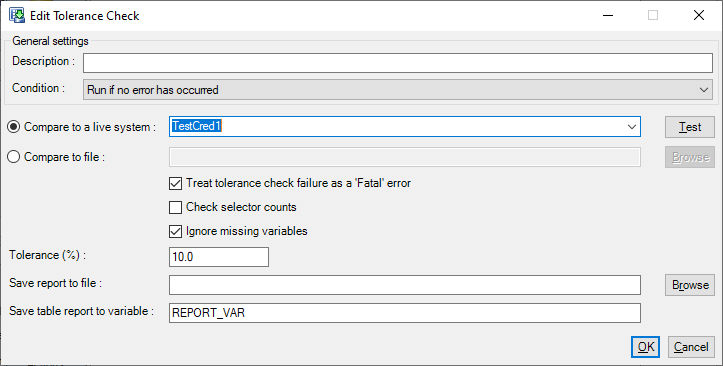
Alternatively the new system can be compared to a XML reference file. A suitable reference file is generated on every build in the 'log' sub-directory and is called designer_out.xml.
A report can be stored in an environment variable, the contents of this variable can then be used in a later Send Email post-load action to provide the contents of an email.
The tolerance check action performs the following checks:
For each variable in the newly built system compare the Load Statistics of the new variable to the Load Statistics of the earlier version of the variable.
Load statistics
| Load Statistic | Description |
|---|---|
| Total | Number of records in the variable |
| Valid | Number of records that could be read |
| Invalid | Number of records that could not be read (i.e. invalid CSV records) |
| Missing | How many records contained missing or blank value |
| Zero | How many records contained a zero value. Applies to numeric variables only. |
| Overflow | How many records overflowed the numeric data type. Applies to numeric variables only. |
| Unclassified | How many records were marked as Unclassified. For Selector, Array & Flag Array variables only. |
For Selector, Array & Flag Array variables the Selector code counts can optionally be compared (Check Selector Counts):
For each code the count is compared to the count in the new version of the variable. New codes are ignored.
For each table
The total number of records loaded into each table is compared with the earlier version.
Comparison
The comparison is a numeric comparison to check that the new count is within ± % tolerance of the older count. To calculate the upper and lower bounds:
Lower Bound = Previous Value * (1 - Tolerance)
Upper Bound = Previous Value * (1 + Tolerance)
So if the Previous Value is 5000 and the Tolerance is 10% then the Lower Bound will be 4500 and the Upper Bound will be 5500.