Attribute processing
Warning
Attribute Processing has been superceded by Dynamic Database Data Sources.
See Using a Dynamic Database Data Source for more details.
Background
Representation of questionnaire data is a frequent requirement of both B2B and B2C marketing databases.
In a relational operational database the tables are usually structured to allow for the definition of a practically unlimited number of questions and coded answers.
The basic structure usually consists of
- A “Questions” table defining all questions that can be asked - called a Variable Specification File
- An “Answers” table defining the allowed answer codes for each question - called a Attributes Specification File
- A “Responses” table containing the question and answer codes provided by each respondent - called a Input Data File (answers)
The Questions table has one row per question, and typically has attributes such as Question Code, Question Text`.
The Responses table contains one row per response, and typically has attributes such as Person Id, QuestionCode, AnswerCode.
The Answers table has one row per allowed answer per question, and typically has attributes such as Question Code, Answer Code, Answer Text.
This structure is ideal for minimising storage space (as the data is usually rather sparse) and allowing easy definition of new questions and answers. The structure is completely open-ended the application can define and store any data without requiring and changes of the database design. FastStats however requires the attributes to be logically represented on the person / company record, a format more suitable for analysis. The standard facilities for defining and maintaining variables in FastStats Designer are unsuitable for manually editing very large numbers of attributes that may change frequently.
The FastStats Attribute Build Process automates the definition and updating of large sets of attribute variables directly into a FastStats database.
FastStats attribute build process
The attribute update process has the following benefits over alternative methods:
- The attribute extract tables can be easily formatted from the operational database usually by a simple SQL extract query.
- Attribute variables are automatically created as virtual variables and do not need to be manually defined in FastStats Designer.
- If new attributes are added to the operational database they will be automatically added to the FastStats configuration with a minimum of administration.
Note
Attribute names and values should still be changed and deleted with care. If they have been used in saved FastStats selections (.SEL, .CMB) that may be recalled then it is important not to delete or rename them without considering the consequences.
The attribute build process parses the attribute structures and produce an update script and transaction update files. The update script is then run after the main FastStats load to append the attributes to the FastStats system as virtual variables.
An additional benefit of this approach is that the attribute variables can be updated without reloading the full FastStats configuration. This may be useful if attributes are used to capture scores or indicators that are required to feed through into the marketing selections without waiting for the next full data refresh.
So how does it work?
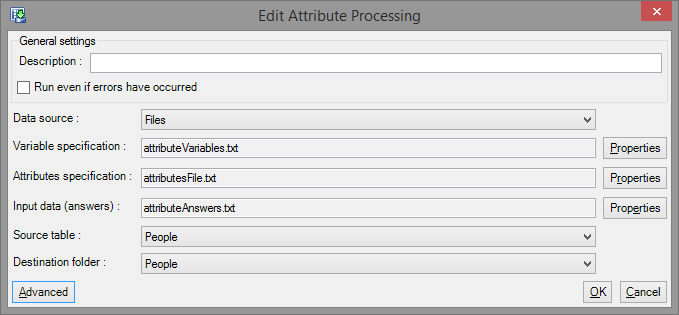
The attributes build process reads a set of specially prepared input files to create variable definitions, transaction data files and a script file to apply them. Running the script dynamically adds the attributes to the configuration as virtual variables.
As well as the flexibility and automation, this process is far faster than creating a wide flattened attribute record as attributes are in general rather sparsely populated.
Inputs to the attribute build process
The following input files are required as correctly formatted delimited files (e.g. comma separated with quotes around text fields). Usually these files can be created using a basic SQL query that can be implemented as a scheduled stored procedure within the operational database. For efficiency these files should be on disks local to the machine running the FastStats build.
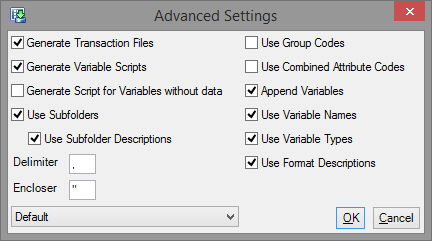
The Group Code is an optional source code (e.g. “Magazine Code”) for the attribute to allow publishers who may ask the same question in questionnaires relating to different publications to differentiate between the responses.
FastStats variables file – the questions table
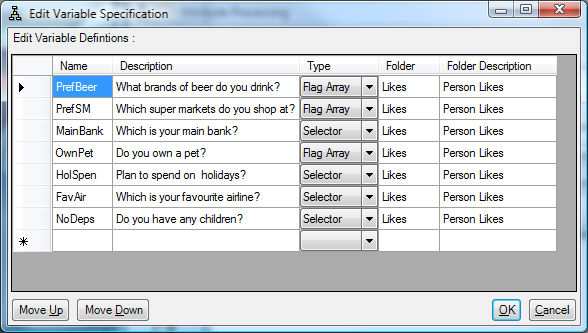
FastStats variable definitions file. A delimited file with the following columns:
- FastStats variable name e.g. “aRenHous”, maximum of 8 characters, no spaces, no punctuation
- FastStats variable description e.g. “House insurance renewal month”, maximum of 35 characters
- FastStats variable type
Sfor selector (categorical)+for multi response flag array,D2for currency,Vfor long integer numeric
- If Use Format Descriptions is enabled then an optional format character can be specified after the data type to format the code description.
C— code: description (default)D— description only
- FastStats folder for this variable e.g. “Demogs”
- FastStats folder description e.g. “demographics”
Only FastStats variables in this file will be selected from the Attributes File for inclusion in the attribute build. FastStats variables are added in the sequence defined by this file. The variable names are used to select from the Attributes File and must match (FastStats variable names are not case sensitive).
Note
The FastStats variable names will not be created if the names are already in use as existing variables within the FastStats database — we recommend using a naming convention to avoid clashes.
Attributes file – the allowed answers table
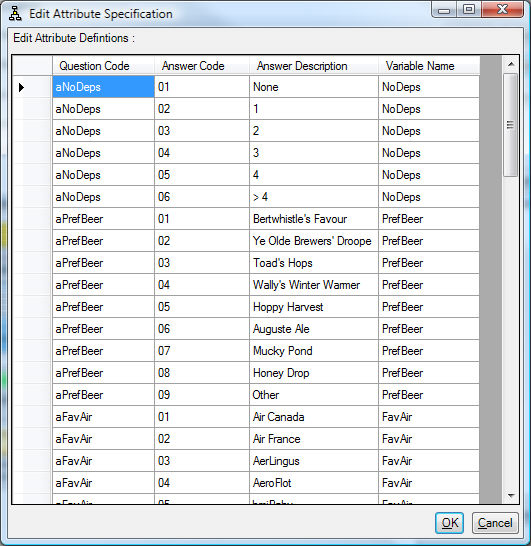
Attribute definitions table. There is one record for each attribute value (e.g. each allowed answer for each question). A delimited file with the following columns:
- [Optional Group Code] e.g. 123
- Question Code e.g. RENHOUSE
- Answer Code e.g. 02
- Answer Description e.g. February
- FastStats Variable Name e.g. aRenHous
Note
The FastStats Variable Name in the Attributes file must be one of the variables defined in the Variables file for the data to be processed.
Note
The Question code is used to match to the Answers file. The Question code and FastStats Variable name can be identical, but do not need to be.
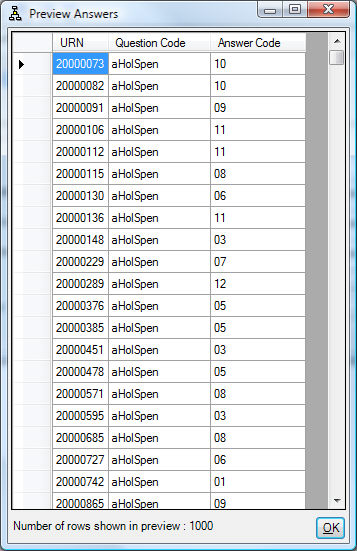
Answers file – the responses table
Attribute assignment file with one record for every person-attribute. One person may have from zero to many records reflecting the number of attributes collected.
A delimited file with the following columns:
- Person Id e.g. 123456789
- Optional Group Code e.g. 123
- Question Code e.g. RENHOUSE
- Answer Code e.g. 02
If the Optional Group code is not required, the field can be omitted (and no extra delimited is needed).
This example is read as “Person 123456789 has (question) House Insurance Renewal Month (answer) 02 collected by Group Code (123).”
Note
The updates will not necessarily be applied in the order provided. If the same person has answered the same question twice then either answer may be used. De-duplicate your answers before running the action.
Combined attribute codes
The ‘Use Combined Attribute Codes’ functionality is used to reduce the size of the Answers table by combining the question and answer code into a single Combined Attribute Code and using that in the Answers file.
The variables file stays the same
The Attributes file will contain an extra column (Question Code, Answer Code, Answer Description, Variable Name, Combined Attribute Code)
The Answers file will only contain 2 columns (ID, Combined Attribute Code)