Dynamic database data sources
A Dynamic Database Data Source is one where the variables are defined by the results of a database query. It is similar in principle to attribute processing and was developed as an alternative to the attribute processing post-load action.
A Dynamic data source is defined using 3 queries. The results from the 3 queries are combined to provide all the necessary details and data to create the dynamic variables.
Variables query
Defines each variable and properties about that variable:
Required properties for each reference. If any of these properties do not exist then the variable will be excluded.
- Foldername (restricted to 9 characters)
- Datatype
- QuestionCode is required for variables that are not Selector, Array or Flag Array
Designer always adds a default ‘URN’ (Unique Reference Number) field that will contain the candidate key.
Attributes query
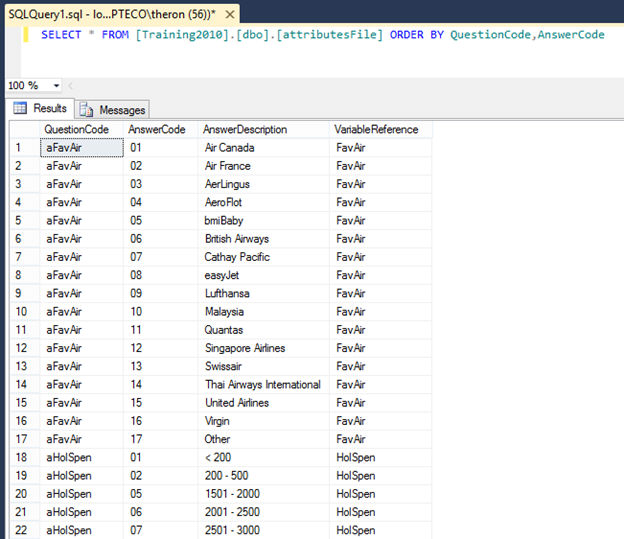
Defines the code and descriptions for Selectors, Array and Flag Array variables.
SELECT [QuestionCode], [AnswerCode], [AnswerDescription], [VariableReference] FROM [DynamicAttributes]
The QuestionCode in the attributes query is used to match the Answer's question code to the variable. For variable types that do not have any entry in the attributes query (Text, Numeric, Currency, Date, DateTime) the required variable property QuestionCode is used for the match.
Answers query
Defines the data to be loaded and must be sorted in URN order. For variables that only support a single value (i.e. not Arrays/Flag Arrays) then the last answers record will be taken if there are multiple answers.
Differences to attribute processing
- Input data must exist in an external database (files sources are not supported)
- Data source forms part of the main data load and a UI is provided
- All data types are supported (including Flag Array and Array variables)
- A marker is added to the Folder Structure to indicate the position of the variables in the System Explorer
Performance
- Extract forms a single large flattened file and takes place in parallel with the other data sources. Answers query must sort by URN.
- Queries and Extract are run on every single build – previously extracted files will not be re-used.
- Table should normally be specified as a lookup (MPL, MPL in memory or SPL).
Variable properties reference
| Property Name | Applies To | Description |
|---|---|---|
| FolderName | Optional for all variables | Restricted to 9 characters |
| DataType | Required for all variables | Possible values: Selector Text URN Numeric Currency Date DateTime Array FlagArray |
| Included | Optional for all Variables | Whether to include the variable in the built system (will still be included in extract file). Useful for excluding foreign keys. True (default) False |
| ReferenceType | Optional for URN types | Text (default) Numeric |
| QuestionCode | Required for Text, Numeric, Currency, Date, DateTime | Defines the question code that links the answer to the variable |
| FolderDescription | Optional for all variables | Restricted to 80 characters |
| Description | Optional for all variables | Restricted to 80 characters |
| AddCodeToDescriptions | Optional for Selectors, Arrays, Flag Arrays | Pre-pends each description with the code True False (default) |
| AddUnclassified | Optional for Selectors, Arrays | True (default) False |
| UnclassifiedDescription | Optional for Selectors, Arrays, Dates | Restricted to 80 characters |
| CatType | Optional for Selectors, Arrays | Nominal (default) Ascending Descending |
| Selectable | Optional for all variables | True (default) False |
| Browseable | Optional for all variables | True (default) False |
| Exportable | Optional for all variables | True (default) False |
| ExportDescriptions | Optional for Selectors, Arrays, Flag Arrays | True False (default) |
| NumericType | Required for Numeric variables | Byte UnsignedByte ShortInteger Integer SmallFixedPointDecimal FixedPointDecimal BigFixedPointDecimal SinglePrecisionFloat DoublePrecisionFloat |
| Precision | Optional for Numeric variables (Fixed, Float, Double) and Currency variables | Number of decimal places |
| CurrencyType | Optional for Currency variables | UnsignedSmallFixedPointDecimal SmallFixedPointDecimal FixedPointDecimal (default) BigFixedPointDecimal |
| Locale | Optional for Currency variables, gives Currency symbol | Culture Identifier (LCID) in decimal None (default) UK (£) is 2057 US ($) is 1033 German (Euro) is 1031 |
| MinYear | Optional for Date variables | Earliest Year (default 1901) |
| MaxYear | Optional for Date variables | Latest Year (default 2050) |
| EncryptionType | Optional for Text variables | AES |
| DateInputFormat | Required for Date/DateTime variables | YYYYMMDD DDMMYYYY MMDDYYYY DDMMMYYYY MMMDDYYYY YYYYDDD |
| DateDescriptionFormat | Optional for Date/DateTime variables | Examples: DD.MM.YYYY MM\DD\YYYY YYYY-MM-DD |
| Notes | Optional for all variables |
Folder structure
A dynamic data source must be included in the table relationship diagram and in the folder structure:
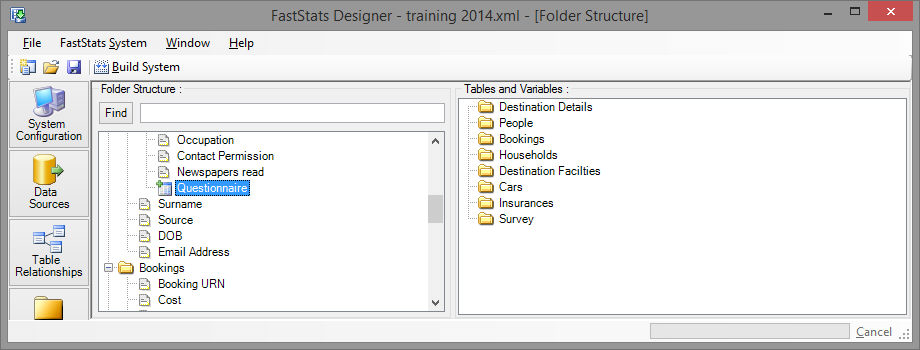
Drag the 'placeholder' to the location in the folder structure where you want the dynamic variables to appear.
Examples
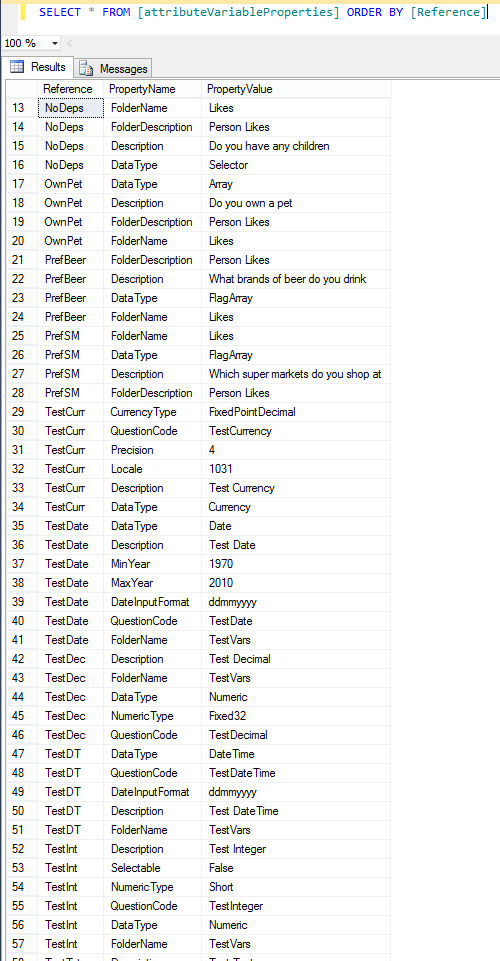
For Selectors, Arrays, and Flag Arrays.
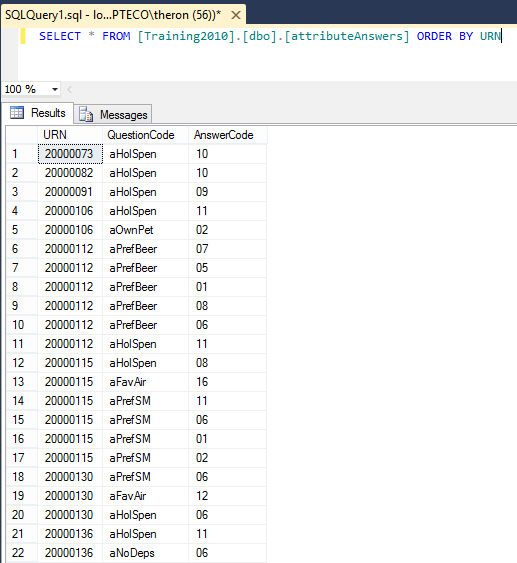
BCP extracts cannot be used with Dynamic Database Data Sources.