Contact strategies
With contact strategies you can set the maximum number of times all of the communications within a campaign can be received by a recipient within a given time period.
To apply a contact strategy:
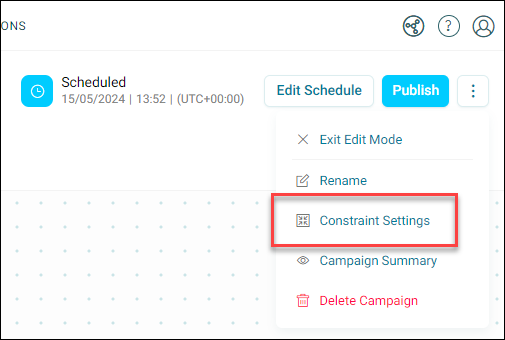
- On your campaign journey, click the option menu in the top-right corner.
-
Click Constraint Settings.
-
Click + Add Constraint.
-
Define your contact strategy:
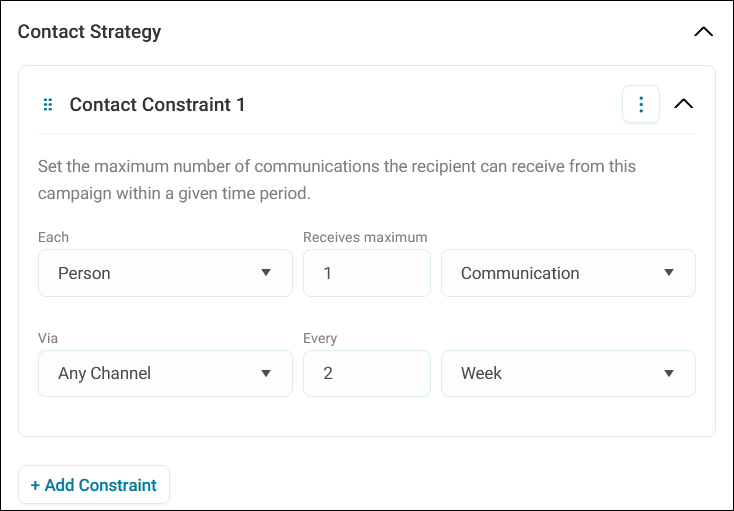
- Select whether the strategy applies to each Person or Household
- Choose the volume of communications or campaigns the recipient receives
- Specify the channel or choose Any Channel
- Set the frequency by entering a number and selecting the timeframe (e.g., days, weeks, months)
Example use case
Here we chose the contact strategy that every person receives one communication via any channel every two weeks.
-
Click + Add Constraint to include more contact strategies as needed.
Tip
Use the 6-dot drag icon to reorder your contact constraints.
Note
You can name, rename, and delete any contact constraint via the option menu.
-
Click Apply.
You save and apply constraints in the same way as schedules (i.e. you need to publish your campaign).
-
Click Publish.
By following these steps, you ensure that your communications are strategically timed and targeted.