Reordering tabs
Dashboards and audiences can have multiple tabs in Apteco Orbit, allowing you to display different tools and data from a single multi-tabbed view. Reordering your tabs lets you adjust and streamline your workflow for enhanced organisation.
Reordering dashboard tabs
To reorder your tabs in a dashboard:
- Create a dashboard or open an existing one.
-
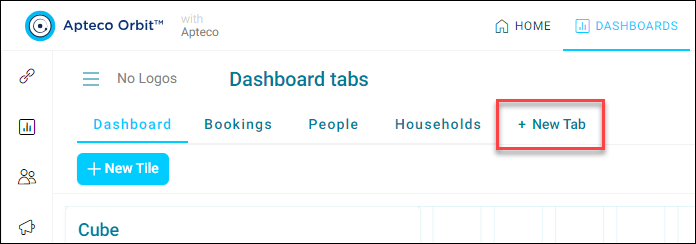
To add additional dashboard tabs, click + Add New.
-
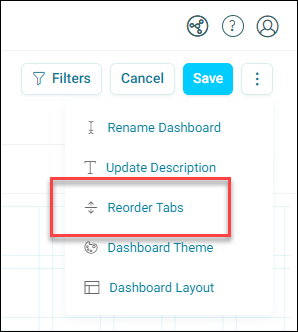
Click the ellipsis option menu in the top-right corner, then click Reorder Tabs.
-
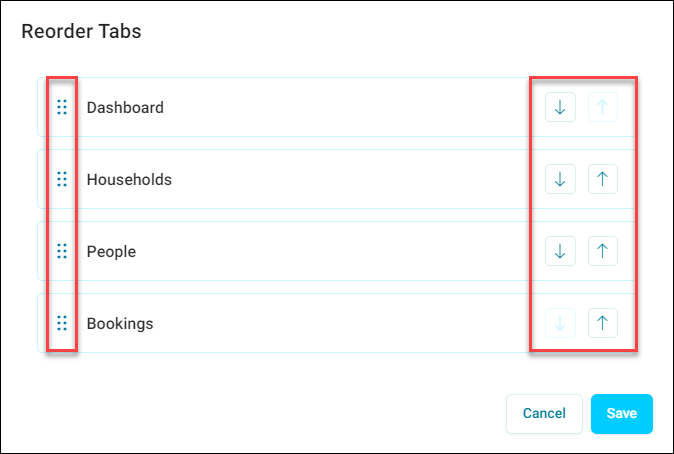
A list of your tabs appears. To reorder them, you can either:
- Click and drag the dotted area to move the tabs
-
Use the arrows on the right to cycle the tabs up or down
-
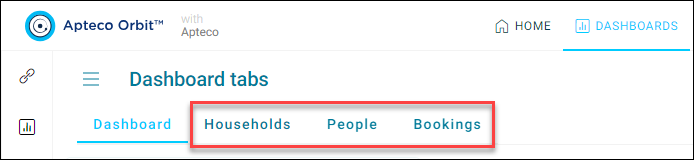
When you are happy with the new tab order, click Save.
You have now reordered your dashboard tabs.
Reordering audience workbook tabs
To reorder your tabs in an audience:
- Create an audience or open an existing one.
-
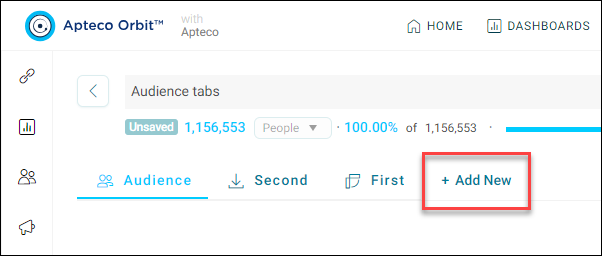
To add additional dashboard tabs, click + Add New.
-
Click the ellipsis option menu in the top-right corner, then select Reorder Tabs.
-
A list of your available tabs appears. To reorder them, either:
- Click and drag the dotted area to move the tabs
-
Use the arrows on the right to cycle the tabs up or down
-
When you are happy with the new tab order, click Save.
You have now reordered your audience tabs.