Additional options
The Advanced Options are advanced internal properties of FastStats Server and should generally be left to take their default values.
General settings
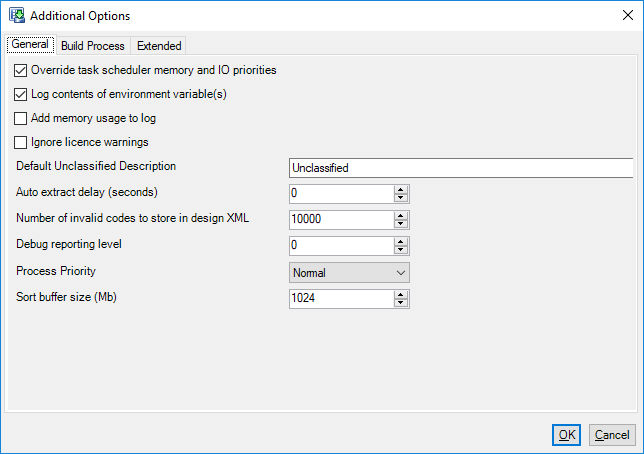
Override task scheduler memory and IO priorities
Applications running under Task Scheduler on Windows 2008 or later are given lower memory and IO priorities than other tasks. This can impact the speed of scheduled builds if other processes are running on the same machine. Checking this box forces the Designer process to ignore these lower priorities and run at full speed. The default is on.
Log contents of environment variables
Environments may contain sensitive information such as connection string and passwords. By default Designer writes to the build log the names of user defined environment variables but not include the contents of these variables. Checking this option will include the content of user defined environment variables in the build log. The default is on.
Add memory usage to log
Two further columns are added to the build log text file, One is the total memory used by Designer and the other is the memory used by the .NET components of Designer.
Default unclassified description
Sets the value used for the description of Unclassified codes if no Description is specified in the Selector properties. Set an Selectors unclassified description as blank to use this value.
Auto extract delay
Allows a delay to be specified when the Extract dialog appears to the user. A countdown will be displayed and when it reaches 0 then extract will automatically proceed.
Number of invalid codes to keep in design XML
This limit helps reduces the size of the design XML. Invalids codes are shown in the System Summary. If this limit is set then it means then if a previous build is opened up then not all invalid codes from the last build will be shown in the System Summary. This setting does not affect the build.
Debug reporting level
Specifies the level (and quantity) of informational messages generated in the Progress and log files. In general use set the debug level 0. For troubleshooting use level 1 or 2 but be aware that the volume of messages will slow down the Progress screen.
Process priority
Allows the user to control how much CPU resource is allocated to the build process.
Sort buffer size
Determines the size (in Mb) of the sort buffer Designer uses when processing data. The Default is 256Mb for 32bit Designer and the Default is 1024Mb for 64bit Designer. Increasing this value will allocate more memory to the sort process which may improve performance but may also cause “Out of Memory” errors if this is set too high. Different values are stored in the design XML file for 32 bit and 64 bit versions of Designer.
Build process settings
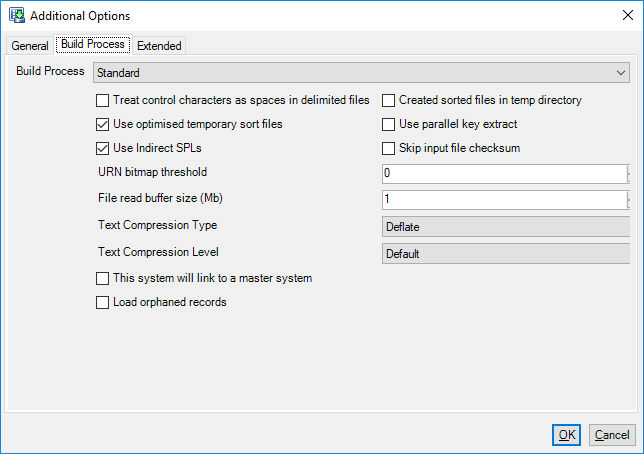
There are two build processes: Standard and Enhanced.
Standard build process options
Treat Control Characters as spaces in delimited files
Specifies that any control characters (ASCII value below 32) in input files get treated as spaces
Created sorted files in temp directory
By default a sorted copy of the input data is created in the same directory as the input data is found. This is usually the extract directory. Checking this option will instead create the sorted version of the input files in the temp directory specified on the Build tab. This can be useful if you do not have enough disk space on your extract disk. The default is off.
Use optimised temporary sort files
This uses an alternative format for the temporary sort files. This can save disk space and improve the sort speed. The default is on.
Use indirect spls
Indirect SPLs are an alternative way of building single parent lookups. Instead of treating them as transaction tables and adding entries into the .fsDat file the .fsJoin file is used instead. This can reduce the size of the .fsDat file if you have a large number of single parent lookups. The default is on.
Use parallel key extract
Checking this option switches on a new high performance, multi-threaded way of creating the key files that Designer requires for sorting and building tables. The default is off.
Skip input file checksum
Designer calculates checksums on input files to see if previously sorted input file can be re-used. If files are always replaced then there is no reason to calculate this checksum and it can be skipped. Skipping this calculation may save up to a couple of minutes on large input files.
File read buffer size
The size of the in-memory buffer used to read files sequentially. If input files or the build is stored on a file system with high latency then increasing this value may improve performance.
Text compression type and level
The default text compression is Deflate, compression level Normal. Alternative compression strategies are available and the level of compression is controlled by the Text Compression Level. A greater compression level will yield higher compression but at the expense of greater processing time during the build. The RCS (Repeated Character Suppression) compression strategy is an older compression strategy that is not as effective as Deflate or LZ4 and cannot be tuned by Text Compression Level setting.
Some typical options:
| Compression Type | Compression Level | Relative Compression Speed | Typical Compression Ratio | Effective Query Speed |
|---|---|---|---|---|
| Deflate | 1 - Best Speed | x3 | x2.7 | Normal |
| Deflate | Normal | x1 | x3.0 | Normal |
| Deflate | 9 - Best Compression | x0.5 | x3.1 | Normal |
| LZ4 | 1 - Best Speed | x20 | x2.1 | Fast |
| LZ4 | 9 - Best Compression | x1.5 | x2.7 | Fast |
Details of the Enhanced Build Process are here: Enhanced Build Process
Extended settings
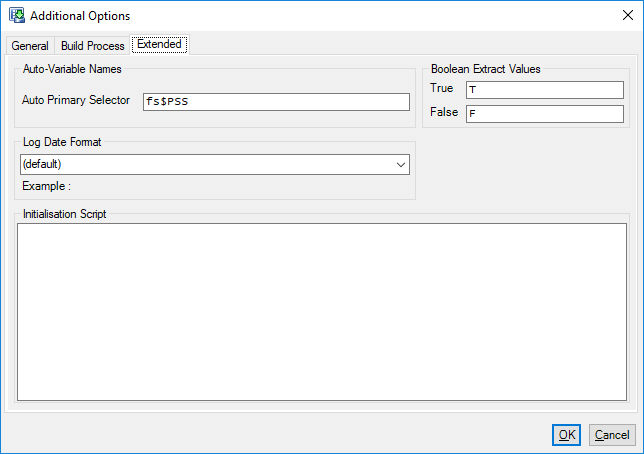
Auto-variable names
The default values are: Auto Primary Selector: 'fs$PSS'
Boolean extract values
These define the values that are written into the extract files for database boolean column types when Designer performs an extract - usually 'T' and 'F' are sufficient to create suitable decode lists or for use in Flag Arrays. You must ensure that if you are representing these fields with a Selector that the codes in the Selector match these values.
Initialisation script
This allows a snippet of FastStats script to be run before Post-load actions are run. This should be used instead of placing script in autoexec.fsf on the build machine.