Advanced tab
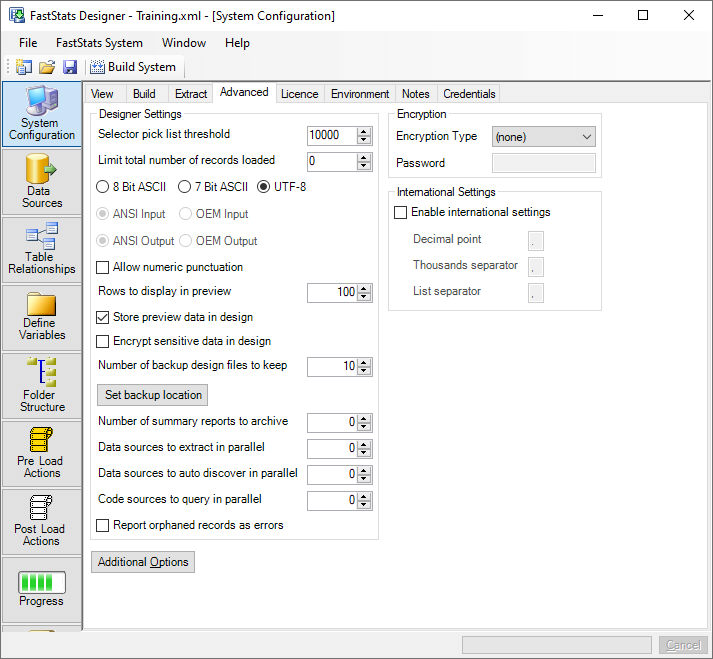
Designer settings
- Selector Pick List Threshold is used when FastStats performs Auto Discovery. This process finds values in the data to generate codes for selector variables. If the number of codes found exceeds this threshold FastStats will stop finding codes and convert the variable to a more suitable type (for example, numeric or text). The maximum value of codes allowed in a Selector variable is 200000. The default threshold is 10000 codes.
- 8 bit ASCII / 7 bit ASCII specifies whether the top ASCII bit is valid and used by the character set. Usually data from modern database environments will use 8 bit ASCII. If 7 bit is chosen the top bit will be removed and some compression will be slightly more effective.
- UTF-8 specifies if the input data files are encoded in UTF-8 so that FastStats can support the Unicode character set. If this option is checked then database extracts will also be in UTF-8 format.
- ANSI / OEM specifies the character encoding. Usually data from modern database environments will use ANSI.
- Allow Numeric Punctuation supports thousand separators in numeric fields.
- Rows to display in preview - specified the number of data rows to be displayed to the user in the data sources preview pane.
- Store preview data in design - By default Designer stores the preview data in the design XML. This speeds up opening a design but can increase the size of the design XML. Unchecking this option will mean that Designer has to re-run the preview data query but will reduce the size of the design XML file.
- Encrypt sensitive data in design - Designer stores credential information in the design XML. Checking this option will encrypt this sensitive data so it's not visible in the design XML. The encryption used is reversible so the design XML should still be treated as though it contains sensitive information.
- Backup design files to keep - The number of .bak, .bak.1, .bak.2 files to be kept when the user saves the design.
- Set backup location - This sets the default backup location for the Design XML
- Data sources to extract in parallel - The maximum number of queries that should be allowed simultaneously when extracting data from a database, a higher number (0 means infinite) may improve extract performance but will also place a heavy load on the database server.
- Report orphaned records as errors - normally orphans records are reported as warnings, thus allowing the build to continue. Checking this box will causes orphans to be treated as errors and deployment will be prevented if orphans are found.
Encryption
Only Text fields can be encrypted within a FastStats system. The only encryption type currently supported is AES-256.
Specifies the encryption type and the encryption password used to store encrypted text variables. Encrypted text variables take considerably more storage space and are slower to load and query than plain text variables. Users wishing to export encrypted text data will need to know the password.
International Settings
- Enable International settings switches on international number and data formats support:
- Decimal Point character used in decimal numbers and currency e.g. ‘.’ (English), ‘,’ (French).
- Thousand Separator character used in decimal numbers and currency e.g. ‘,’ (English), ‘.’ (French).
- List Separator character used between list items e.g. ‘,’ (English), ‘;’ (French).
- Language specifies the language to be used for messages from FastStats to the user via the FastStats Server and FastStats Web Service.
Join options
This system will link to a master system
Enables the use of linked systems.
Load orphaned records
By default FastStats Designer excludes all orphaned records (records that do not match to a parent record - e.g. People who do not belong to a household) - this ensures referential integrity throughout the FastStats system.
If orphaned records are detected then the number of orphaned records is reported in the build log and in the system summary for each table.
It is possible to load orphaned records but by relaxing the referential integrity constraint the users may encounter the following scenario:
- If a selection is made on a table with orphaned records then the returned count will include orphaned records.
- If a selection is mode on a table and it's parent then returned count will not include orphaned records - to the user this will manifest itself as a drop in the count. This occurs because if the selection spans a table and it's parent then only matching records can be considered and returned.
There are also Additional Options to control further aspects of the build.