Build tab
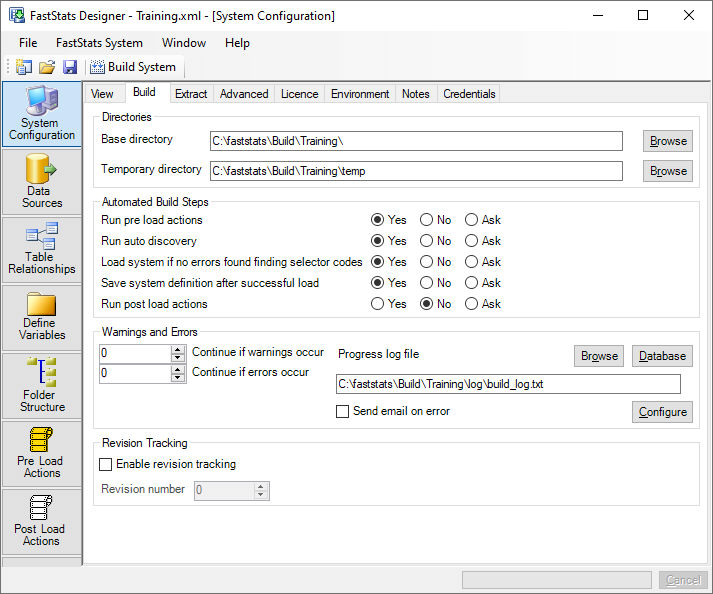
Directories
Specifies the disk locations of the FastStats system and intermediate files. These paths should be specified with local paths (for example, c:\) rather than UNC (for example, \\server\c$\) - UNC paths will work but will be slower.
Base directory
Where the FastStats system will be created. For efficiency specify a fast local disk with sufficient capacity. The data transfer rate to this directory will have a significant effect on the load time.
Temp directory
Where any temporary files will be created. For maximum efficiency specify a fast local disk with sufficient capacity. The data transfer rate to this directory will have a significant effect on the load time.
Automated build steps
These specify the system build phases.
- Run pre-load actions run a number of steps before the build process starts.
- Run AutoDiscovery scans the incoming data and automatically produces coding definitions for all variables.
- Load System joins, compresses and indexes the data to create a FastStats Database.
- Save System on completion of the FastStats load ensures that load statistics and related information are saved with the design.
- Run post-load actions on completion of the load starts running the actions checked in the Post-load actions list.
FastStats Designer makes calls to FastStats Server to perform the build phases and report to the progress window.
Build errors & warnings
As the system build progresses FastStats may report progress and informational messages. Problems may be reported due to inconsistent properties, missing or erroneous data. Messages are classified as:
- Info Normal operational messages including progress information. Extra Info messages are generated if the Debug Level is set above level zero.
- Warning messages should be read as they highlight potential problems that may have an impact on the completed FastStats system.
- Error messages indicate problems in the data or build process that will usually require correction before a rebuild.
- Fatal error messages indicate problems in the data or build process that are severe enough to stop the build immediately.
By default FastStats Designer will continue the build unless a fatal error is encountered. This strategy may be modified to force a build to stop after a specified number of warnings or errors.
Progress log file
Optionally writes the messages that are added to the Progress Window to a file or to the Build Log Database.
Revision tracking
Allows the system to be built into a new directory on every single build. After each successful build the revision number is automatically incremented.