Dependent variables
Where it is possible to edit a virtual variable, the step panel on the left of the wizard gives two opportunities to review any dependant variables on the one being updated.
Note
The review of dependant variables is only available to Enterprise system users.
Before updating
The first review comes by marking the Review Dependant Variables box on the Name step. This gives the opportunity to see which variables will be affected by the potential changes before the update takes place.
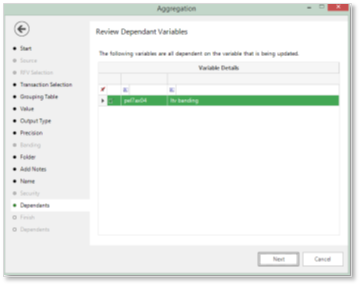
After updating
The second review is available after the update has taken place by marking the Show dependant variables box on the Finish step.
Note
It is a personal choice as to whether a review of dependant variables is made before or after the update of a virtual variable. In either case the User will need to manually amend any dependant variables if required.
Manage Virtual Variables
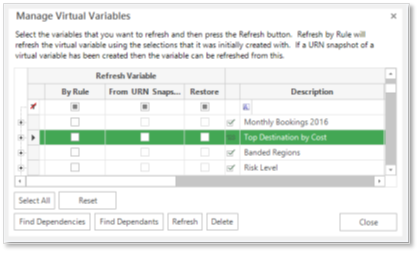
Alternatively, it is possible to review all Virtual Variables by navigating to the Manage Virtual Variables window:
- File – Tools – Manage Virtual Variables…
-
Highlight a Virtual Variable in the grid and click on…
- Find Dependencies – which will show virtual variables that are used in its creation
- Find Dependents – which will show Virtual Variables that use this variable in their creation