Tracking multiple objectives for a message
Campaigns often include messages designed to drive several outcomes, such as event sign-ups, product purchases, and app downloads. You can track multiple objectives for a single message in Orbit. This allows you to monitor different types of responses from the same message, helping you evaluate each call to action individually.
Example use cases
Product launch campaign with pre-order and event registration
You’re launching a new product and want to engage your audience in two ways: encouraging pre-orders and promoting a virtual pre-launch event.
- Objective 1: Event registrations
Track how many people sign up for the pre-launch event. Set a target of 500 registrations to gauge interest in the event.
- Objective 2: Product pre-orders
Track pre-orders of the product directly from the campaign message. Set a target of 200 pre-orders within a four-week timeframe to estimate demand.
Cross-promotional campaign for donations and event attendance
Your campaign supports a charity with two primary calls to action: encouraging event attendance and raising donations. You want to understand the effectiveness of each call to action within the same message.
- Objective 1: Event sign-ups
Track registrations for an upcoming charity event. Set a target of 300 registrations to measure event engagement.
- Objective 2: Donation tracking
Track donations made from the campaign link. Set a target donation amount of £10,000 within a three-week window to evaluate the fundraising impact.
Adding an additional objective to a message
To add an additional objective:
- In your campaign journey, select a message step with an objective already applied.
-
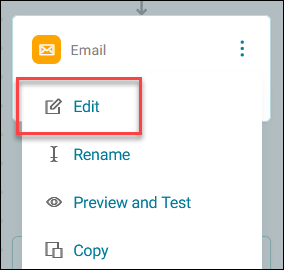
Click the option menu, then click Edit.
-
In the side panel, click + Add Objective.
-
Create a new objective by following the steps in Creating an objective.
- You can continue adding as many objectives as necessary for your campaign.
You have now set up multiple objectives for your message.