Journey steps
Journey steps are the building blocks of your campaign journeys in Apteco Orbit. You can design targeted campaigns by guiding your audience through a series of well-defined stages.
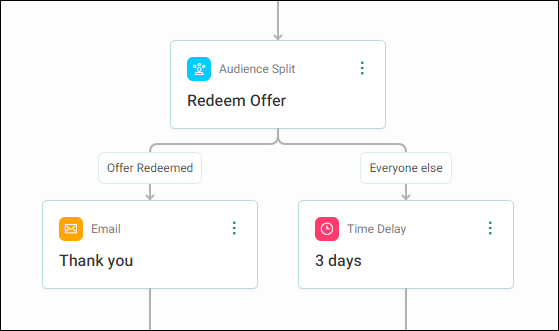
Here are the key elements:
- Target segment step: Identify and segment your target audience. See Including and excluding audiences.
- Channel step: Utilise various communication channels like email, WhatsApp, etc. See Campaign channels.
- Interaction split: Divide your audience into segments and direct each down different paths. See Interaction splits.
- Audience split: Customise your campaigns based on recipient interactions. See Audience splits.
- Time delay: Introduce pauses between stages in your campaign journey. See Time delays.
- Sections and path redirects: Build complex campaigns and keep journeys clean and efficient by redirecting paths anywhere in your campaign. See Redirect sections.
Note
Each journey steps displays the step type with details on path flow, and the name you have given the step.
Expand any step by hovering your cursor over to show further details, such as audience net counts, email template, or time delay duration.
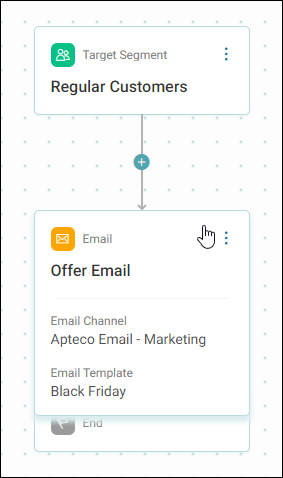
Exit campaign step
The default step at the end of a campaign exits participants from the journey.
Hold participants
The Hold participants option on the same step lets you keep participants at the end of a campaign journey indefinitely, rather than exiting them immediately.
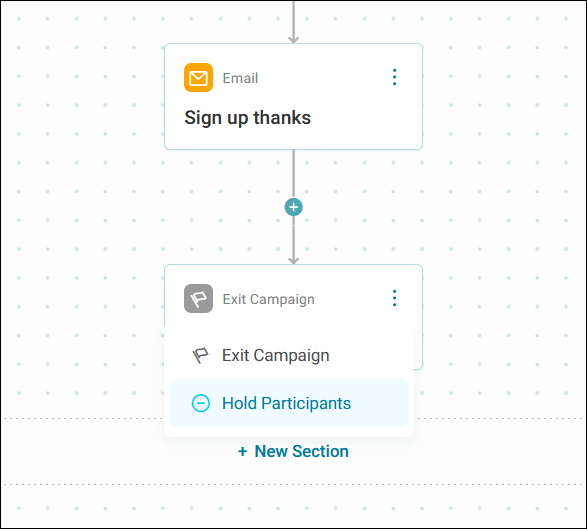
This is useful when you have a Triggered events campaign where participants reach milestones independently and at different times. Instead of using Time delays to keep participants in the diagram, you hold them indefinitely and let your triggered events handle progression and exit.