Interaction splits
Interaction splits let you to personalise customer journeys based on how your recipients engage with messages. You can automatically route contacts through different campaign paths for more targeted follow-ups by setting up rules based on specific behaviours, such as opening, clicking, or bouncing emails.
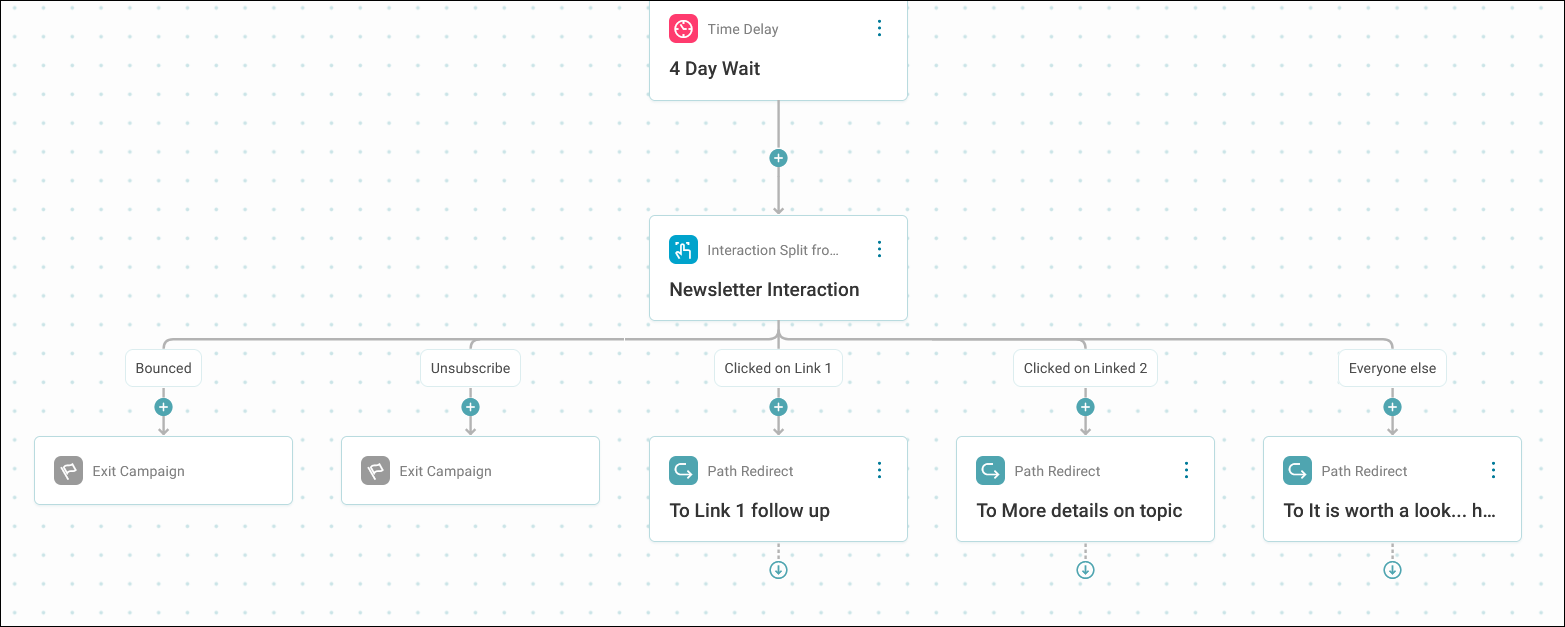
Interaction splits evaluate recipient actions within a defined timeframe and branch your journey accordingly. You can reference any of the preceding message steps in your journey to base the split upon.
Example use cases
Event attendance follow-up
You're promoting a show and want to identify cancellations whilst monitoring engagement from those still attending. Combine an audience split to identify cancellations with an interaction split to measure engagement with your initial promotion email. This lets you route:
- Engaged prospects towards purchase reminders
- Unengaged contacts towards re-engagement campaigns
Lead nurturing with message-specific engagement
You've sent an introductory email and now want to segment responses based on interaction. Set up an interaction split referencing that email, with paths for clicked, opened, and unopened recipients. Route clickers to a sales conversation, openers to a follow-up educational email, and unopened contacts to a re-engagement sequence. Later in the journey, you can reference a different message step to measure engagement with subsequent sends.
Info
Interaction splits can reference the following message step types: Email, SMS, and WhatsApp. You can't base an interaction split on a message step within a triggered event.