Managing Apteco SMS opt-outs
When setting up your Apteco SMS channel, you can send messages in two ways:
- Using a specified phone number—messages appear to originate from this number
- Using an alphanumeric sender ID (e.g. your company name)—messages display this as the sender
See Setting up your SMS channel.
The process for managing opt-outs differs between the two.
Standard long number opt-outs
When sending SMS via long numbers (two-directional), you can process recipient responses through either FERG or the AptecoResponsesAPI webhook. See Setting up Apteco SMS webhooks for responses.
Long numbers allow for direct response handling, making opt-out management straightforward.
Setting opt-out keywords
Configure opt-out keywords in your channel settings:
When recipients reply with any of these keywords, the system records an entry in the Responses table with a MessageType of OptOut, preventing further SMS messages to those numbers.
Alphanumeric sender opt-outs
Alphanumeric senders (e.g. "Apteco") are one-directional and cannot receive replies, which presents a challenge for opt-out management.
Note
This solution requires Apteco software version Q2 2025 or later.
Implementation steps
-
Configure your channel with:
- Sender: Your alphanumeric name (e.g. "Apteco")
- Reply Sender: Your dedicated opt-out long number
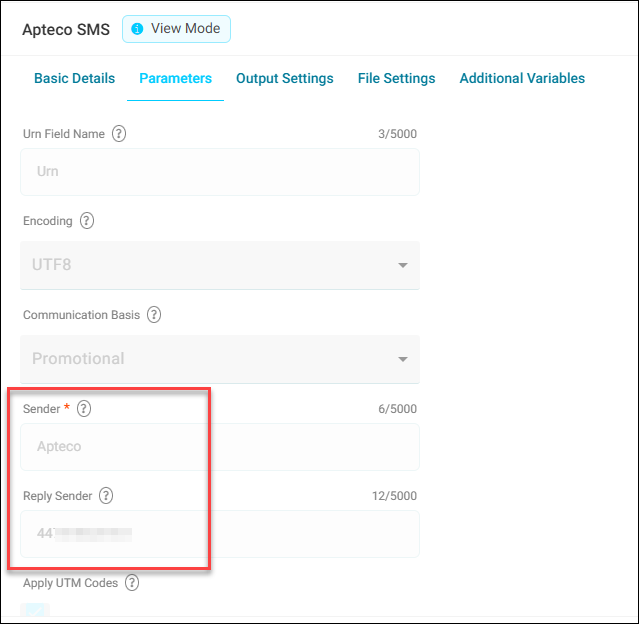
Customer communication
Inform recipients that to opt out, they must text keywords like "STOP" to your designated opt-out number (the Reply Sender value).
Technical details
When running a campaign with this configuration, the Broadcasts table records the parameters:
If recipients send opt-out keywords to the Reply Sender number, the SMS webhook records this in the Responses table with:
- Phone number in the Email field
MessageTypeofOptOut

Note
These entries won't have a Communication Key or BroadcastId, as they can't be linked to specific originating messages.
Suppression mechanism
The broadcast process suppresses delivery to any phone numbers that:
- Appear in the Email field of the Response table
- Have a
MessageTypeofOptOut
Identifying opt-outs for alphanumeric senders
Query the Response and ResponseDetails tables to identify opt-outs:
SELECT R.Email
FROM ResponseDetails RD
INNER JOIN Response R ON RD.Id = R.Id
WHERE RD.[Name] = 'To'
AND RD.[Value] = '447418628101'
AND R.MessageType = 'OptOut'
Replace 447418628101 with your specific opt-out number.