Orbit installation
Introduction
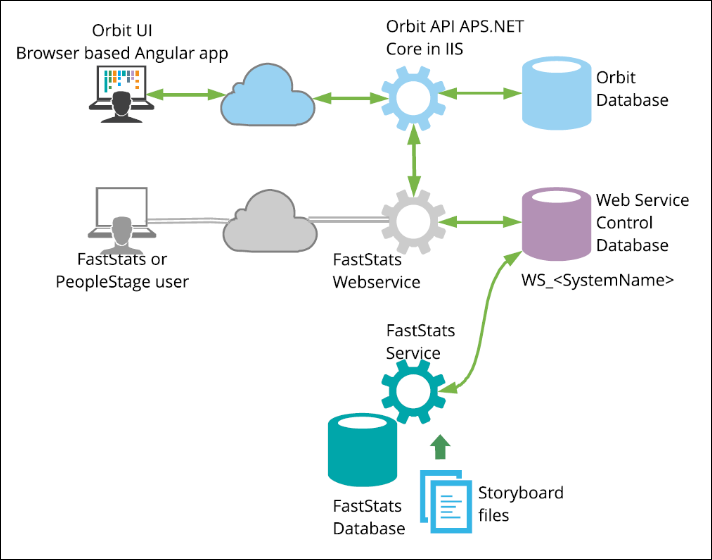
FastStats Orbit is a JavaScript web application that deploys from a web server and runs in modern browsers. You can use Orbit on a variety of devices as it runs in a browser user interface (BUI) and communicates with FastStats via the Orbit API.
The Orbit API and Orbit Updater service
The Orbit API is a RESTful web service that connects the Orbit application to FastStats.
The FastStats Orbit Updater service is a Windows service that obtains the Orbit web application and Orbit API from Apteco's update server.
Before you begin
Warning
Installing Orbit requires access to staff with experience installing Apteco products and administering IIS, SQL, and Windows Server. If you are concerned you do not have access to appropriate skills, please contact your partner.
This guide details the steps required to add FastStats Orbit to an existing FastStats Enterprise system, adding the following to your web server:
- Orbit web application—see Configuring the Orbit web application
- Orbit API—see Orbit API Configurator
Note
Apteco only guarantees compatibility with the previous four FastStats system releases and no releases before Q2 2017. You need Q2 2020 to use the Pareto feature and Q1 2021 to use the Resolve Table feature.
Security information
Securing user sessions
Orbit should be installed on a web server that supports HTTPS.
The authentication process sends passwords in plain text through the communication channel between the Orbit UI (client) and Orbit API (web server). Using HTTPS ensures all communications are encrypted.
Security considerations of the Orbit Updater process
The Orbit Updater service downloads packages (NuGet packages) from the Orbit Update Server (usually https://orbit.apteco.com) over HTTPS. The update server exists in Apteco's DMZ and the packages are encrypted in transit.
The server is secured using a certificate issued by DigiCert, ensuring that:
- All communications are encrypted
- The packages are secure in transit
- The configured update server is valid and is not a malicious site purporting to be the configured update server
The orbit.apteco.com server is managed within the Apteco DMZ and protected by a current firewall with an active threat detection subscription.
Support for signing NuGet packages has only been introduced recently and is therefore not yet supported within Orbit; Apteco plans to introduce support for signed NuGet packages in a future release of the Orbit Updater.
The Orbit Updater runs packaged SQL scripts to apply any necessary changes. These scripts ship with a .sig (signature) file containing a SHA512 signed hash of the SQL script. The Orbit Updater only applies these scripts if:
- The .sig file is present
- The .sig file matches the contents of the SQL script
- The signature matches a known Apteco signature
Process overview
The installation is a five-stage process. A checklist is included for your convenience.
- Prerequisites
- Information required
- Orbit installation
- Orbit database
- Updater service
- Post-installation check
- Configuration
- Orbit
- IIS
- FastStats
- Testing and validation
Apteco recommends completing and validating the prerequisites, and deciding and documenting the information required, before starting the installation process. In some environments, completing the prerequisites may require effort and support from multiple teams.