Configure FastStats for Orbit
FastStats can publish storyboards to Orbit using the Orbit API and provide FastStats users with a link to Orbit.
Web Service configuration
To configure FastStats for Orbit:
- Open the FastStats Configurator and go to the Web Service section.
-
Find the system you are setting Orbit up for and go to the Orbit page.
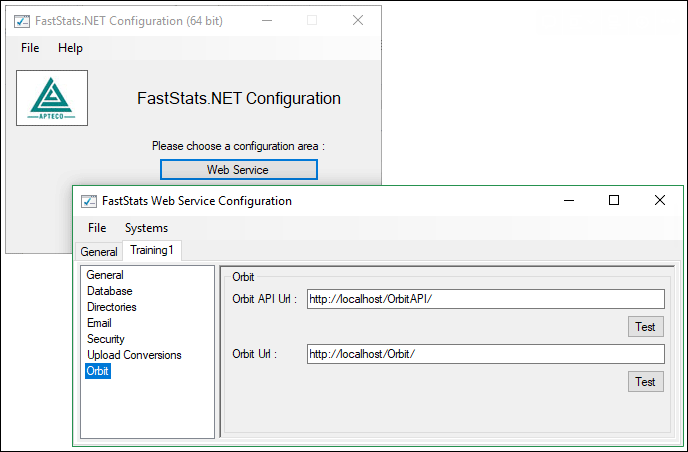
Field Value OrbitAPI URL http(s)://<server>/OrbitAPIOrbit URL http(s)://<server>/OrbitNote
Use the above settings if you are installing a new site in the root. Use the Test buttons to check the setup is correct.
-
Choose File > Save to save changes and close the dialogue.
FastStats Service configuration
- Open the FastStats Service settings using the FastStats Services button.
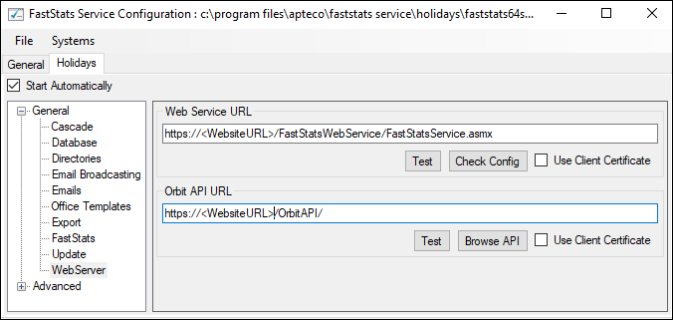
- Choose the system you are configuring Orbit for and open its settings by selecting the Properties button.
-
From the System tab, choose the Web Server panel and enter the Orbit API address.
-
Use Test to confirm you can connect to the URL.
- Choose File > Save to save the changes.
- Restart the FastStats Service for these changes to take effect.
Verify the configuration
To verify that FastStats and Orbit are connected:
- Navigate to
https://<server>/Orbitand log in with a FastStats username and password. - Open FastStats and click Send to Orbit to share a Storyboard.
-
View the Storyboard in Orbit and confirm the visualisation is reproduced correctly.