Troubleshooting
Verify the API is responding
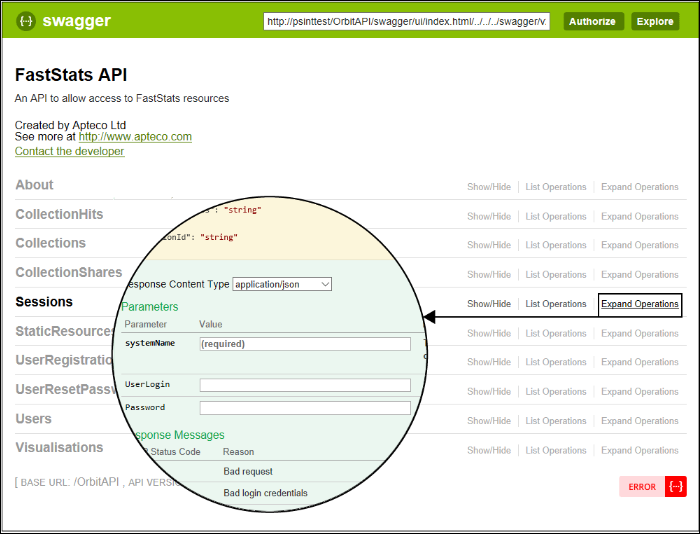
Navigate to https://<server>/OrbitAPI in a browser. If the API is responding, you should see a page similar to this:
Login troubleshooting
To troubleshoot login problems manually:
- Expand the Sessions section and choose Simple Login.
- Enter login credentials in the Parameters section. You can use either the FastStats username or the email address.
Note
You can safely ignore the following error if it appears:
Errors relating to client access
Error: 401 Unauthorised
Solution: If the API responds with a 401 error when using correct login details, ensure the security settings in appsettings.json match the settings in your Web Service configuration.
Error: 403 Access Denied
Solution: The default page file must be index.html within IIS. If it is not set correctly, users will receive a 403 access denied message.
Errors relating to directory access
These errors occur when the user running the AspNetCore application pool cannot execute dotnet.exe or cannot access the directory.
Error:
Application MACHINE/WEBROOT/APPHOST/ORBITAPI with physical root D:\www\inetpub\...\OrbitAPI\ failed to start process with commandline '"dotnet" .\Apteco.Orbit.API.dll', ErrorCode = '0x80070002: 0.
Solution: Add C:\Program Files\dotnet\ to the PATH environment variable for the executing user, or edit web.config in the OrbitAPI directory to use the full path:
Change:
<aspNetCore processPath="dotnet" arguments=".\Apteco.Orbit.API.dll" stdoutLogEnabled="false" stdoutLogFile=".\logs\stdout" forwardWindowsAuthToken="false" />
To:
<aspNetCore processPath="C:\program files\dotnet\dotnet\dotnet.exe" arguments=".\Apteco.Orbit.API.dll" stdoutLogEnabled="false" stdoutLogFile=".\logs\stdout" forwardWindowsAuthToken="false" />
Errors relating to ASP.NET Core version
This error occurs when an incorrect version of ASP.NET Core is installed (for example, the 'Current' channel rather than LTS).
Error:
Application '...' with physical root C:...\my-app-folder\ failed to start process with commandline '"dotnet" .\MyApp.dll', ErrorCode = '0x80004005: 80008083.
Ensure you have installed the correct LTS version. See ASP.NET Core 8 requirement.
Errors when using Internet Explorer with an intranet deployment
Error: The Orbit login page renders incorrectly in Internet Explorer.
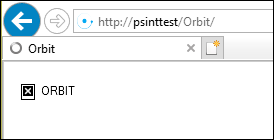
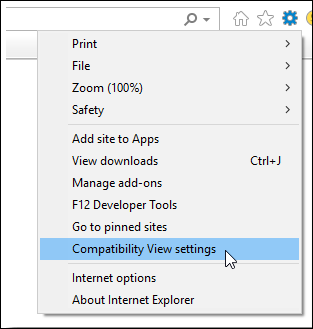
Solution: Open the Compatibility View Settings in Internet Explorer.
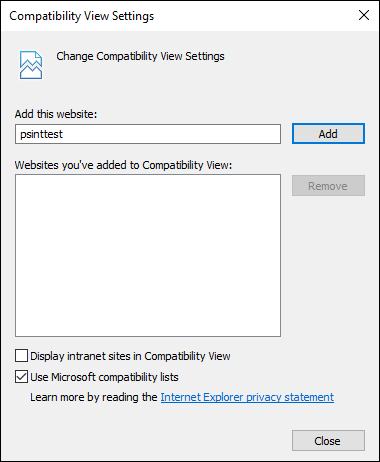
Clear the checkbox for Display intranet sites in Compatibility View.
API settings
The API settings are maintained in appsettings.json in the /OrbitAPI virtual directory.
Note
You may need to reset IIS after making changes to appsettings.json.
| Setting | Notes |
|---|---|
| JwtIssuerOptions | JSON Web Token Issuer Options—used as part of the login process. Possibly not required, or could be set to default and overridden in certain circumstances. |
| CorsOptions | Cross Origin Resource Sharing Options—allows the Orbit UI to communicate with the Orbit API when they are not the same website. Also useful when IP addresses and domain names are used interchangeably. |
| Systems > Emails | The Email service settings indicate the method by which the API sends emails. The EmailNotificationService describes the details of emails that are sent. |
| Systems > SessionService | The session service password details must match the FastStats Web Service password restrictions. Values for HashMethod are: BasicCipher, SHA1, SHA256, SHA384, SHA512, MD5 |
| Systems > User service | Orbit allows sharing to any email address in a list of domains. The domains are set in RestrictedEmailDomains. Example: "AllowUnrestrictedEmailDomains": "false", "RestrictedEmailDomains": "apteco.com example.com" |
WebDAV conflicts
WebDAV is an IIS extension that can interfere with Orbit's correct operation, specifically causing Audience Export to fail silently.
Who is affected: Customers running Orbit on a server that also has GoldVision may be using WebDAV.
Diagnosis: Use browser developer tools to check for blocked HTTP verbs such as Delete or Put, or blocked methods such as Download. The following error indicates a WebDAV conflict:
{"code":10002,"id":null,"message":"ErrorGettingFileContents","parameters":[{"key":"details","value":"The remote server returned an error: (405) Method Not Allowed.\n"}]}
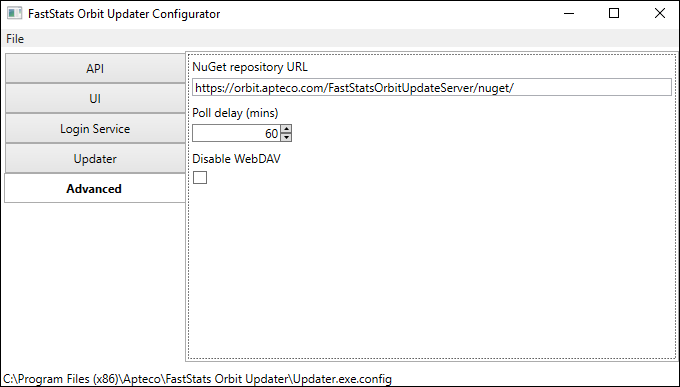
Solution: In the Orbit Updater Configurator, tick Disable WebDAV on the Advanced tab.
Warning
Only select Disable WebDAV if you are certain WebDAV is installed on the IIS instance. Disabling it when it is not installed will cause errors in IIS and may result in no sites being served.
After changing this setting, restart the FastStats Orbit Updater Service. The service will then adjust the OrbitAPI web.config on its next update cycle.
Technical notes
Default OrbitAPI web.config with WebDAV placeholders:
<?xml version="1.0" encoding="utf-8"?>
<configuration>
  <!--
    Configure your application settings in appsettings.json. Learn more at http://go.microsoft.com/fwlink/?LinkId=786380
  -->
  <system.webServer>
    <handlers>
      <add name="aspNetCore" path="*" verb="*" modules="AspNetCoreModule" resourceType="Unspecified" />
      <!--StartWebDav--><!--EndWebDav-->
    </handlers>
    <aspNetCore processPath="dotnet" arguments=".\Apteco.Orbit.API.dll" stdoutLogEnabled="false" stdoutLogFile=".\logs\stdout" forwardWindowsAuthToken="false" startupTimeLimit="3600" requestTimeout="23:00:00">
      <environmentVariables />
    </aspNetCore>
    <rewrite>
      <rules>
        <rule name="UseUnencodedUrl" stopProcessing="true">
          <match url="(.*)" />
          <action url="{UNENCODED_URL}" type="Rewrite" appendQueryString="false" />
        </rule>
      </rules>
    </rewrite>
    <security>
      <requestFiltering allowDoubleEscaping="true" />
    </security>
    <!--StartWebDavModule--><!--EndWebDavModule-->
  </system.webServer>
</configuration>
When Disable WebDAV is checked, the OrbitAPI web.config is modified to:
<?xml version="1.0" encoding="utf-8"?>
<configuration>
  <!--
    Configure your application settings in appsettings.json. Learn more at http://go.microsoft.com/fwlink/?LinkId=786380
  -->
  <system.webServer>
    <handlers>
      <add name="aspNetCore" path="*" verb="*" modules="AspNetCoreModule" resourceType="Unspecified" />
      <!--StartWebDav--><remove name="WebDAV" /><!--EndWebDav-->
    </handlers>
    <aspNetCore processPath="dotnet" arguments=".\Apteco.Orbit.API.dll" stdoutLogEnabled="false" stdoutLogFile=".\logs\stdout" forwardWindowsAuthToken="false" startupTimeLimit="3600" requestTimeout="23:00:00">
      <environmentVariables />
    </aspNetCore>
    <rewrite>
      <rules>
        <rule name="UseUnencodedUrl" stopProcessing="true">
          <match url="(.*)" />
          <action url="{UNENCODED_URL}" type="Rewrite" appendQueryString="false" />
        </rule>
      </rules>
    </rewrite>
    <security>
      <requestFiltering allowDoubleEscaping="true" />
    </security>
    <!--StartWebDavModule--><modules><remove name="WebDAVModule" /></modules><!--EndWebDavModule-->
  </system.webServer>
</configuration>