Cross cube
Cross cubes allow the ability to use the same variable on both dimensions and also to display a mixture of variables from 'sibling' tables.
Same variable on each dimension
Display a blank Cube and then drag the same variable onto each of the dimension drop zones and click the Build button.
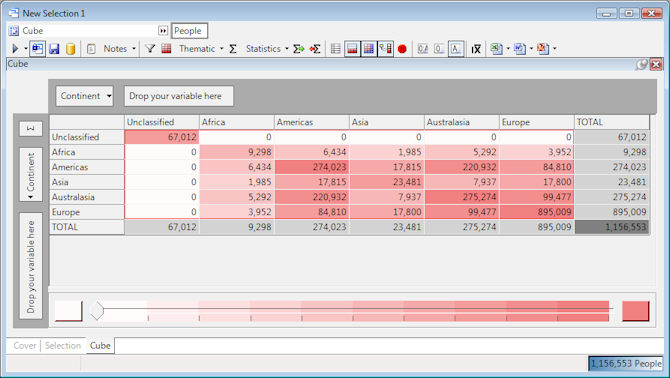
In the above example the Continent variable has been used so that you can see combinations of holiday bookings. e.g. 1.985 People have made bookings to both Asia and Africa. The figures that cross over for the same category e.g. Africa v Africa show the number of People who have been to that holiday destination although they may have made bookings to other continents.
Variables from sibling tables
Display a new blank Cube and then drag a variable onto each of the dimension drop zones one from one sibling table and one from another and click the Build button.
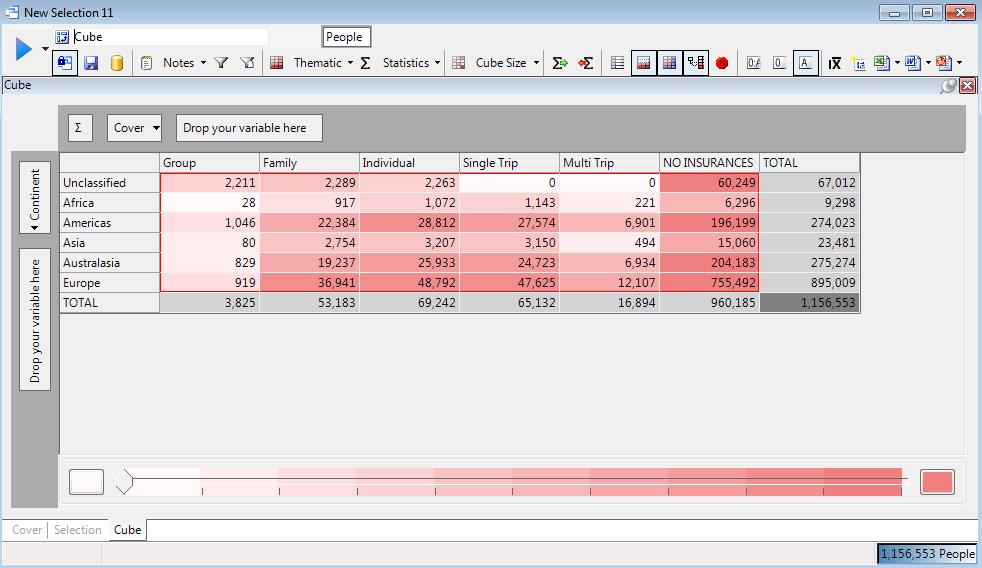
In the above example Continent is from the Booking table and Cover from the Insurance table. From the Cube you can see there are 1143 People who have made Bookings to Africa and taken a Single Trip insurance policy. However, the Single Trip insurance policy does not necessarily apply to the bookings to Africa. This can be seen more clearly in the selection logic for this cell by dragging out the cell onto the workspace.
In both the examples above a  Cross Cube symbol will appear in the Cube icon bar to indicate the functionality is in use.