Twitter / X
Apteco integrates with Twitter/X using the Twitter Public API, Media API, Ads API, and OAuth 2.0 protocol. The integration is supported by the FastStats Service and Web Service, a Social database, and the Twitter Response Gatherer component.
Using the Administration Suite within FastStats, you can:
- Set up Twitter Apps and Handles
- Grant permissions to FastStats administrators and users to manage Apps and Handles
- Obtain and store Handle tokens via FastStats' built-in Twitter login mechanism
Once valid tokens are stored in the Social database, you can create campaigns and reports in PeopleStage and gather responses.
Note
Your FastStats Designer model must include Twitter UIDs to post Twitter Direct Messages.
Only Twitter Apps where the advertiser Handles have been whitelisted can publish campaigns in PeopleStage.
Process summary
The following diagram describes the typical interactions between Apteco and Twitter.
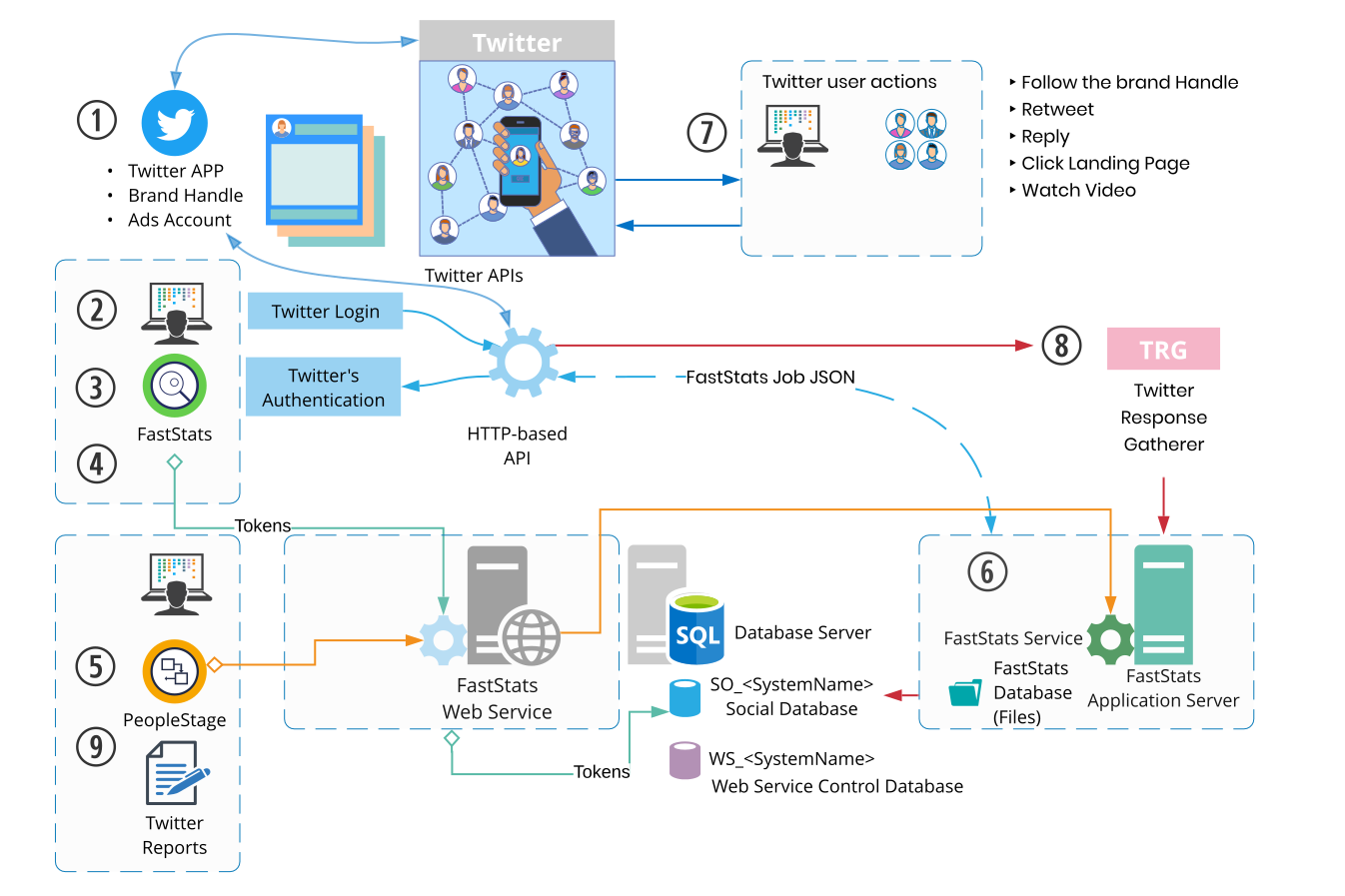
- An Apteco administrator whitelists the Twitter App in FastStats.
- A FastStats user logs in to the Twitter App via the FastStats login dialogue.
- Twitter authenticates the user and returns:
- An Access Token (API key) to manage the App
- An Access Token Secret (API secret)
- Apteco stores the token and token secret in the Social database and validates them when the user runs Twitter Administrative Functions.
- PeopleStage uses the validated tokens when publishing campaigns. Campaigns can publish Direct Tweets, Adverts, or Direct Adverts.
- The FastStats Service posts to the HTTP-based API and receives returned data as JSON.
- Twitter user interactions (follows, retweets, replies, clicks, video views) are recorded.
- The Twitter Response Gatherer runs scheduled jobs and saves responses into the Social database.
- Twitter Summary Reports are available in PeopleStage.
Prerequisites
Ensure you have installed:
- A pre-existing FastStats system with PeopleStage
- A Social database (shared with other social integrations)
- The Twitter Response Gatherer
Creating a Social database
All Apteco social integrations share a single Social database. If you already have one for Facebook or another integration, skip this step.
To create the Social database, follow the same steps as for Facebook prerequisites.
If the Social database already exists, proceed directly to FastStats configuration.