Multiple variables
Drag positions and logic
To combine variables in your selection, simply drag and drop the variable onto the selection and choose the connecting logic to combine them.
There are 4 ways you can drag a variable onto an existing selection. These are:
-
Onto the white space at the bottom of the current selection – this will append the selected variable onto the existing selection using an AND clause.
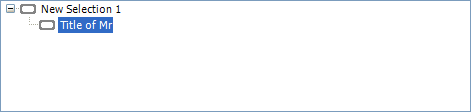
As an example, if you drag the variable of Source onto white space below Title of Mr on the existing selection above, the selection would be modified as shown below:
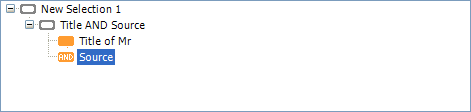
The selection has now become Title of Mr AND Source. You would need to specify which Sources to select on.
-
In between two existing nodes at the same level in the Selection tree – in this case, FastStats will look at the logic that connects the two nodes above and below your insertion place and use that to determine the connecting logic. You will notice that the cursor changes into a black line. The left hand edge of the black line determines how the inserted clause will be indented into the current selection and so governs what logic will be used.
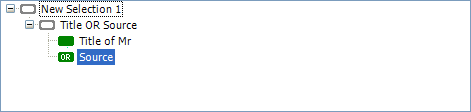
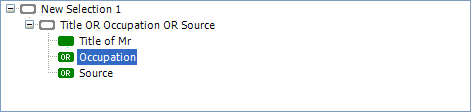
As an example, if you dragged the Occupation variable in between the Title of Mr and Source nodes in the above selection, FastStats would insert a new node called Occupation connected using OR logic as shown below. It assumes that because there are two nodes separated by an OR clause then the Occupation selection will be an additional OR clause as shown below.
-
Onto an existing selection node – this will add the selected variable into the selected node and combine them using the different logic than simply putting it at the end. For example, if we dropped Occupation onto the AND Source node below then it would be combined using an OR clause (as opposed to an AND clause). An exception to this is the first node in the tree. If we dragged Occupation onto Title of Mr then it would be added with an AND clause.
As an example, if we dragged the Occupation variable onto the existing Source node above, the selection would be modified as shown below i.e. it is combined using an OR clause (as opposed to another AND clause which you would get by dropping it in the space between Title of Mr and AND Source or dropping it in the white space at the bottom).
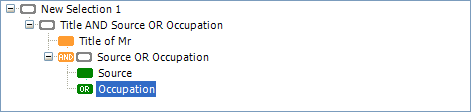
The selection has now become Title of Mr AND Source OR Occupation. You would need to specify which Sources and which Occupations to select on.
If you now dragged say Year of Birth onto the OR Occupation node then this time it would be combined using an AND clause (as opposed to another OR clause which you would get by dropping it in the space between Source and OR Occupation or dropping it in the white space at the bottom).
-
In between two existing nodes at different levels in the Selection tree.
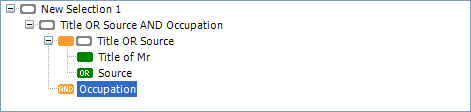
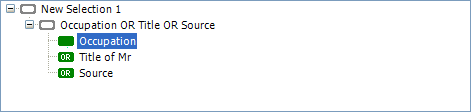
For example, if you dragged the Occupation variable in between the two nodes labelled Title OR Source and Title of Mr above so that the black insertion bar extended only as far left as the green node below then the Occupation clause would be inserted in line with the green node and separated with an OR clause as shown below.
If, however, you dragged the Occupation variable in between the two nodes labelled Title OR Source and Title of Mr so that the black insertion bar extended as far left as the white node above then the Occupation clause would be inserted in line with the white node and separated with an AND clause as shown below.