FastStats release notes 2024
Q4 2024
4 December, 2024
Analysis
New Segmentation: relative time points for date rules
The Segmentation tool now offers a third option for specifying date rule schedules: Relative Time Points. This allows you to specify the schedules as points that are relevant to a particular datetime point — for example, "every month from the start of this month backward by 6 months, to the start of this month."
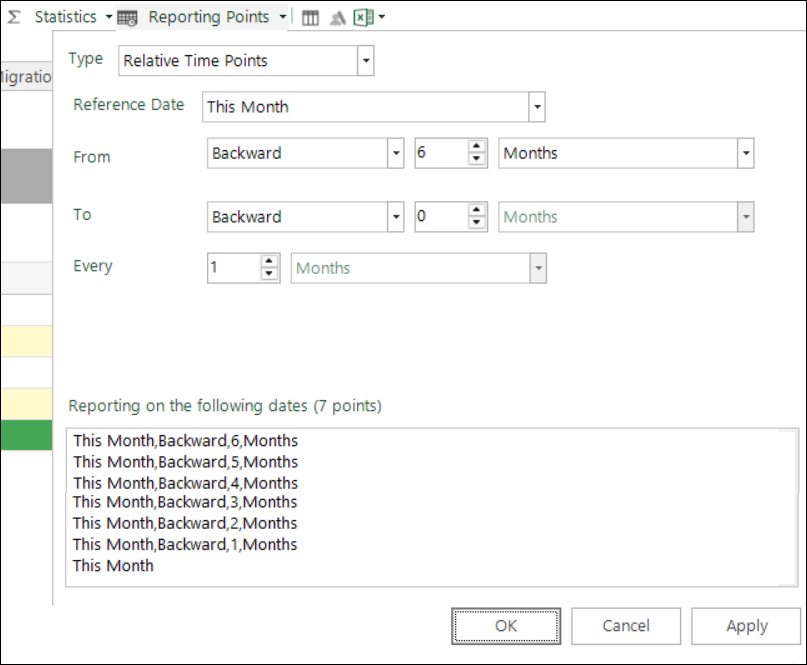
Over time, rerunning the segmentation automatically updates the volumes and the date reporting points. Significantly, any selections dragged off, or virtual variables created from a segmentation using this type of schedule, are subject to the defined relative time points and can then be used in scheduled tasks, or regular campaigns, without the need for manual intervention and updating. Relative time points work across all the segmentation reports and use cases include:
- An annual reminder for policy or subscription renewal
- A monthly communication to the people in your best segment
- A regular special offer campaign to people who have remained in the best segment for the last 2 years
- A regular re-engagement campaign aimed at those who have lapsed in the last month
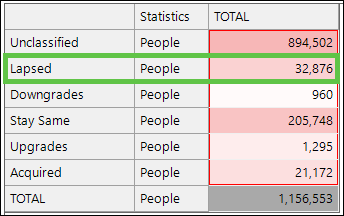
See How do I explore a segmentation change over time using relative time points.
New Date and datetime expressions in selections
You can now create and use date and datetime expressions directly in selections, interacting with them as you would date or datetime variables. This provides several benefits, including eliminating the need to create a virtual variable when you want to make a selection based on the result of a date or datetime expression.
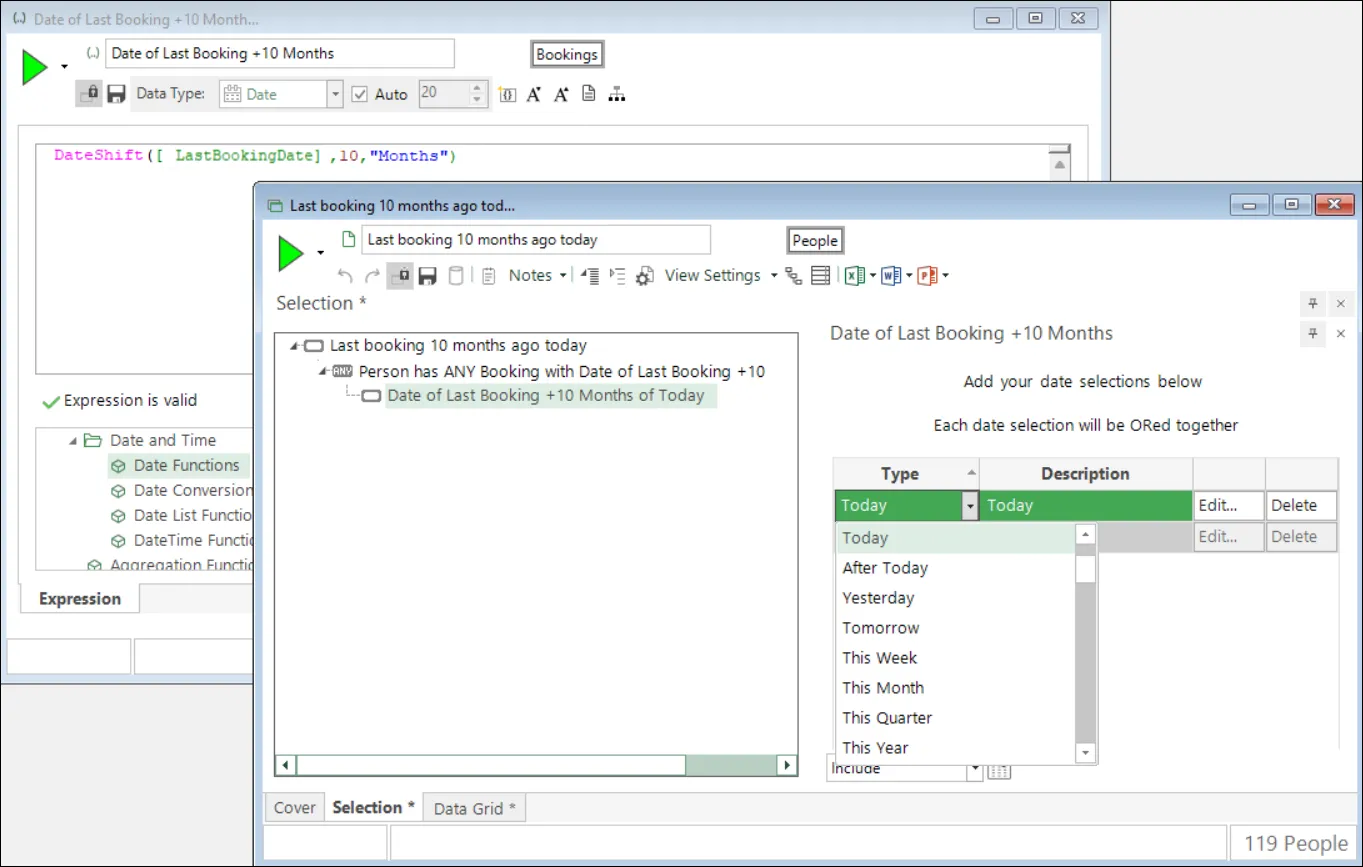
See Using expressions in selections: Date and DateTime.
New Data grid: copy cell contents
You can now select and right-click on an individual data grid cell to copy its contents. This feature lays the groundwork for upcoming enhancements but also offers, for example, the potential added benefit of easily copying and pasting text for use in FastStats expressions. While visible in the user interface, access to this option is restricted to users with the necessary system privileges and permissions.
New New expression functions
A new DateTimeConvert function allows you to convert a datetime from one time zone to another.
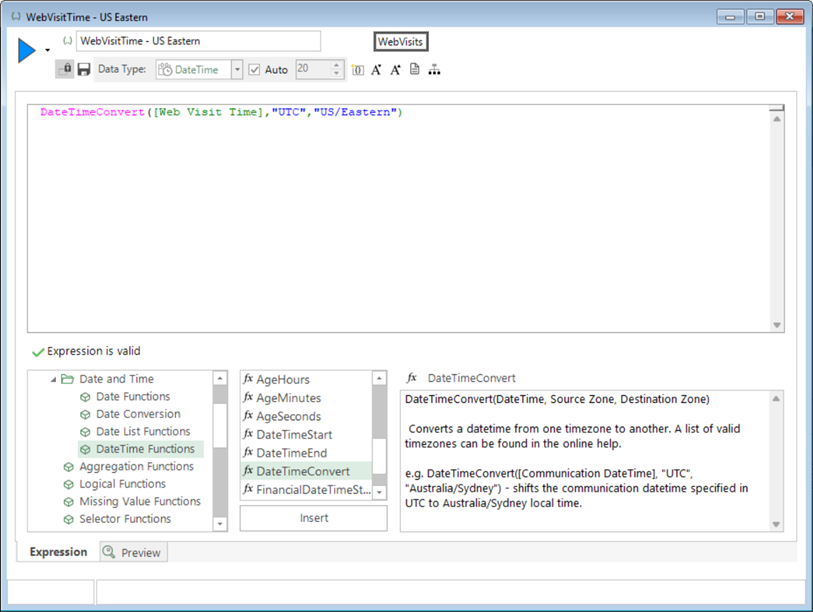
See Considerations when working with the DateTimeConvert function.
Also added:
SelectedDays: Optional parameter for an exclusion list in YYYYMMDD format as a numeric list.SelectedHours: Existing function now more efficient (approx. 40x faster) and has optional parameter for an exclusion list in YYYYMMDD format as a numeric list.
Improved Cube caching performance
We've extended caching to include requests for cubes, trees, and cube-based visualisations such as charts and Venn diagrams. When configured in the FastStats Service settings by your administrator, cached results are retrieved unless your system has updated between requests or sessions, or you make changes to the underlying criteria, cube dimensions, or cube measures.
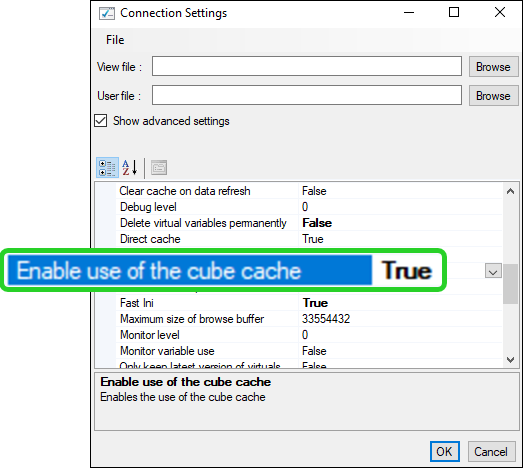
This feature benefits all users by returning results significantly faster when a cached result is available.
Bug fixes
- Expressions
- Fixed an issue where the DateTimeShift parser error message does not show 'datetime expected.'
- Fixed an issue with find and replace in Pattern Match numerics.
- Wizards
- Fixed an issue where notes added do not display in the virtual variable Properties dialogue.
For administrators
The following FastStats Service updates were also included in this release.
- Virtual integrity report: A new column lists the last updated date of a virtual variable (obtained by reading the LatestRefresh.xml files).
- Non-admin configurator shortcut: A shortcut for the non-admin executable is now included. The configurator title bar also shows whether you are running as admin or not.
- Distributed processing fix: Fixed a bug that caused incorrect records to be read from .fsDat files when they reached 16 GB.
Q3 2024
11 September, 2024
Analysis
Improved Pattern match: numeric variables
The power provided by existing pattern match functionality on selector variables is extended, and you can now define a pattern match aggregation on a value (numeric or currency) variable alone, or on a selector and value variable together. The options within the on the fly pattern match aggregation dialogue have been updated and allow you to select and define your pattern match settings accordingly.
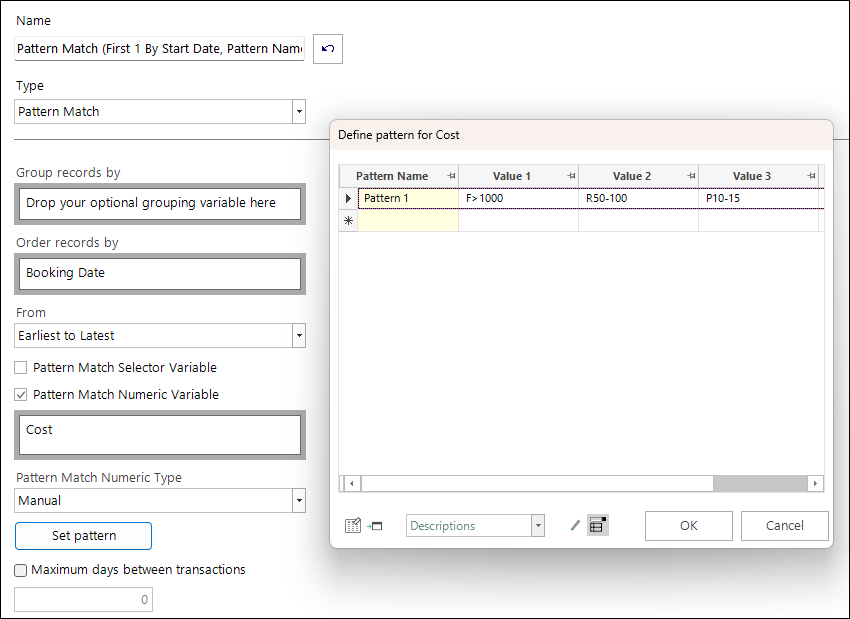
Valid pattern match elements include predefined 'longest sequence' options, all existing wildcards, and also the ability to search based on fixed numeric values, fixed and relative numeric ranges, and percentage difference numeric ranges. You can return the results in multiple different ways.
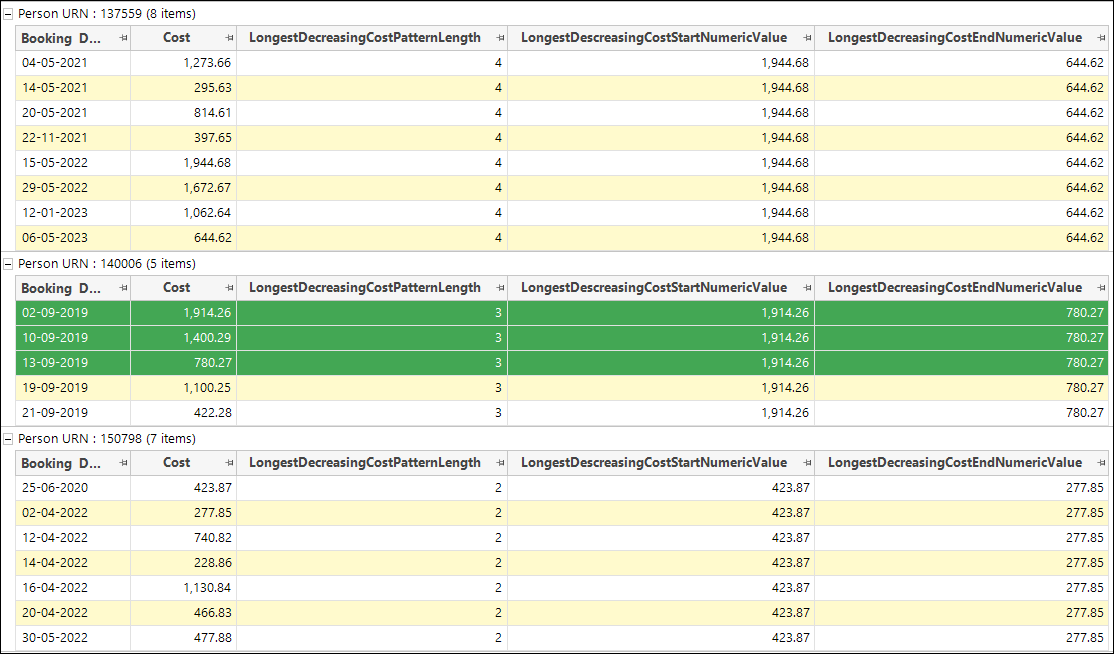
See Aggregations on the fly - Pattern Match numeric and Aggregations on the fly - Pattern Match - selector and numeric.
New New Sequence Analysis wizard
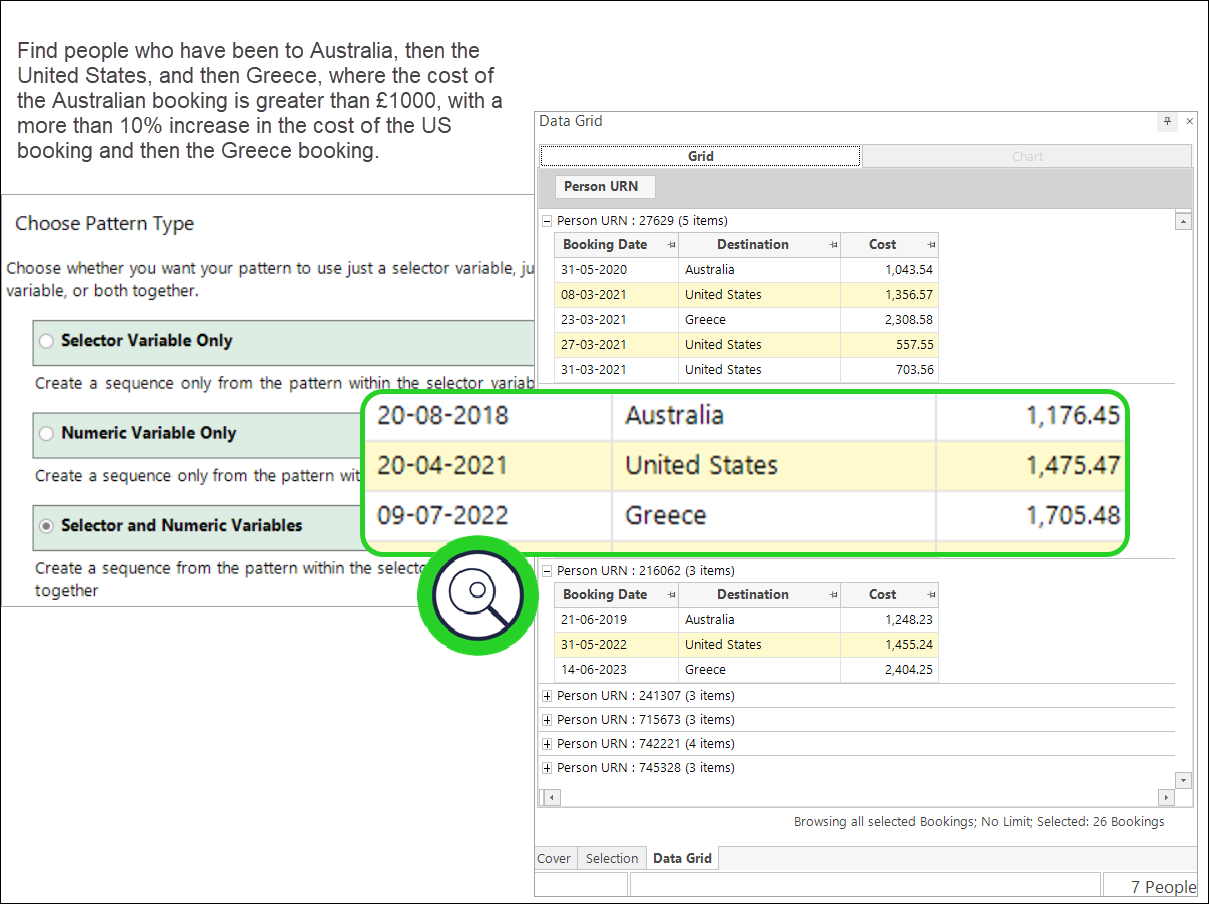
Making the power of pattern match analysis even more accessible, the new Sequence Analysis wizard provides a simple mechanism for creating sophisticated, on the fly, pattern match aggregation expressions that allow you to look for particular patterns of transactions, or for longest sequences of transactions with a particular property — for example, bookings to the same holiday destination, repeat purchases of a particular product, changes in donation type, etc. Clear, guided steps lead you through the process of defining a transactional pattern of interest, which can be based on the categories within a selector variable, the values within a numeric or currency variable, or a combination of both. You can then use the resultant expression to interrogate your data and find records which match the pattern criteria.
New Scheduled tasks: user-defined date format
When managing scheduled tasks, it is possible to append a run or system build date to your file output name. A new user-defined option brings greater flexibility and the ability to format this date to best suit your specific requirements.
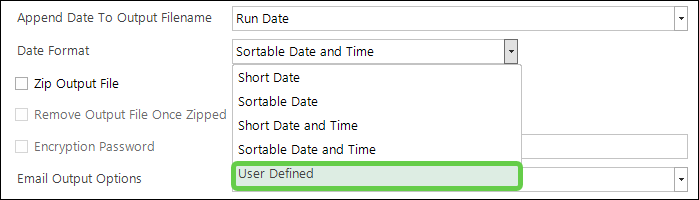
See Scheduled tasks.
Bing Maps: public transport removed
As notified in Q2 2024, from 30th September 2024, Microsoft removed the Transit endpoint from the Bing API. It is no longer possible to calculate public transport isochrones. This drivetime option is now removed from the FastStats user interface. For users on pre-Q3 2024 versions, the option remains visible but does not return a result.
Improved Expression function updates
Today,TimeNow,BuildDate, andBuildDateTimenow support zero parameter versions.VarSelectandVarSelectNthextended from 255 to allow 65k parameters.
System improvements
Improved Performance for numeric value selections
Query speed is significantly improved when selecting large numbers of numeric values, enhancing overall performance.
Improved Compressed text block size in FastStats Configurator
You can now choose a block size larger than 32,000 in the FastStats Configurator for compressed text data.
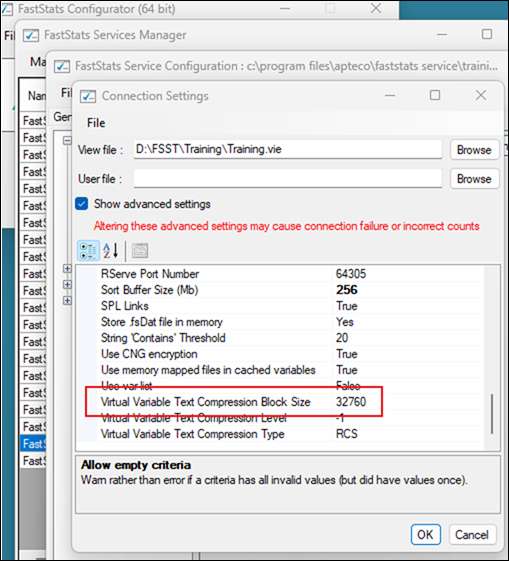
This reduces the size of compressed .dat files and decreases I/O calls, improving performance particularly on systems with high latency.
Bug fixes
- Expressions
- Fixed an issue in Category Grouping where returning Min(Mean(group results)) data type should be a decimal.
- Fixed an issue in Category Grouping where some missing in a group could return wrong results.
- Fixed an issue in Category Grouping where all missing values in a category could return wrong results for the 'return group results'.
- Fixed an issue in Category Grouping where some missing values returning person level results could be wrong.
- Fixed an issue in Pattern Match when selecting Manual and defining ?N with a maximum number of days caused an error.
- Wizards
- Fixed an issue in the Territories wizard relating to a crash from the SHP file when a polygon contains 0 points.
- Fixed an issue in the Territories wizard where simplified shapes from file can result in a bad expression if the polygon data is missing.
- Scheduled Task
- Fixed issues when the Send Email To Task Owner On Error did not work for an error in the FTP step.
Q2 2024
17 May, 2024
Analysis
New Pattern match: predefined longest sequences
On-the-fly Pattern Match aggregation is extremely powerful, sophisticated, and flexible. You can use it to manually search for and select based on longest transactional sequences. However, this process has become easier and more straightforward with the introduction of predefined 'longest' solutions. You can simply select these from the Pattern Match Type drop-down within the Pattern Match dialogue.
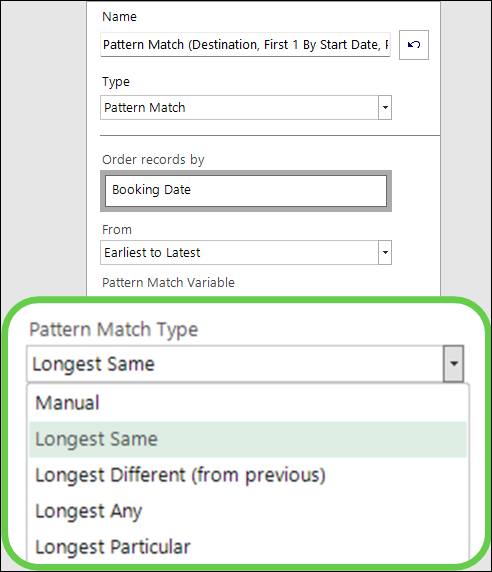
These options assist with common scenarios, such as finding the longest sequence of holidays a person has taken to the same destination.
See Aggregations on the fly - Pattern Match longest sequence.
Improved Selector virtual variables: improved expression output
The established but limited ability to output selector type variables from expressions is improved with the introduction of two new options accessed through the Calculate Expression wizard. With an easier approach and greater flexibility, you can now choose to define codes and descriptions manually or, where appropriate, specify that the virtual variable takes its codes and descriptions from an existing variable. This is particularly useful in cases where the known values always match existing ones, and you want the values in the same order as the source variable.
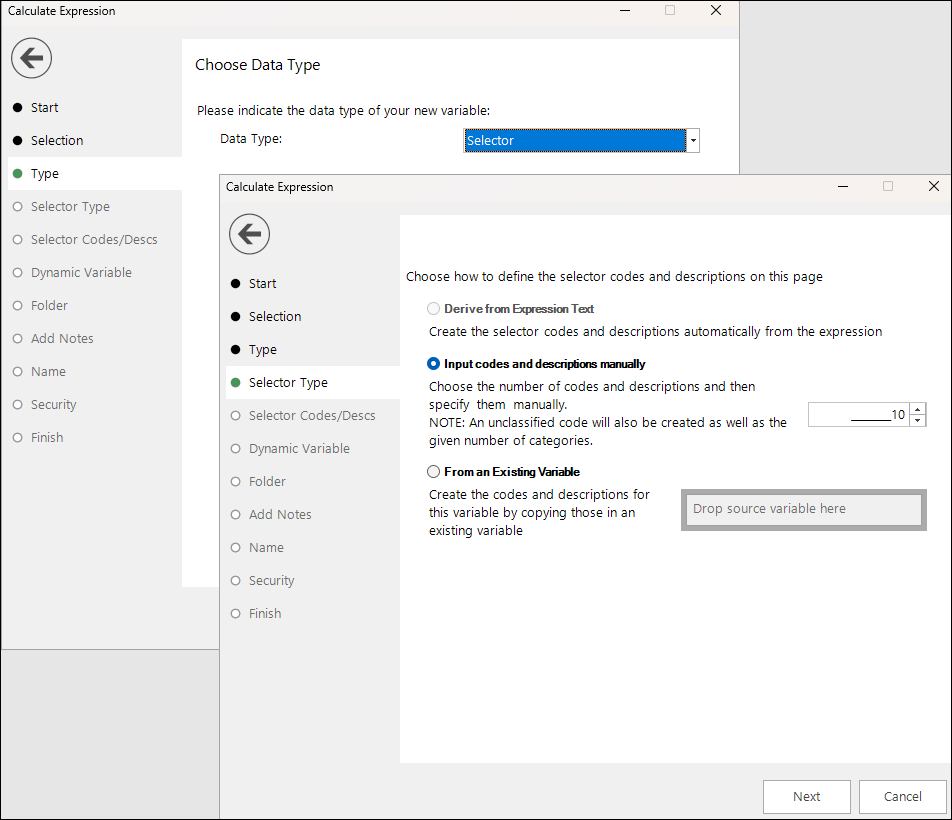
See Calculate Expression wizard.
New Index thematic shading
A new thematic shading is introduced specifically for index measures. This development offers greater power and insight, providing a more natural way of applying shading symmetrically around the fixed threshold value of 100, with the maximum deviation in each direction linked, and ranges either side of the threshold being of the same size.
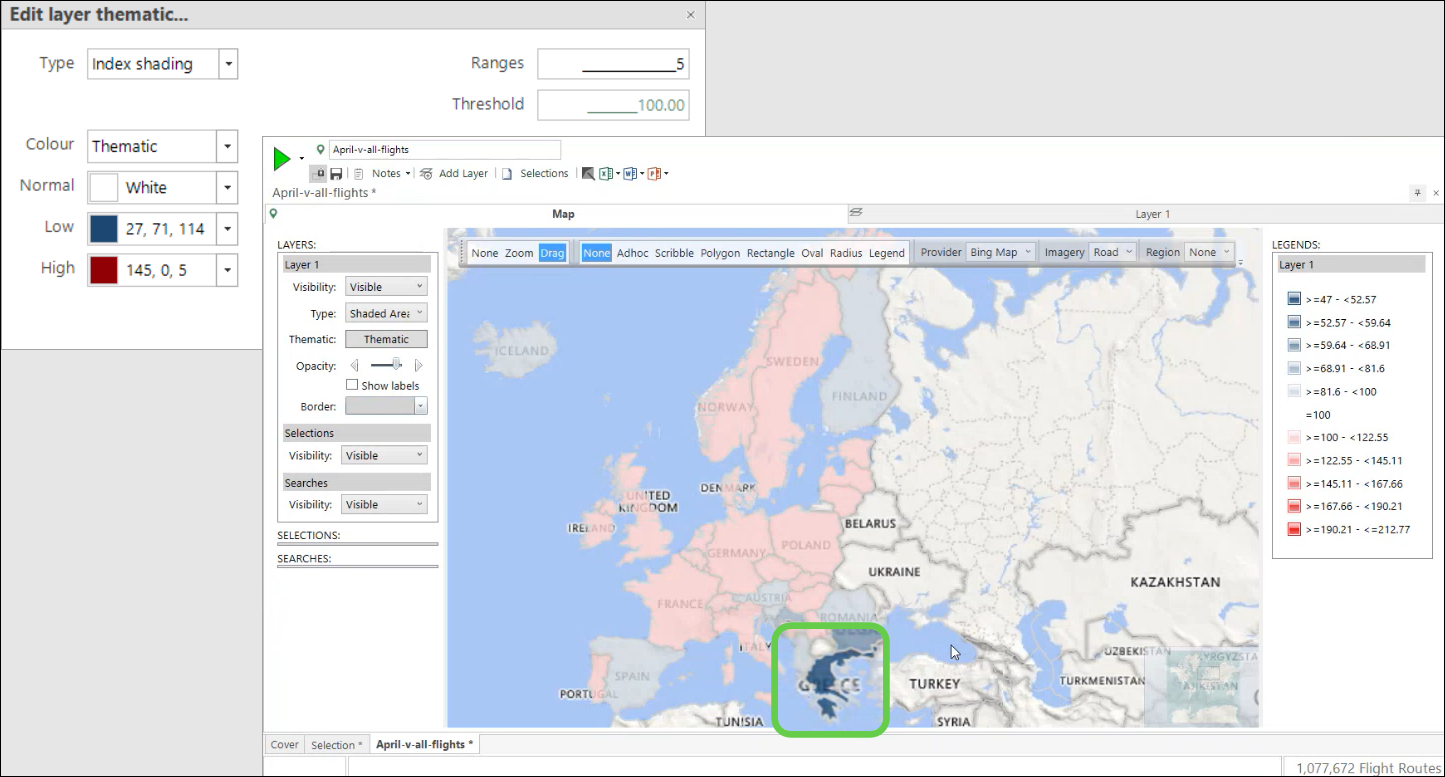
The above penetration map shows flights from the UK to European destinations over the last 25 years and compares flights in April (analysis group) to flights in all months (base group). Using this new thematic option, it is clear that whilst the number of flights to most countries in April is about average, there are considerably fewer flights than expected to Greece.
See Bing Maps Penetration Mapping.
Improved Personal Best: grouping variable
The Personal Best on the fly aggregation processing mechanism is extended and now allows you to specify a selector type grouping variable, with transactions split into these groups before the personal best algorithm is applied to each group individually.
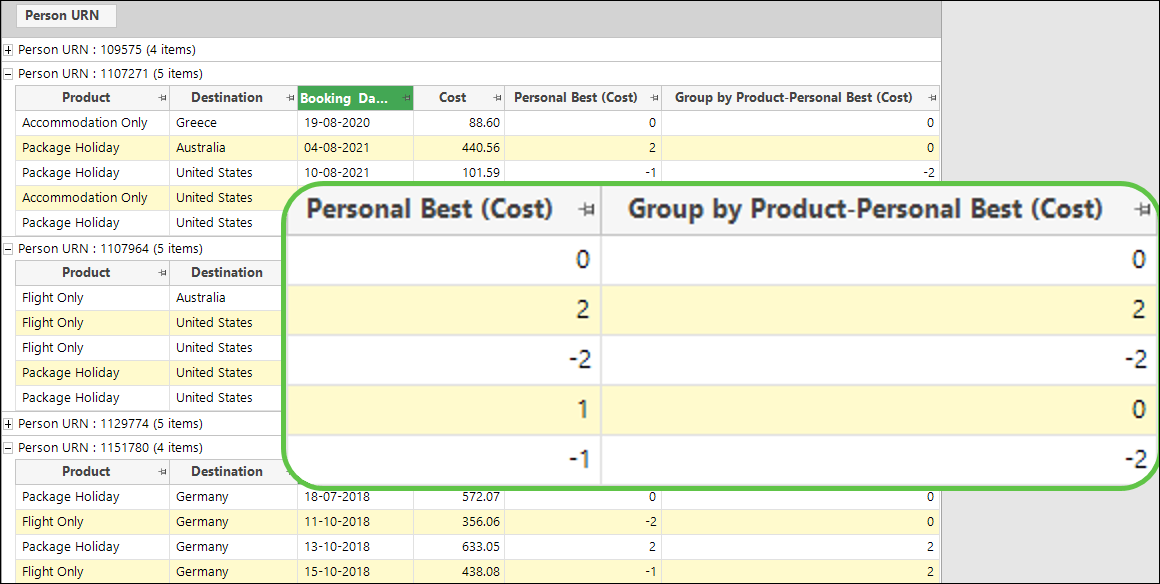
See Expressions: Personal Best on the fly aggregation.
Bing Maps: public transport removal
On 30th September 2024, Microsoft are removing the Transit endpoint from the Bing API. After this date, it will no longer be possible to calculate public transport isochrones. This drivetime option in the FastStats Map tool will be removed from the user interface with effect from the Q3 2024 release. For users on pre-Q3 2024 versions after this date, the option will remain visible but not return a result.
Modelling
New User-defined behavioural feature calculations
Behavioural modelling in FastStats now allows you to define your own dimensions from a calculation involving any two other dimensions. This offers a significant extension to the existing predefined calculations used with behavioural features and, by honing in on more specific aspects of people's behaviour, provides the potential to create even more powerful data models.
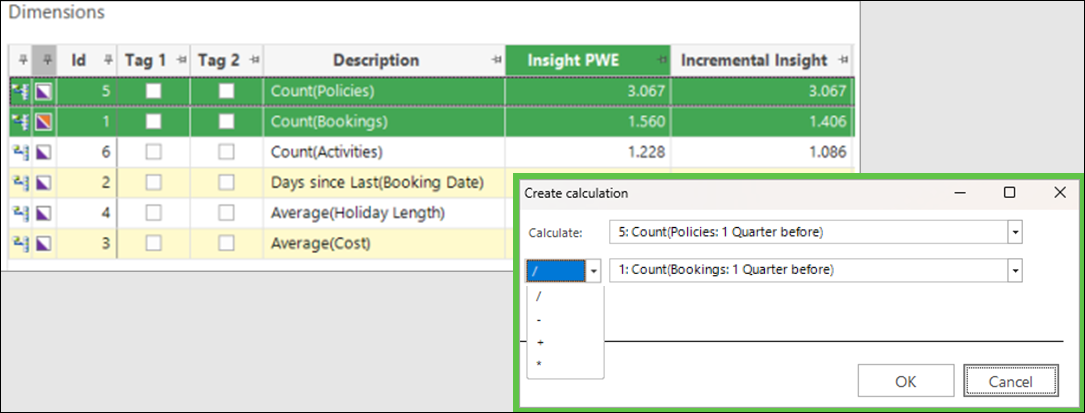
The example above demonstrates just how easily you can now select features from the dimensions list and create, for example here, a ratio to determine the number of policies per booking.
See Behavioural modelling - user-defined calculations.
Bug fixes
- Data Grid
- Fixed an issue of work lost when data exported as a fixed file, followed by close.
- Wizards
- Fixed an issue where the Import Data wizard had incorrect min/max values in system xml.
- Expressions
- Fixed an issue where the maximum days between transactions was not remembered in the Pattern Match on the fly aggregation.
- Date Variables
- Fixed an issue in the Q1 24 release where a date rule was not remembered in the UI.
Q1 2024
21 March, 2024
Analysis
New Selector variables: extended selection options
The options for making selections using selector type variables have been extended and, in addition to working with the traditional variable picklist, you can now search for categories in the same way as when working with text variables. For example, for a selector comprising thousands of product categories, you could select based on a code or description that begins with, ends with, or contains particular characters.
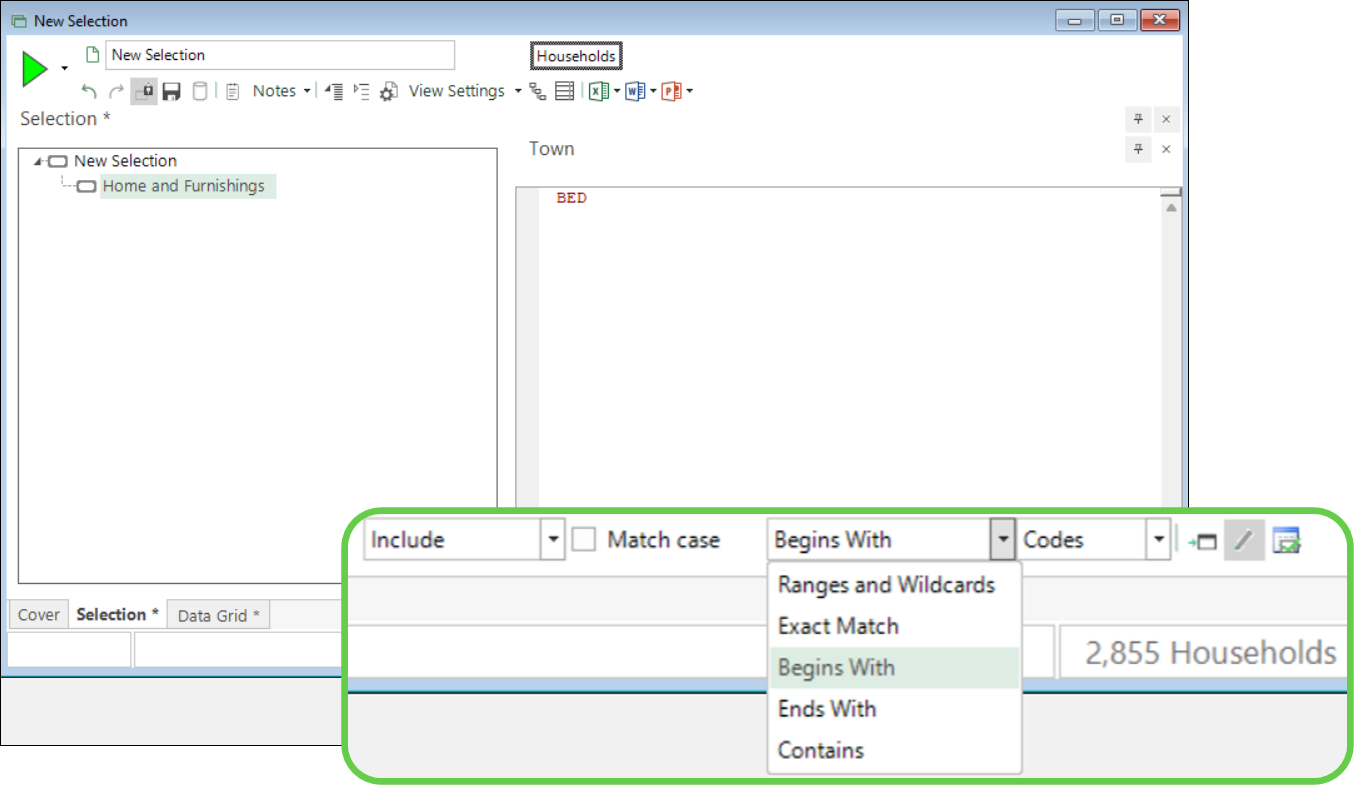
Selecting using this freeform mechanism brings the additional benefit of ensuring that, if new categories meeting the defined criteria are subsequently added to the underlying data, they will also be picked up when the selection is re-run.
See Using variables in selections: Selector variables.
New Banded date expressions in data grids
You can now create and add a banded date expression as a column in a data grid. Simply right drag your date expression onto a data grid and select from the list of possible date/datetime bandings, specifying the start and end year for the expression being calculated.
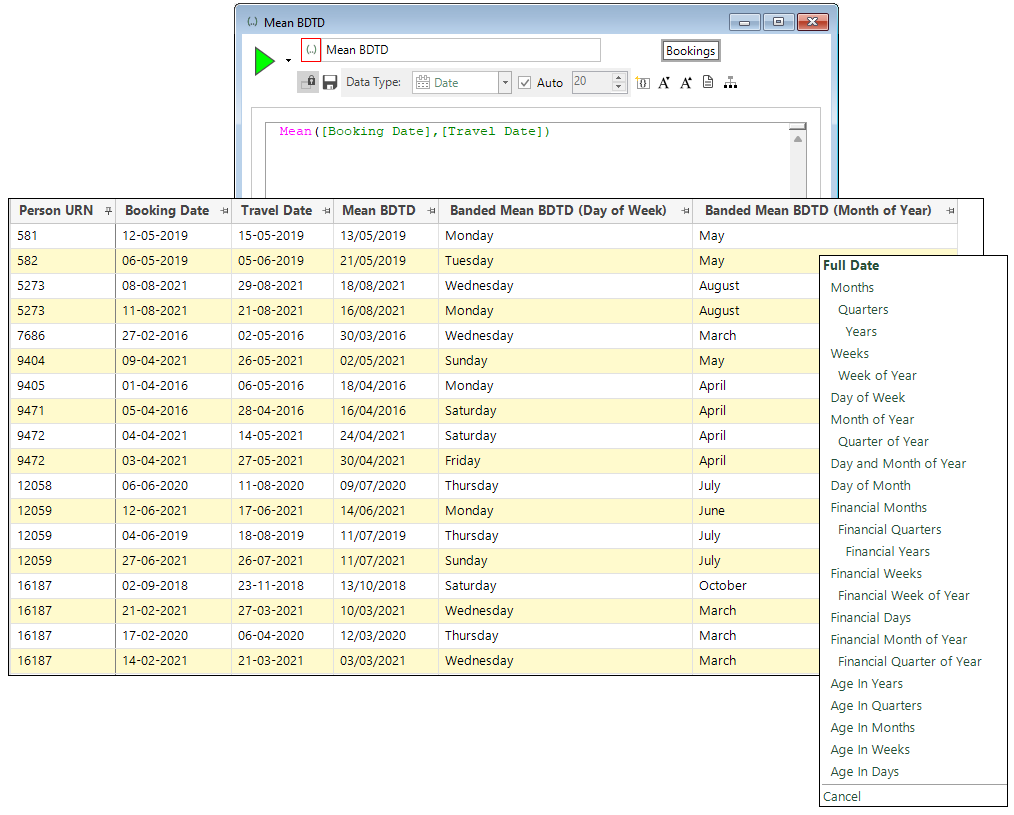
This development forms part of ongoing work which allows you to use a banded date or date time expression without first needing to create a virtual variable.
See How do I use expressions in a data grid?
Improved Drive times: seconds and part-miles support
In interactive maps and the Drive Zone wizard, drive times now support seconds and drive distances support part-miles.
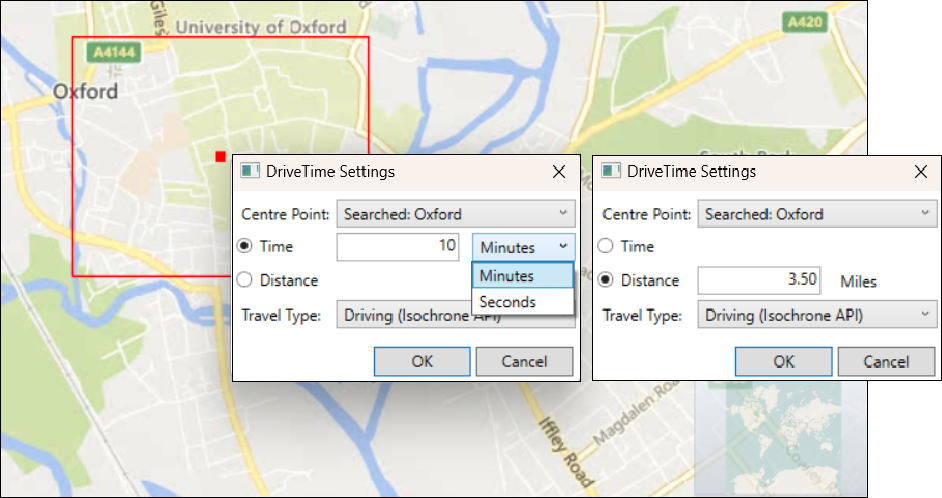
New Penetration maps — mapping options
Penetration maps offer the ability to use an external file to display a column of results against which to compare records in your FastStats system. You can now apply mapping to postal sector and district to convert the external information into standard FastStats formats.
See Expressions: Mapping options for List and File functions.
New New expression functions
TextListMapping: this new function takes the elements of a text list and allows you, for example, to apply a postcode mapping, or upper, lower, or proper case mapping.TextListFromFile: this function has been extended to include optional mapping when reading a text list from a column in a file.
See Expressions: Mapping options for List and File functions.
Bug fixes
- Variables
- Fixed an issue in Custom Date Rules where the date was hardcoded to start at 21/11/2012. Now set to today's date.
- Wizards
- Fixed an issue in the Drive Zone and Point to Point wizards where the description override did not work.
- Fixed an issue to disallow [centrepoint] in the description of a single flag array drive zone variable, or a single variable created via the Point to Point wizard.
- Fixed an issue where latitude and longitude geoformats should be set in the Location Geocoder wizard.
- Virtual Variables
- Fixed an issue where a virtual variable created via the expression wizard could have descriptions but not references in it after editing but making no changes.
For administrators
LiveData configuration UI
We've identified an issue with the LiveData Configuration UI running against the single database configuration in the Q1 2024 release. The UI, written in F# and utilising an ORM library, lacks flexibility in dynamically changing the database schema.
To address this:
- The Q1 2024 release retains the LiveData UI targeting the multi-database configuration (
dboschema), as in the Q4 2023 version. - Adoption of the single database model is recommended only for those few customers who want to host PeopleStage/Campaigning on Azure SQL.
- For customers requiring LiveData in a single database configuration, a custom build targeting the specific schema (
businesslibraryschema) will be provided as needed. Please contact Apteco support if this is the case.