Longest sequence
Pattern Match is super powerful, super sophisticated and super flexible. You can use Pattern Match aggregations to manually search for and select based on longest sequences, but the process is improved and simplified using the predefined 'longest' solutions which you can select from the Pattern Match Type drop-down in the Pattern Match dialogue. These options help with common use-cases for finding the longest X sequences - for example, the longest sequence of holidays a person has made to the same destination.
Note
This functionality supports other existing pattern match options where possible - such as include/exclude lists, filter selections, days between transactions, grouping variables, returning different values, and returning the first/last 1 instance.
Scenario
Find the longest sequence of holidays a person has made to the same destination
To get started:
- Open a new Expression window in your workspace.
- Click on the
 Add Aggregation button and then on the tab entitled Frequency(Bookings) that opens up at the bottom of the window.
 - In the Type drop down select Pattern Match.
- Set the Grouping Table to People and Transactional Table to Bookings.
- Drag the Booking Date variable onto the Order records by drop-box and leave the From as Earliest to Latest.
- Drag the Destination selector variable onto the Pattern Match Variable drop box.
- From the Pattern Match Type drop-down select Longest Same.
- From the Return the drop-down select Pattern Length.
- Name the expression - for example, LongestSameDestination-PatternLength.
-
Drag and drop the expression onto a data grid to view the results:
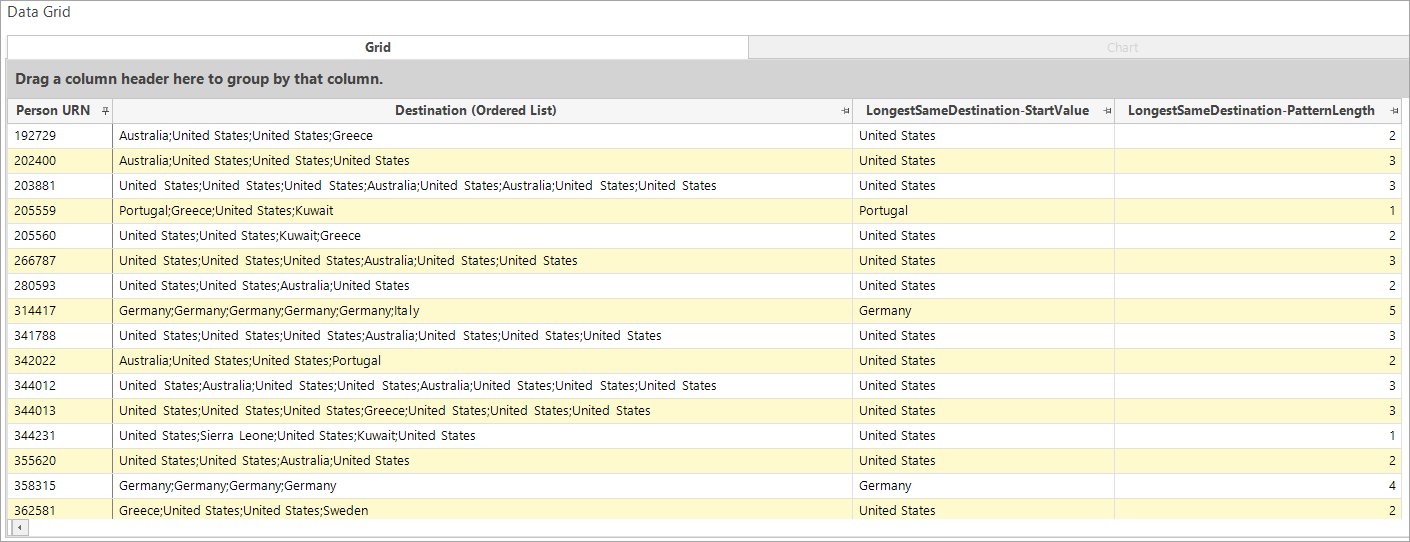
The above data grid is aggregated from bookings to people and has destination ordered by booking date to display the destinations visited by each person. The underlying RFV selection identifies only those people with 4 or more bookings. As well as the LongestSameDestination-PatternLength expression created above, a further pattern match aggregation has been added using the same settings, but returning the Start Transaction Value - here the destination - for the longest sequence. This provides an additional means of checking the results.
The "Longest" pattern options available to select from will depend on whether you are working with a selector or value (numeric/currency) variable:
Selector - pattern definition
- Longest Same
- Longest Different (from previous)
- Longest Any
- Longest All Different
- Longest Particular
Numeric/currency - value definition
- Longest Same
- Longest Different (from previous)
- Longest Any
- Longest Increasing
- Longest Strictly Increasing
- Longest Decreasing
- Longest Strictly Decreasing
- Longest Particular
Note the difference between ‘increasing/decreasing’ and ‘strictly increasing/decreasing’ - for example:
A set of numbers, such as 5,6,6,7,8 is valid as an increasing sequence, but it is not strictly increasing due to the presence of two equal values. To be 'strictly increasing', the sequence of values must always be increasing - 5,6,7,8 whereas 'increasing' is a sequence where the values are increasing, or where consecutive values are the same.