Positional wildcards
The Pattern Match feature of on the fly aggregations supports the following positional wildcards:
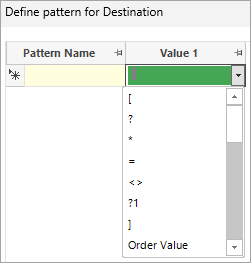
Wildcards allow you, for example, to select people who bought product A, then another product, and then product A again
With the use of the positional wildcard ?N (where N is a number) at any place in the pattern, it is now possible to refer to other items within the pattern match sequence and say that they are explicitly the same as, or different to, others within the sequence.
When FastStats first encounters a pattern - ?1 – it stores that value, e.g. Destination of United States. Subsequent references later in the pattern will always return the same value. Any other ?N must, therefore, match a different value - i.e. ?2 in this example could not be United States.
Example pattern match sequences:
Australia - ?1 - Australia - ?1 - Australia
This will select and return people who have been to Australia, then somewhere else, then back to Australia, then back to the same somewhere else, and then Australia.
Or:
?1 - ?2 - ?3 - ?2 - ?1
This will select and return people who have been to Destination 1, then Destination 2, then Destination 3, then back to Destination 2 and back to Destination 1.
Note
?1 means first in the defined pattern - and not necessarily first in a list - of transactions.
When manually defining a pattern, the pattern elements you can use to create sequences on a value (numeric or currency) variable are as follows.
Using booking Cost as the value variable in these examples:
- Fixed numeric values - F200 to find transactions which are exactly £200 in value.
- Fixed numeric ranges - F>100, F<1000, F500-800 to find bookings which cost more than £100, less than £1000 and between £500-800 respectively.
- Relative numeric ranges - R10-30 to compare transactions and look for a transaction that is between £10-30 more than the previous transaction.
- Percentage difference numeric ranges - P10, P10-20 to calculate that the next value in the list is 10%, or 10-20% bigger than the previous transaction.
Note
If no F/R/P prefix is used, FastStats assumes that the most common case - fixed - is required.
Example 1
-
Open a new Expression window and click on the
 Add Aggregation icon.
To access the ‘on the fly’ options:
-
Click onto the Frequency(Bookings) tab.
- Select Pattern Match from the Type drop-down menu options.
- Set the Grouping Table to People and the Transactional Table to Bookings.
- Order records by Booking Date.
- Add Destination as the Pattern Match Variable.
- Click Set Pattern to open the Define pattern for Destination window.
-
Click on the drop-down menu in the Value 1 cell to access the available options.
-
Select ?1.
Note
Wildcard numbers must be introduced into the pattern in order. Once selected, when you subsequently click onto the Value 2 cell, the options to select ?1 and ?2 will be available, etc. It is not valid to enter ?1 - ?3 - ?5.
-
Complete the settings and enter the Pattern Name as in the screenshot below.
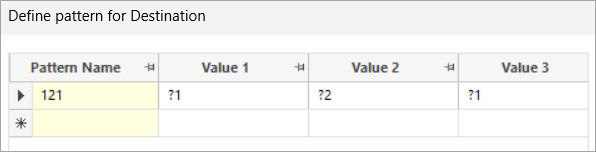
The pattern matched for each person will be dependent upon the value recorded against ?1. The screenshot below demonstrates this:
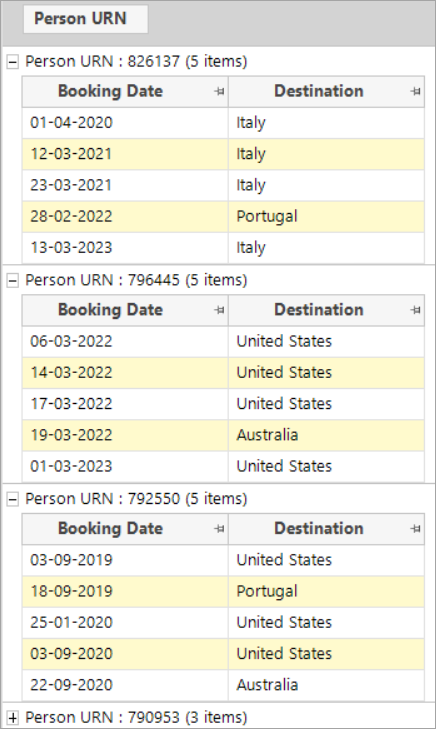
- Person URN 826137: Italy-Portugal-Italy
- Person URN 796445: United States-Australia-United States
- Person URN 792550: United States-Portugal-United States
These wildcards can be used with:
Fixed values
e.g. ?1 Australia ?1
Returns: Destination 1, then Australia, then back to Destination 1
= wildcard
e.g. ?1 = ?2 =
Returns: Destination 1, then Destination 1 again, then Destination 2, then Destination 2 again
? wildcard
e.g. ?1 ? ?2
Returns: Destination 1, then anywhere (that could be Destination 1), then Destination 2
* wildcard
e.g. ?1 * ?2 * ?1
Returns: Destination 1, then any number of Destinations (that are all Destination 1), then Destination 2, then any number of Destinations (that could be Destination 2), then Destination 1
Note
N must be in the range from 1 to 255, which is the maximum pattern length permitted. N > the number of codes for a variable will never match.
Example 2
You can use [ and ] as wildcards to represent the beginning and end of a person's transactions. This allows you to specify whether the desired pattern should be anchored to the start or end of the transactions you are analysing - or in some cases, both.
Let's imagine that you are interested in identifying people whose first three holiday bookings are to Australia then the United States and then Greece.
- Repeat steps 1-8 in example 1 above.
-
Name and define the pattern for Destination as shown below.

-
Name your expression.
-
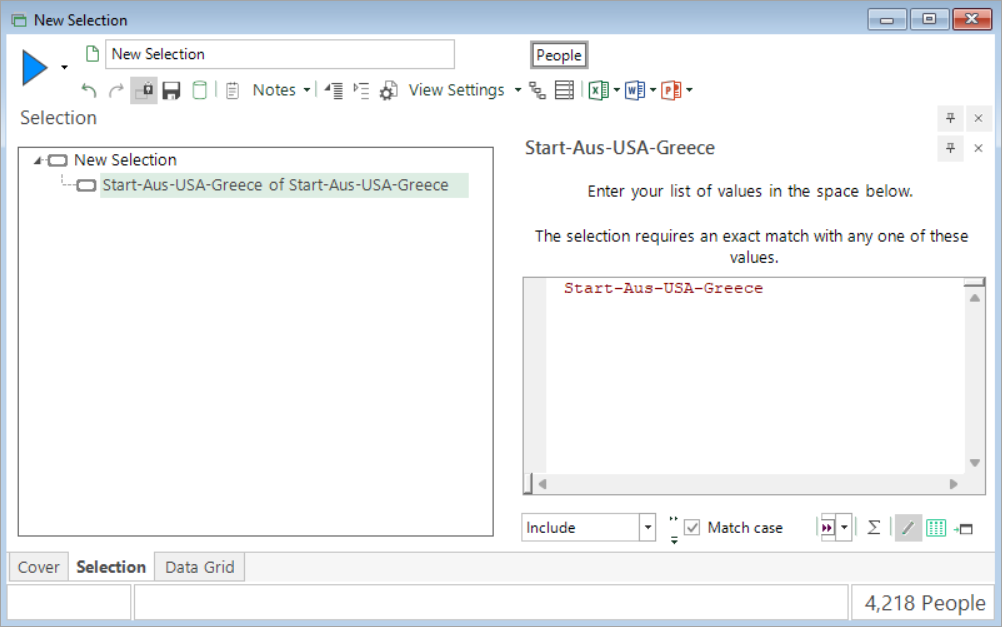
Drag the expression onto a new selection and enter the pattern name.
-
Drag and drop a data grid onto the selection. Add Destination and Booking Date (ordered ascending) and build the display.
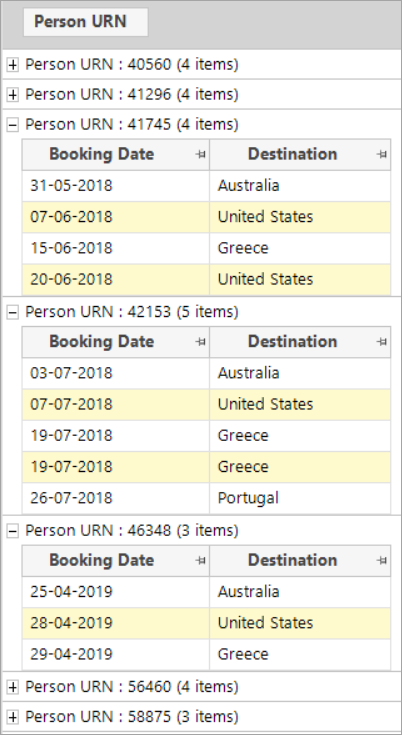
You can clearly see that each person's transactions start with the defined pattern of Australia, then the United States, and then Greece - even if they then go on to have further bookings to any other destinations.
You can also:
-
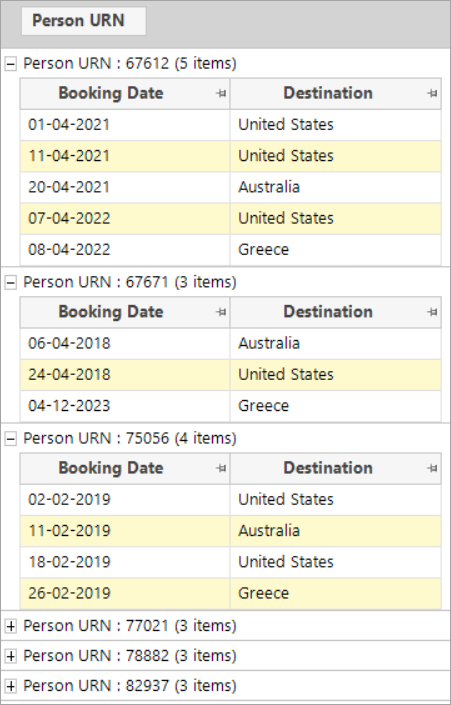
Use the ] wildcard to anchor the pattern to the end of a list of transactions.

-
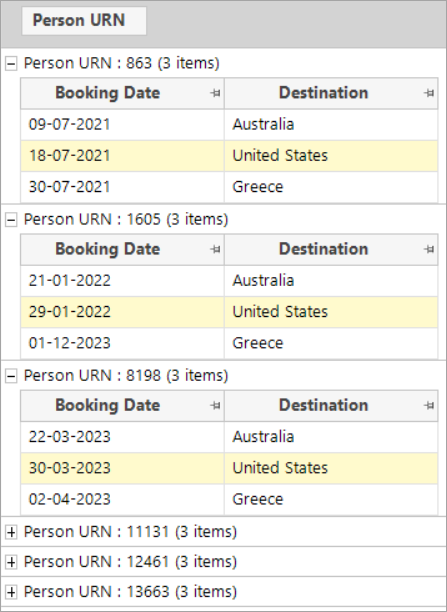
Use both [
and] to search for people whose whole sequence of transactions matches your defined pattern.
Note
By allowing a * wildcard to finish a pattern, it is possible to search for ongoing sequences. For example, a pattern of AUS * ] would match a pattern from a person's last Australian holiday onwards.
Summary
The Pattern Match feature of on the fly aggregations supports the following positional wildcards:
| Character | Meaning | Example | |
|---|---|---|---|
| \* | Select any number of values - to represent 0 or more of any value(s) when specifying and finding a desired sequence of transactions. | France \* Germany | Find people with a booking to France, then to any destination(s) - other than Germany - and then Germany. |
| ? | Select a single value - to represent any single value in that position. Use where the actual value on this element of the pattern is not needed. | France ? Germany | Find people with a booking to France, then to any destination, and then to Germany. |
| ?N | Select and store a value to refer back to - to represent any value the first time it is encountered in the pattern, and then all subsequent references to it must match the same value. | US ?1 US ?1 ?1 ?2 ?3 ?1 | Find people with a booking to the US, then anywhere, then the US, then the same anywhere. Find people who have purchased product 1, then product 2, then product 3, and then product 1 again. |
| = | Match the previous value in the pattern. | ?1 = ?2 = | Find people with a booking to Destination 1, then Destination 1 again, then Destination 2, then Destination 2 again |
| >= | To compare the numeric value in this record to the numeric value in the previous record. | Note: These are most often used for numeric sequences but can be used with ordinal selectors. | |
| F | To define a fixed numeric value or fixed numeric range. | F200 F>100, F | Find people with transactions which are exactly £200 in value. Find people with bookings which cost more than £100, less than £1000 and between £500-800 respectively. |
| R | To define a relative numeric range. | R10-30 | Find and compare transactions and look for a transaction that is between £10-30 more than the previous transaction. |
| P | To calculate percentage difference numeric ranges. | P10, P10-20 | Find and calculate that the next value in the list is 10%, or 10-20% bigger than the previous transaction. |
| S | To define an ongoing sum value. | F>600, S>1200, S>1800 | Find people with a booking which cost more than £600, followed by transactions which return an ongoing sum value of more than £1200 and £1800 respectively. |
| M | To define an ongoing mean value. | F>300, M>300, M>300 | Find people with a booking which cost more than £300, followed by two further bookings which return an ongoing mean value of more than £300. |
{N} |
To identify the Nth previous numeric range that should be referenced. | R {1} >=100 P{1}10, P{1}10-20 |
Find and calculate that the next value in the list is at least 100 greater than the transaction matching the first pattern element. Find and calculate that the next value in the list is 10%, or 10-20% bigger than the transaction matching the first pattern element. |
| [ | To represent the beginning of a person's transactions. | [ Australia US Greece | Find people whose transactions start with Australia, then the US, and then Greece. |
| ] | To represent the end of a person's transactions | Australia US Greece ] | Find people whose transactions end with Australia, then the US, and then Greece. |
| [ ] | To mark that a person's complete list of transactions should match your defined pattern | [ Australia US Greece ] |
Find people whose complete list of transactions is Australia, then the US, and then Greece. |