Numeric ranges
When manually defining a numeric range, the pattern elements you can use to create sequences on a numeric variable are outlined below. Using booking Cost as the example value variable:
- Fixed numeric values - F200 to find transactions which are exactly £200 in value.
- Fixed numeric ranges - F>100, F<1000, F500-800 to find bookings which cost more than £100, less than £1000 and between £500-800 respectively.
- Relative to previous numeric range - R10-30 to compare transactions and look for a transaction that is between £10-30 more than the previous transaction.
- Relative to Nth previous numeric range - R
{1}>=100 to specify that this transaction is at least 100 more than the transaction matching the first pattern element. - Percentage difference to previous numeric range - P10, P10-20 to calculate that the next value in the list is 10%, or 10-20% bigger than the previous transaction.
- Percentage difference to Nth previous numeric range - P
{1}10, P{1}10-20 to calculate that the next value in the list is 10%, or 10-20% bigger than the first pattern element.
If you are confident in using the required syntax, you can type your ranges directly into the value columns within the Define pattern dialogue:
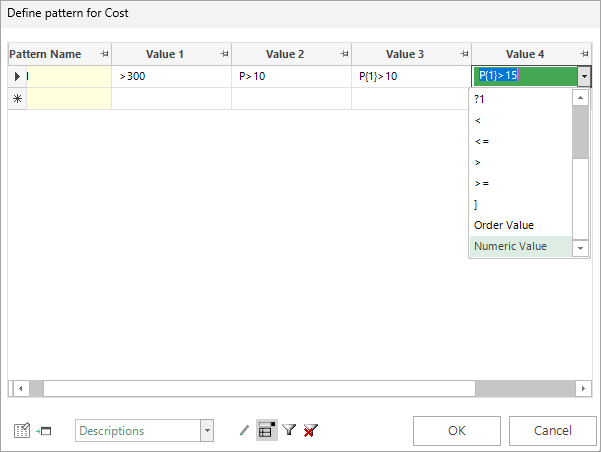
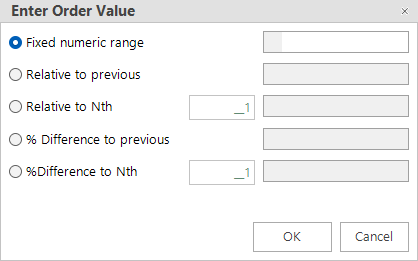
Alternatively, when you select Numeric Value from the Value column drop-down menu and then click Enter, you can set your order values using the Enter Order Value dialogue:
Example 1
It is possible to use the above options in conjunction with one another to create a pattern, when appropriate:
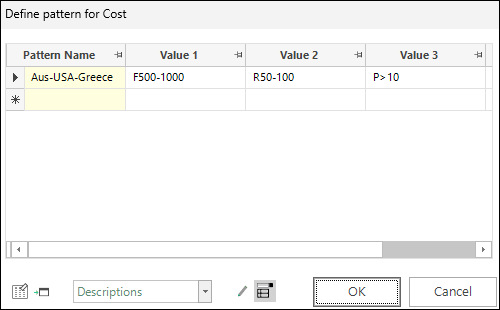
- Value 1 cost should be between £500-1000.
- Value 2 cost should be between £50-100 more than value 1.
- Value 3 cost should be more than 10% higher than value 2.
Note
If no F/R/P prefix is used, FastStats assumes that the most common case - fixed - is required.
Example 2
You can create and search for numeric patterns where a value is relative to any previous value, rather than just the one immediately before. This is achieved through the use of { } brackets to indicate which transaction to reference.
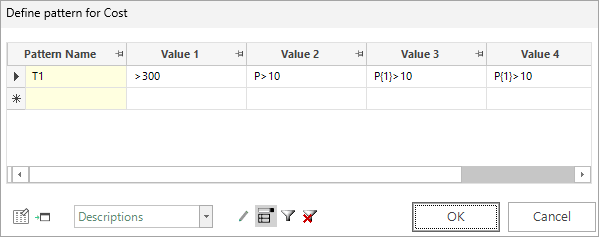
In the case of the above defined settings:
- Value 1 cost should be more than £300.
- Value 2 cost should be more than 10% higher than value 1.
- Value 3 cost should be more than 10% higher than value 1.
- Value 4 cost should be more than 10% higher than value 1.
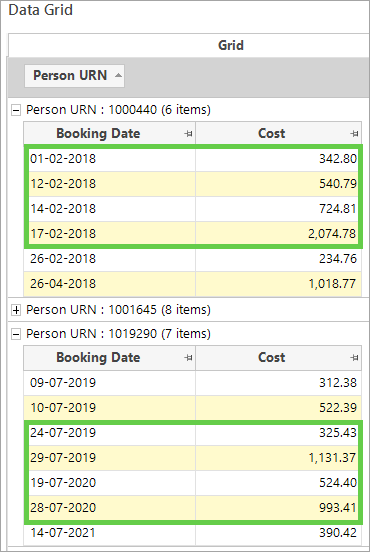
To view the results:
- Right drag the expression and create a new selection.
- Enter the pattern name as the criteria to search for.
- Add a data grid with Booking Date and Cost and build the display.
- Group by Person URN and sort into ascending order by Booking Date.
Examples of people satisfying the defined pattern match are shown below.
For related topics see: