Orbit login service
To use a SAML SSO service for user authentication in Orbit, you must first configure an Orbit Login Service.
- Run the Orbit Updater Configurator as Administrator.
- On the Login Service tab, check that Update is set to Update if not installed or already installed and a newer version is available.
- Choose the Service directory (default:
%ProgramFiles%\Apteco\OrbitLoginService). -
Choose the Service name (default:
OrbitLoginService).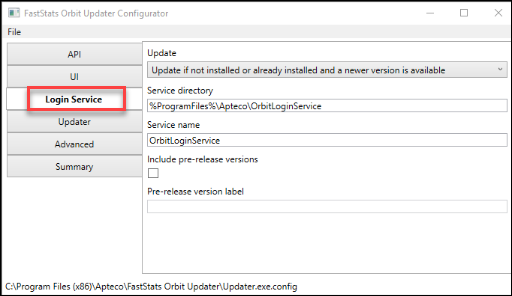
-
Save changes and restart the Orbit Updater Service to pick up the changes.

-
Check that the OrbitLoginService is installed and running.
-
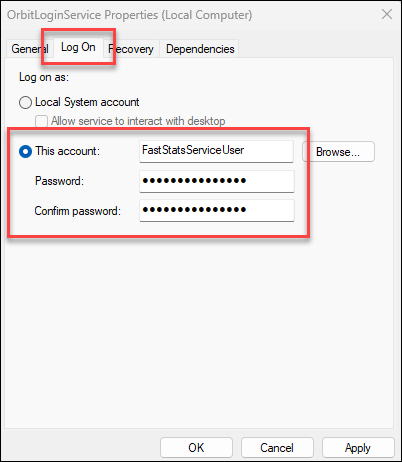
Right-click on the OrbitLoginService and select Properties.
Orbit API Configurator
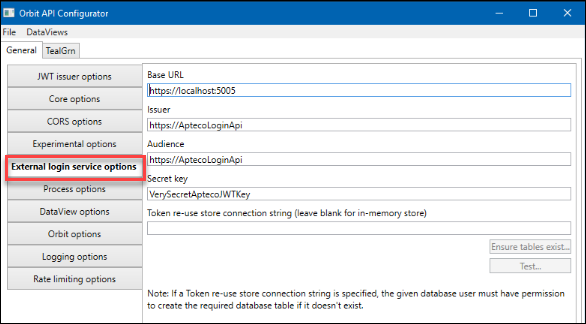
To set up the Login Service in the Orbit API Configurator, enter the following values under External login service options:
| Setting | Value |
|---|---|
| Base URL | https://localhost:5005 |
| Issuer | https://AptecoLoginApi |
| Audience | https://AptecoLoginApi |
| Secret key | VerySecretAptecoJWTKey |
Warning
Change the Secret Key from the default value before using in production.
Save and close the Orbit API Configurator.